If stale data changes the decision, use real-time. If it doesn’t, use batch. That’s the main call.
I’d boil the article down to this: update timing drives data pipelines for AI, affecting model output, spend, system pressure, and replay risk. In one case, a real-time LLM layer took daily compute spend from $220/day to more than $58,000/day for 14 million records. In another, 5-minute updates in aerospace cut scrap by $420,000 per year.
Before I choose a path, I’d check four things:
- How fast the decision must happen
- How much stale data hurts output quality
- How much extra system complexity I can take on
- How easy I need replay, audit, and recovery to be
For most teams, the answer is not all-or-nothing. A hybrid setup often fits best: batch for structured, high-volume fields, and real-time only for events that need an immediate response.
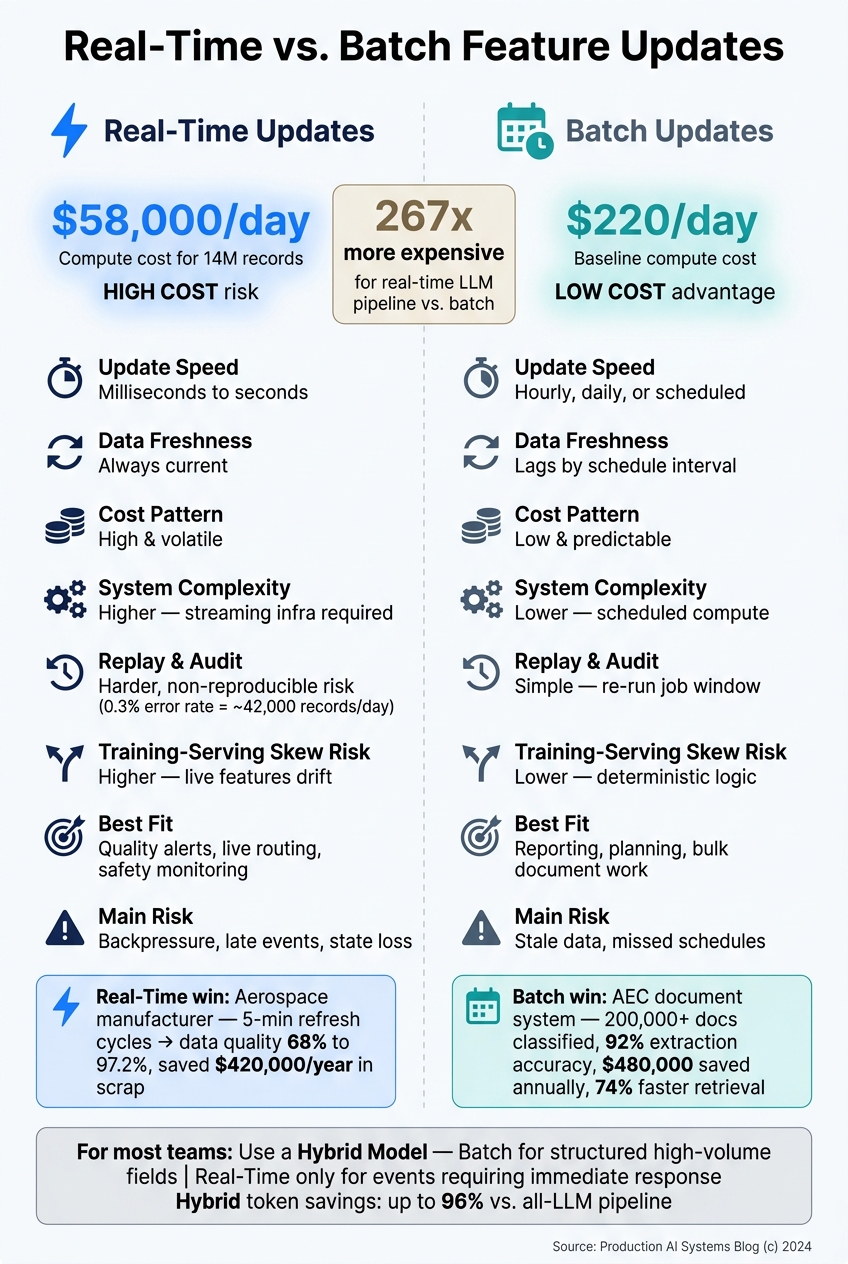
Real-Time vs. Batch Feature Updates: Cost, Speed & Trade-offs
Batch vs Realtime Stream Processing - A Deep Dive
Quick Comparison
| Criteria | Real-Time Updates | Batch Updates |
|---|---|---|
| Update speed | Milliseconds to seconds | Hourly, daily, or scheduled windows |
| Data age at decision time | Low | Higher, based on schedule |
| Cost pattern | High and can swing hard | Lower and easier to plan |
| System complexity | Higher | Lower |
| Replay and backfill | Harder | Easier |
| Audit trail | Tougher, especially with non-deterministic steps | Simpler to review |
| Best fit | Quality alerts, routing, live monitoring | Reporting, planning, bulk document review |
| Main risk | Backpressure, late events, state issues, drift | Stale data, missed schedules |
My takeaway: don’t pay for constant updates unless the business case is clear. If a slower feature update won’t change the action, batch is usually the better bet. If minutes matter for quality, safety, or routing, real-time can earn its keep.
Real-time vs. batch feature updates: Core differences
Timing shapes cost, system load, skew risk, and recovery. The trade-off gets easier to see when you compare load, recovery, and skew side by side.
| Feature | Real-Time Updates | Batch Updates |
|---|---|---|
| Latency and freshness | Event-driven; features reflect current state | Predictable batch windows; can lag by the schedule interval |
| Training-serving skew risk | Higher - live features can diverge from training data | Lower - scheduled runs are easier to replicate offline |
| Operational burden | Higher infrastructure burden - requires streaming infrastructure and rate-limit management [1] | Lower operational burden - scheduled, predictable compute loads [1] |
Real-time updates: Low latency and current system state
Real-time feature computation updates as events arrive. If freshness changes the prediction, the lower-latency path can pay off, even though it adds more moving parts.
A 2025 case from a Tier 2 aerospace components manufacturer shows the upside. Near-real-time feeds from MES and CMM systems on 5-minute refresh cycles moved data quality from 68% to 97.2% and cut scrap by $420,000 per year [2]. Real-time alerting also brings data quality issues to the surface within minutes.
That said, this speed comes at a price. You take on more load and tighter system limits, which means the pipeline has less room for error.
Batch updates: Lower cost and simpler recovery
Batch pipelines run on a set schedule. That makes them deterministic and easier to replay, audit, and recover [1]. In regulated settings, that kind of predictability matters a lot.
For features where a few hours of staleness do not change the prediction, batch is usually the cheaper and simpler option. Put plainly: if the decision will stay the same, there is little reason to pay for always-on updates.
Model impact: Freshness, skew, and decision quality
Training-serving skew can quietly chip away at production AI quality. It happens when the features used at inference time drift away from the distribution the model saw during training. Real-time pipelines face more risk here because live feature values keep shifting.
One aerospace POC failed because the training-serving gap was never resolved [2]. Batch pipelines lower this risk because the same feature logic runs in both training and serving. From there, the issue becomes practical: can the system handle the load needed to keep features this fresh?
Trade-offs in production: Cost, load, and system limits
In production, the trade-off comes down to speed, cost, and operational burden. Once data freshness starts to affect model quality, the next question is simple: can your platform keep up with that update rhythm without getting expensive or hard to manage?
| Dimension | Batch Updates | Real-Time Updates |
|---|---|---|
| Compute model | Scheduled windows (Spark/SQL) | Continuous, event-driven processing |
| Infrastructure footprint | Intermittent, on-demand | Always-on, dedicated |
| Pipeline load | High burst during short windows | Steady, throttled by throughput limits |
| Failure modes | Missed schedules, job timeouts, schema drift | Late events, backpressure, state loss |
| Replay / backfill | Simple - re-run the job window | High complexity, often non-reproducible |
| Monthly cost behavior | Low and predictable | High and volatile |
Latency and pipeline load
Batch jobs do their work in short windows and then sit idle until the next scheduled run [1]. That makes the load pattern spiky but contained.
Streaming pipelines work differently. They process small event updates all the time. On paper, that sounds smoother. In practice, API rate limits can drag a job that should take minutes out to 47–90 minutes [1]. So while the load is steadier, it can also linger longer than expected.
That creates a practical problem: steady pressure can pile up downstream. Backpressure becomes more likely, and tight SLAs get harder to meet. When something breaks, recovery also gets messier because the system never had a clean pause built into it.
Reliability, recovery, and governance
Batch pipelines usually fail in familiar ways: a missed schedule, a job timeout, or a schema change that breaks a regex. Annoying? Yes. But at least the failure pattern is usually easy to spot.
Real-time pipelines bring a different kind of headache. You have late-arriving events, state that must survive restarts, and outputs that may not match even when the inputs do. That last point matters more than it may seem at first glance.
Batch replay is usually simple. You just rerun the job window. Streaming replay is much harder, and in some cases you can’t reproduce the same result cleanly. In 2024, Ryshe’s internal experiment with an LLM-based real-time transform layer found a 0.3% non-reproducible behavior rate - even with temperature set to 0 - equating to roughly 42,000 records per day with inconsistent results for identical inputs [1]. Even with temperature set to 0, identical inputs can produce different outputs [1].
In regulated environments - aerospace, manufacturing, defense - that kind of non-determinism isn’t just an engineering issue. It’s a governance issue. If a compliance team asks, “Can you show exactly how this output was produced?” batch has a much easier answer. The same input reliably produces the same output, which makes audit trails far easier to defend.
That’s why some workflows can live with real-time delivery, while others are better off staying in batch.
Where each pattern fits: Quality, planning, maintenance, and document workflows
These trade-offs don’t show up the same way in every workflow. It depends on how fast a bad answer turns into cost, safety issues, or compliance trouble. A simple way to think about it: start with the workflow where delays hurt first.
Quality and operations monitoring
Real-time updates make sense when stale signals can hide defects or lead to safety events. If a slower refresh won’t change the decision, batch is usually the better choice.
That’s the core split. When timing matters, go real-time. When it doesn’t, batch often saves money and keeps things simpler.
Planning and maintenance
Planning and forecasting usually line up with batch processing because they depend on slower-moving historical data, like utilization records, service history, and demand signals. Those inputs don’t shift much between runs, which helps keep compute costs predictable.
Predictive maintenance is often a hybrid case. Real-time telemetry can flag early warning signs as they appear. Batch history then adds context, so teams can tell the difference between a one-off anomaly and a pattern worth acting on.
That same pattern shows up in document-heavy work too.
Document and workflow automation
Document workflows follow a similar split. Batch processing works well for large-scale ingestion, such as classifying drawing sets and indexing contracts. In one 200-employee AEC design firm, an AI document intelligence system classified 200,000+ documents, achieved 92% extraction accuracy, sped up document retrieval by 74%, and saved $480,000 annually [3].
Real-time triggers are a better fit for new RFIs, change orders, and inspection results that need immediate routing or updated AI context. That’s how production document systems stay fast while still leaving a clear audit trail. Ryshe’s governed AI delivery and document automation work keeps structured document processing on batch paths while supporting real-time updates for events that need immediate routing [4][3].
A practical rule of thumb:
- Send structured fields like dates, IDs, and numbers through batch rules.
- Save real-time LLM processing for unstructured or ambiguous inputs, such as handwritten notes and complex RFIs [1].
Conclusion: Match update cadence to decision speed and business risk
Pick your update cadence based on how fast decisions need to happen and how much risk the business can take on. Batch processing fits slower-changing, lower-risk workflows. Real-time processing makes more sense when quality, safety, or daily operations depend on the current state. At the end of the day, the call comes down to four things: freshness, cost, system load, and recovery.
The practical rule is simple: for most production AI systems, the best answer sits in the middle. A hybrid model often gives teams the right balance, with deterministic rules handling high-volume structured data and asynchronous LLM processing saved for ambiguous or unstructured inputs. That setup can cut token consumption by 96% compared to an all-LLM pipeline while still delivering strong accuracy gains [1].
Key takeaways for production AI teams
Freshness is a design variable, not a default. Use short refresh cycles only when stale data changes the decision.
Do the production math before you build. A real-time LLM pipeline can cost 267 times more than a legacy batch compute pipeline [1]. Match the architecture to urgency, model sensitivity, recovery needs, and operating limits.
FAQs
How do I know if real-time updates are worth the cost?
Compare the cost of production-scale, real-time updates with the value of making decisions faster.
If sub-minute latency helps prevent downtime, catches quality issues early, or cuts down heavy manual reconciliation, the spend may make sense. If your team can work well with a longer update cycle, it may not.
It doesn’t have to be all or nothing, either. Many teams use real-time updates for high-value, latency-sensitive data and batch processing for everything else.
First, make sure your data is integrated and reliable. Then decide where speed pays off.
When is a hybrid feature update model the best choice?
A hybrid feature update model works best when you need a balance between fast, high-volume rule-based processing and AI for gray-area judgment.
Use it when roughly 80% of your data is structured and can move through clear rules, while AI steps in for the 20% that’s messy, unclear, or unstructured. That split helps keep costs in check and supports reliability, since non-deterministic AI stays out of workflows that need the same output every time.
How can teams reduce replay and audit risks in real-time pipelines?
Treat governance and audit trails as core parts of the architecture, not add-ons. Build them in from the start.
Use automated audit trails to record system activity, role-based access controls to manage who can see and use data, and real-time data quality monitoring with automated alerts so teams can spot anomalies fast.
For AI-driven processes, set clear authority boundaries, define human escalation paths, and put hard-stop mechanisms in place, such as CUI and PII detection. That keeps automated actions inside compliance and operating limits.