If you need a simple answer: COMET helps me check whether a translation keeps the source meaning, then route low-scoring content before it causes trouble.
I’d sum up the article like this:
- I use reference-based COMET when I have source, machine output, and a human reference.
- I use COMET-QE or COMETKiwi when I need source + output only.
- I use Doc-COMET for long documents.
- I use XCOMET when I need error detail for audits and review records.
- I treat scores as routing signals, not final truth.
- I set thresholds by use case, then log each decision.
- I pair COMET with rule checks for empty output, wrong language, numbers, units, and markup.
- I review thresholds on a set schedule because MT quality shifts over time.
Most checkpoints score on a 0.00 to 1.00 scale. In many setups, below 0.30 points to weak output, above 0.80 often points to strong output, and the middle band usually needs review. But those are starting ranges, not fixed rules. A medical form, safety manual, and internal status update should not use the same cutoff.
Here’s the main point in plain English: COMET is not just a metric for reports. I can use it as a QA gate. That means I can auto-approve some content, send some for review, and send some back for rework based on score bands, content risk, and language pair.
Quick comparison
| Model | Inputs | Best fit |
|---|---|---|
| Reference-based COMET | Source + output + reference | Benchmarks, release checks, test sets |
| COMET-QE / COMETKiwi | Source + output | Live QA gates, production monitoring |
| Doc-COMET | Source + output + reference + document context | Long documents, cross-sentence checks |
| XCOMET | Source + output + reference | Error tagging, audits, review records |
I also take one extra step the article makes clear: COMET should sit inside a control loop. Score the translation, store the result with metadata, and route the content based on policy. In Azure terms, that can mean batch scoring in a pipeline, Python-based routing in an Azure Function, dashboards in Power BI, and alerts in Azure Monitor.
So if I had to condense the whole piece into one takeaway, it would be this: COMET gives me a better way to judge translation meaning than overlap-only metrics, and its main job in production is to help me make review decisions with less guesswork.
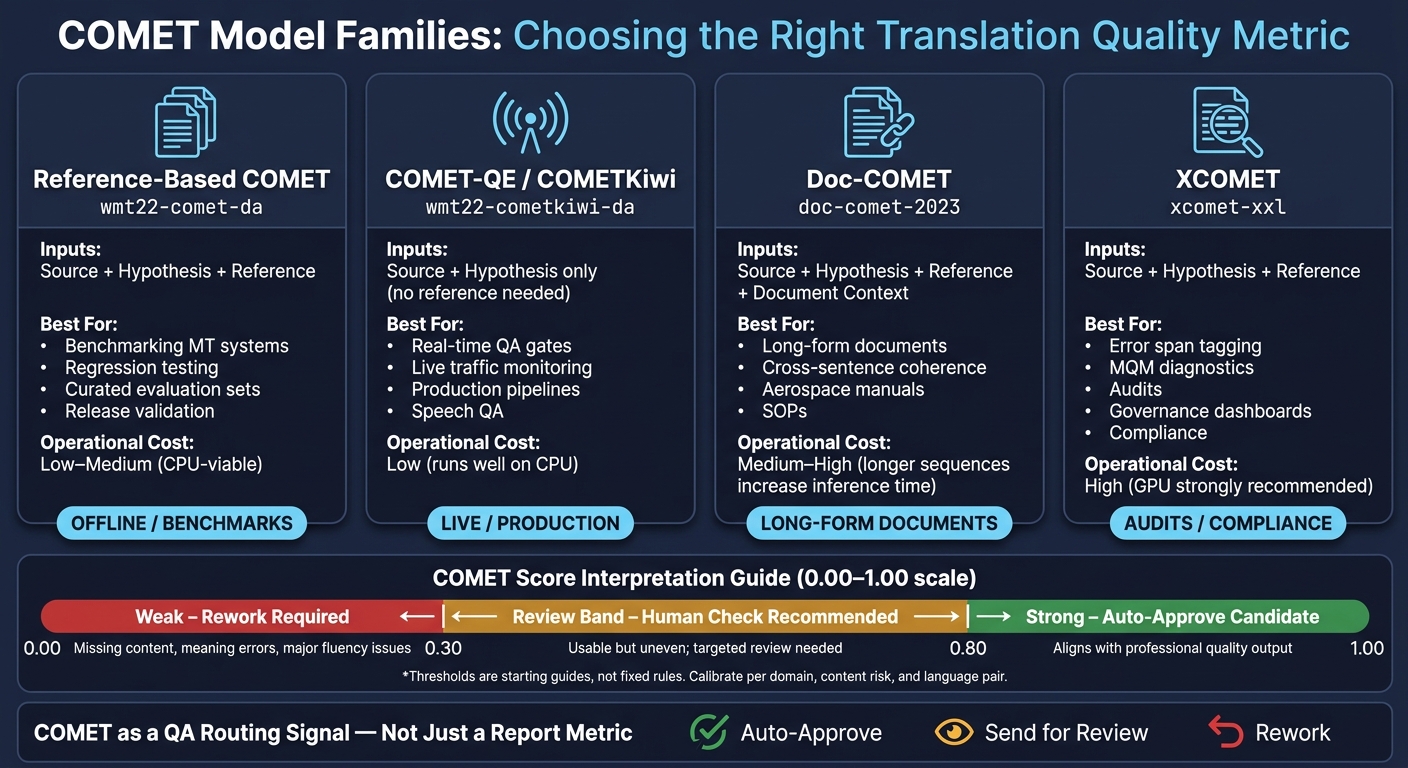
COMET Model Families: Which Translation Quality Metric Should You Use?
LTI Colloquium: COMET: a Neural Framework for State-of-the-art MT Evaluation
How COMET works as a source-aware learned metric
Once the inputs are set, COMET turns them into a learned quality score. It’s a multilingual metric that uses a shared encoder to map the source, the hypothesis, and sometimes a reference into embeddings. A regression head then converts those signals into a score that lines up with human judgments.[4][7][2][12]
Put simply: COMET looks at the source and the translation in the same multilingual space and returns a score that tends to track how people rate translation quality.
Core inputs: source, hypothesis, and reference
COMET’s input setup changes based on the model variant.
Reference-based COMET uses three inputs for each segment: the source sentence, the machine translation output, and a human-written reference translation. In APIs, those usually come in as three parallel lists - sources, predictions, and references - with matching indexes for each segment.[3][1][2][12]
COMET-QE and COMETKiwi work without a reference. They score source-hypothesis pairs only. That makes them a good fit for real-time QA gates, ad hoc content that has no reference, and continuous monitoring in production.[3][9][10][13]
Including the source sentence helps COMET judge semantic adequacy, not just surface similarity to a reference. That gives it a better shot at finding omissions, mistranslations, and unsupported additions. This is especially useful in technical and regulated content, where meaning, numbers, and units have to stay exact.[4][8][5][11]
Main COMET model families and when to use each
| Model Family | Inputs | Best use |
|---|---|---|
| Reference-based COMET | Source + hypothesis + reference | Benchmarking MT systems, regression testing, curated evaluation sets |
| COMET-QE / COMETKiwi | Source + hypothesis | Real-time QA gates, live monitoring, no-reference workflows |
| Doc-COMET | Source + hypothesis + reference, with document context | Long-form documents where coherence, terminology, and pronoun resolution matter |
| XCOMET | Source + hypothesis + reference | Diagnostics, span-level MQM error tagging, governance dashboards |
Each variant fits a different stage of QA.
Why source-aware scoring outperforms overlap-only scoring
BLEU and other overlap-based metrics never see the source. They check how closely the hypothesis matches the reference string. That can help with simple comparisons, but it starts to wobble when there are many valid translations or when the reference has flaws.
For technical documentation, this gap matters a lot. A translation that changes “maximum load 3,000 lb” to “load 300 kg” might still look similar on the surface. But COMET is more likely to catch the problem because the meaning between source and hypothesis no longer matches. In production QA, learned metrics help spot meaning errors before users see them.
WMT22 recommended learned metrics over BLEU across languages and settings.[6][14][15] The next section explains how COMET scores are read, calibrated, and used in production.
Scoring flow, score interpretation, and calibration
Once the inputs are set, the next job is simple: turn COMET output into decisions you can act on.
From raw text to segment and system scores
COMET takes aligned inputs and returns segment scores plus an overall mean score. That same scoring setup works in both CLI and Python.
In CLI mode, it looks like this:
comet-score -s src.txt -t hyp.txt -r ref.txtEach file contains one segment per line. COMET reads those lines in order, scores each segment, and then returns both the segment-level scores and a system mean. In Python, you pass dictionaries with src, mt, and ref, and predict gives you the segment scores along with the dataset mean.
For QE, remove ref and use a no-reference model. For document scoring, group segments with doc_id so COMET aggregates at the document level instead of the segment level. [17][18]
How to read COMET scores in production
Most COMET checkpoints output scores on a 0.00–1.00 scale. A practical starting point looks like this:
- Below about 0.30 often signals weak quality, such as missing content, meaning mistakes, or major fluency issues.
- Above about 0.80 often lines up with strong, professional output.
- The middle band, about 0.30–0.80, usually points to text that may be usable but uneven, so it should get targeted human review.
These ranges are guides, not hard rules. A legal workflow and an internal ops update should not share the same bar. For regulated or safety-critical content, set tighter thresholds. For low-risk internal text, a lower threshold may be fine.
That’s the key mindset: treat COMET as a routing signal, not a yes-or-no verdict.
A good production setup also does a few basic things. Check thresholds against human ratings from time to time, write them into your QA policy, and review them every quarter as your MT engine and content change. [16][19]
Segment, system, and document-level evaluation compared
Each score level answers a different question. In practice, most teams use all three.
| Level | Inputs Required | Typical Usage | Pros | Limitations |
|---|---|---|---|---|
| Segment | Source + hypothesis per segment; optional reference | Real-time routing, speech QA, review routing | Fine-grained control; good for threshold-based routing and error triage | Can be noisy on very short segments; misses document-wide coherence |
| System | Same as segment, grouped by MT engine or version; references recommended | Vendor comparisons, A/B testing, release decisions, regression monitoring | Good for trend tracking | Hides segment-level variability; sensitive to test-set composition |
| Document | Segment inputs plus document IDs or grouping metadata | QA for aerospace manuals, manufacturing SOPs, construction submittals | Matches how enterprises approve deliverables; captures consistency | Needs solid document segmentation; can hide isolated critical errors |
Document-level evaluation is often a better fit when coherence, term use, and cross-sentence context matter. That matters a lot in long-form material, where one sentence may look fine on its own, but the full document still feels off.
Those score levels feed straight into the Azure pipeline and QA gates covered next.
Setup options for Azure-centric translation pipelines
CLI, Python, and runtime choices
Once you know how to read the scores, the next call is simple: where should COMET run in your Azure pipeline? Install it with pip install unbabel-comet on Python 3.8+.[1][20]
Use the CLI when COMET is a clean pipeline step. Use Python when scoring needs to affect what happens next.
CLI scoring fits well in Azure DevOps YAML pipelines or nightly regression jobs. It’s easier to version, easier to inspect, and usually easier to debug when something goes sideways.
Python integration fits better when COMET has to sit inside orchestration logic. For example, an Azure Function can send low-scoring segments to a human review queue. Or an Azure ML pipeline can handle translation, scoring, and retraining in one flow. Python also gives you better hooks for Azure Monitor and Application Insights, which helps with logging, alerts, and tracing.
For runtime, CPU nodes are usually fine for batch scoring. GPU nodes make more sense for higher-volume work or low-latency gates. GPU-enabled Azure VM families like the NC-series can handle heavier models when scoring volume goes up. QE models such as Unbabel/wmt22-cometkiwi-da and Unbabel/wmt20-comet-qe-da are especially handy when you want scores from the source and hypothesis only, without waiting for reference translations.
Using COMET with Azure translation and observability workflows
After you pick a deployment setup, COMET needs a simple control loop: score, store, and route.
A common production flow looks like this: ingest, translate, score, store, route. The key is to save scores with the right metadata, then push them into dashboards and approval flows.
Azure Data Factory or Synapse pipelines can roll up weekly averages by language pair or flag cases where a product release falls below a target band. Power BI can show score trends for quality leads. Azure Logic Apps or Power Automate can handle the routing work:
- Auto-approve high scores
- Sample midrange scores
- Reroute low scores
That setup gives teams a steady feedback loop instead of a pile of raw metrics no one acts on.
Choosing the right COMET model for text, documents, and speech
Model choice should match the job: live gating, batch audit, document QA, or error-span review.
| Model type | Example model names | Azure use case | Operational cost | Governance note |
|---|---|---|---|---|
| Reference-based COMET | Unbabel/wmt22-comet-da | Offline benchmarking, A/B testing Azure AI Translator configs, release validation | Low–medium; CPU-viable | Requires curated references; best for high-value domain audits |
| COMET-QE / COMETKiwi | Unbabel/wmt22-cometkiwi-da, Unbabel/wmt20-comet-qe-da | Production QA gates, live traffic monitoring, speech QA | Low; runs well on CPU for continuous monitoring | No reference dependency; ideal for large-scale, always-on pipelines |
| Doc-COMET | Doc-COMET, Doc-COMET-QE variants | Use for long-form Azure Document Translation outputs where cross-sentence consistency matters | Medium–high; longer sequences increase inference time and cost | Requires solid document segmentation |
| XCOMET | XCOMET-XL, XCOMET-XXL | Best for targeted audits and formal review trails | High; GPU strongly recommended; reserve for targeted audits | Supports formal audit trails for regulated and safety-critical content |
A practical tiered setup looks like this: use COMET-QE or COMETKiwi for continuous monitoring across live traffic, reference-based COMET for periodic release benchmarks when gold references exist, Doc-COMET for targeted audits of high-risk document sets, and XCOMET only when error-span detail is needed for compliance or risk review.
If you want to keep GPU costs under control, cap the number of documents scored each day with XCOMET-XXL. That keeps spend predictable while still checking the content that matters most.
Using COMET in QA gates for multilingual document, speech, and workflow automation programs
Threshold-based routing for review, approval, and rework
Once you’ve calibrated COMET, the next step is simple: turn those scores into routing rules. At that point, source-aware evaluation stops being just a report and starts acting like a real QA gate. The usual setup is a set of routing bands for auto-approve, review, and rework, tuned to your domain and language pair.
COMET can’t handle every edge case on its own. Empty outputs, language mismatches, and malformed HTML/XML should fail before COMET even runs. Very short segments, like part numbers or measurements, can also produce noisy COMET scores. In those cases, it helps to pair COMET with chrF or a basic string-similarity check for a steadier signal.
A practical composite rule looks like this:
- COMET above the set threshold
- chrF above a minimum score
- Structural checks passed
This matters a lot for safety and compliance content. A translation can preserve the general meaning and still be wrong in a way that breaks the task. And in that kind of setting, small wording shifts can cause big problems.
Document and speech workflow examples
The same routing logic works for long-form documents, but you also need to watch coherence across segments. A common approach is to roll segment-level scores into a document-level score and add limits on score dispersion. If COMET flags clusters of low-scoring segments in certain sections, like torque specs, hazard warnings, or assembly steps, the workflow can send only those sections to a subject-matter linguist instead of returning the whole document for review. Sliding-window or document-level scoring also helps catch cross-sentence coherence issues in long-form content.
Speech workflows add another source-aware layer: ASR quality. Here, COMET is applied to the translated transcript, and the ASR output is treated as the source. ASR errors and MT errors need separate routing. Otherwise, a low COMET score tells you something is wrong, but not where the problem started.
A solid pipeline combines:
- COMET
- ASR confidence scores
- Word error rate (WER)
That makes it easier to trace a low COMET score back to its actual source. For translated safety briefings or field reports, critical segments should clear three checks: ASR confidence above a set threshold, COMET above an MT quality threshold, and a domain lexicon check that confirms hazard terms and equipment names survived the translation intact.
Governance and delivery considerations for enterprise teams
High-risk content, such as safety procedures, regulatory filings, and legal terms, should never depend only on auto-approval, even when the COMET score is high. For these content types, thresholds should push work toward human review, not replace it.
Every routing decision based on COMET scores should be logged with the metric value and the configuration version used at the time. That audit trail is what makes post-incident investigations and regulatory reviews workable. Thresholds also need to be treated as controlled thresholds, not engineering defaults. If they change, that change should require sign-off from quality, legal, or safety stakeholders.
Periodic sampling of auto-approved content helps confirm that COMET scores still predict quality as MT behavior and content types drift over time. Ryshe can implement these gates in Azure workflows and add Quanta-based observability for score drift, threshold changes, and review outcomes.
COMET turns source-aware scoring into governed QA gates.
FAQs
How do I choose the right COMET model?
Choose the right COMET model based on what you’re trying to judge: language coverage, task difficulty, and whether the model should look at the source text too.
The goal is simple. Pick a model that fits your translation evaluation setup without wasting time or compute. For some teams, that means broad language support for mixed-content documents. For others, it means tighter checks for speech, post-editing, or workflow automation where small quality slips can cause bigger problems downstream.
A good match comes down to balancing performance and efficiency for the job in front of you. In practice, that means tying each model option to the places where evaluation accuracy has the most impact, such as:
- document translation with strict review thresholds
- speech translation where output can be less predictable
- automated workflows that need fast quality checks at scale
From there, map the model to your own quality gates and benchmarks. If a workflow depends on source-aware scoring, use a COMET model built for that. If speed and broad coverage matter more, lean toward an option that keeps evaluation light while still giving you dependable signals.
How should I set COMET score thresholds?
Use a data-driven approach that matches your quality bar and how much manual review your team can handle. Start by auditing your current workflow so you have a clear baseline. Then compare past COMET scores with human quality checks to see where the score lines up with actual output.
Think of thresholds as dynamic settings, not fixed rules. Adjust them through feedback loops over time, so high-impact exceptions go to human review while routine, high-confidence translations move through automation.
When should COMET scores trigger human review?
COMET scores should trigger human review when translations land in exception categories or fall below set quality thresholds.
With automated quality gates, COMET can approve routine, high-confidence translations and send low-scoring or edge-case output to human experts. Ryshe can plug this scoring into existing systems, so manual review stays focused on high-stakes compliance and accuracy work.