Most AI use cases in AEC and manufacturing should move forward only if three things are already true: you have a clear owner, your data is usable, and the pilot can prove ROI in 30–90 days.
Here’s the short version:
- A feasibility check usually takes 2–3 weeks
- A first pilot usually takes 30–90 days
- In many older firms, 30%–50% of specs and submittals are still scanned PDFs, which slows AI work because OCR comes first
- Weak data access, split systems, missing baselines, and ITAR limits are common reasons to pause or stop
- Success should be judged before the pilot starts, using business, workflow, adoption, and model metrics
- A use case should end in one of three buckets: launch now, fix blockers first, or stop
If I had to reduce the article to one line, it would be this: AI feasibility is not about whether the idea sounds good - it’s about whether the work can ship inside your current systems, rules, and team setup.
What matters most:
- Timeline: Can I assess it fast and run a pilot without delay?
- Data: Is the data owned, accessible, searchable, and fit for use?
- Scope: Is the pilot small enough to finish but large enough to matter?
- Risk: Are there legal, security, or document issues that should stop work now?
- Metrics: Do I know the baseline and the pass/fail threshold in advance?
- Decision: Should I ship, redesign, remediate, or stop?
A simple way to read the full piece is this: first check data and risk, then test a narrow pilot, then make a hard go/no-go call based on written thresholds.
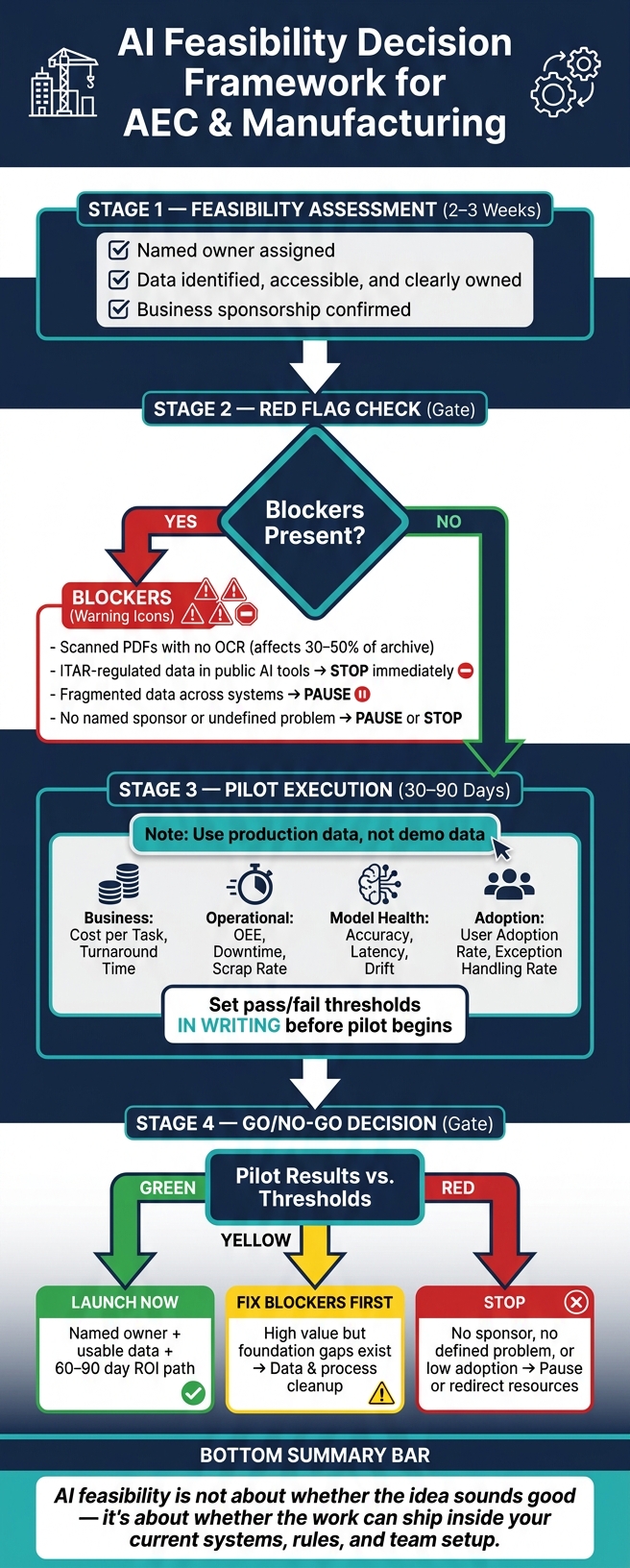
AI Feasibility Decision Framework for AEC & Manufacturing
Scoping the assessment: timeline, data, and pilot boundaries
How long a feasibility assessment and first pilot should take
Once feasibility moves past the “maybe” stage, the next step is simple: decide what can fit into the first pass without dragging the work out.
When data access, system ownership, and business sponsorship are already lined up, a structured feasibility assessment in AEC or manufacturing usually takes 2–3 weeks. A first pilot with measurable outcomes usually runs 30–90 days. In most cases, pilots slip because of approvals and ownership delays, not because the model work takes longer than expected.
What data must be in place before work begins
Before the assessment starts, the right data has to be identified, accessible, and clearly owned. If that sounds basic, it is - but this is often where teams get stuck.
One $85 million manufacturer unified seven disconnected systems and launched a predictive quality model within 60 days. That speed came from fixing integration first, not from the model itself [3].
How to set a pilot scope that is narrow enough to finish and broad enough to matter
The best pilot has a tight enough scope to finish on time, but enough business weight to support a clear go/no-go decision. That balance matters. Too small, and the pilot proves almost nothing. Too broad, and it turns into a slow, messy rollout.
Use your own data during the pilot [2] so the results reflect production conditions, not a demo. The scope should also make the red-flag review decisive, with enough signal to show whether the idea is worth pushing forward.
Red flags that lower feasibility or require a pause
Data and integration problems that typically block delivery
After you set the scope, the next step is simple: check for blockers that can sink a production-ready pilot before it starts.
This is where many pilots hit a wall. Source material is often scattered across systems or locked inside scanned PDFs that need heavy OCR work before anyone can use it. That’s not a small inconvenience. It’s a direct delivery blocker.
If the source data is fragmented, pause the use case until the archive is searchable and centralized. This is a common hurdle when automating document review in architecture and engineering firms.
Business and governance signals that a use case is not ready
Some warning signs are even more serious. If a team is using public AI tools for ITAR-regulated data or proprietary part specifications, that’s a critical red flag. Stop the use case until a secure, approved environment is in place.
“Readiness is more than purchasing technology. Data problems seldom resolve during implementation.” - Ron Smiley, CTO, Wiley|Wilson [2]
That quote gets to the point. Buying tools is one thing. Getting your data, access rules, and controls in order is another.
When to pause, redesign, or stop a use case
One mid-sized civil engineering firm learned this the hard way. It stopped a cost-overrun pilot after six weeks and $40,000 because reports were split across three formats, two SharePoint sites, and many nonsearchable PDFs.
The table below shows the most common red flags, what they point to, how they affect feasibility, and what to do next:
| Red Flag | What It Indicates | Impact on Feasibility | Recommended Action |
|---|---|---|---|
| Scanned PDFs with no OCR | Data accessibility gap | High: AI cannot use 30–50% of the archive without OCR | Pause; run OCR and centralize documents [1] |
| ITAR-regulated data or proprietary part specifications in public AI tools | Security and compliance risk | Critical: legal exposure, potential violation | Stop immediately; establish a secure environment [1] |
Use these flags to decide whether a pilot should pause before success metrics are reviewed. In plain English: these issues come first, because they decide whether the pilot should keep going into success measurement.
How to measure pilot success and decide on production
Business, operational, and model health metrics to define before the pilot starts
Once you’ve cleared the big red flags, measure the pilot against predefined thresholds. Set the bar before the pilot begins. If you skip that step, the final decision turns into guesswork.
Start with a baseline based on your current workflow data, not rough estimates. What does each task cost today? How long does document turnaround take right now? If you don’t have those numbers, you can’t measure pilot results in any meaningful way.
Focus on three metric groups: business outcomes, operational performance, and model health. Each one needs a target range that both sides agree to in writing before the pilot starts. Accuracy matters, sure, but adoption matters just as much. If teams keep falling back to manual spreadsheets, the pilot has failed.
How to set thresholds for production readiness
Production readiness isn’t one single metric. It’s the line you cross when the use case shows enough operational gain, adoption, reliability, safety, compliance, and ROI. If a model needs too much exception handling, it’s not ready for production. That’s a red flag because it means people still have to do too much manual cleanup.
Get written business-unit commitment before the pilot begins: if the use case hits the threshold, they adopt it. That step matters. It forces everyone to define what “good enough” means up front, and it stops people from moving the goalposts later.
Use those thresholds to make the go/no-go call.
| Metric Type | Example Metric | Where It Applies | Role in the Feasibility Decision |
|---|---|---|---|
| Operational | OEE, Downtime, Scrap Rate | Manufacturing floor | Justifies efficiency gains against hardware and sensor costs |
| Business | Cost per Task, Turnaround Time | AEC document workflow | Shows whether time savings translate to billable value |
| Model Health | Accuracy, Latency, Drift | All AI models | Confirms reliability and real-time performance |
| Reliability | Exception Handling Rate | Quality and compliance workflows | Shows whether human review stays manageable |
| Adoption | User Adoption Rate | Project delivery teams | Signals failure if users revert to manual work [4] |
Review the table with both sponsors and delivery leads. If any metric misses the mark, you have three plain options: redesign, fix the gap, or pause.
Using feasibility results to sequence the AI roadmap
How to prioritize ready-now use cases and defer weaker ones
A feasibility assessment should do more than give one pilot a green light. It should rank use cases and spell out the next move for each one.
That ranking gives you a simple way to sort the backlog:
| Readiness Category | Criteria | Action |
|---|---|---|
| Ready Now | Named owner, usable data, 60–90 day ROI path | Launch pilot immediately |
| Needs Remediation | High value, but blocked by foundation gaps | Data and process cleanup |
| Not Ready | No named sponsor, no defined problem, or low adoption risk | Pause or stop; redirect resources |
The goal is sequencing, not just approval. You start where delivery can move fastest, then use those early results to clear the next blocker in line.
Begin with Ready Now use cases. Those are the ones most likely to ship in a reasonable window and show what works in practice. Then use pilot results to spot the data, integration, and process fixes needed for the next wave. That way, remediation stays focused on core gaps, not AI build work that’s too early.
Once the portfolio is ranked, the call gets pretty straightforward: ship the ready work, fix the blocked work, and stop the rest.
Conclusion: The clearest test for whether to move forward
Move forward only when a use case has an owner behind it, data that’s ready to use, and a scope that fits a 60–90 day pilot. If it doesn’t, send it to remediation or pause it.
Stopping a weak use case early is a sign of discipline. It keeps delivery teams on work that can actually ship and protects the credibility of the AI program.
The AI Journey: From Foundations to Real-World Impact for AEC & MFG Teams
For those in the field, seeing practical AI wins in construction can help bridge the gap between theory and the jobsite.
FAQs
How do I know if our data is AI-ready?
Your data is AI-ready only if it’s verifiably correct, complete, consistent, current, and accessible to authorized users without manual work.
Just as important, you need defined data stewards, documented policies, and lineage you can trace back to the source. If your team still depends on manual reconciliation, tribal knowledge, or spreadsheet-linked systems, your data foundation likely needs work first.
What should be included in a first AI pilot?
A strong first AI pilot starts with the basics in place. You need data that’s digitized, easy to access, and clean enough to use. You also need a process that’s already documented and standardized, so you’re improving something stable instead of patching chaos.
Just as important, the pilot has to tie back to the business. If the use case doesn’t connect to a clear goal, it’s easy for the project to drift or look good in a demo but fall apart in day-to-day use.
Make sure the pilot includes:
- Clear ownership and alignment across the people involved
- Measurable success criteria with starting baselines
- Production design that accounts for integration, monitoring, and human fallback
- Kill criteria that define when to pause or stop
That last point matters more than most teams expect. A pilot isn’t a promise that the idea will work. It’s a test. Setting stop conditions up front helps you make cleaner decisions and avoids throwing more time or money at something that isn’t paying off.
When should we pause or stop an AI use case?
Pause or stop an AI use case when clear kill criteria show up.
That usually means one of a few things has happened: the team can’t hit the agreed 30/60/90-day milestones, the data isn’t ready or governed well enough for steady performance, there’s no single owner who’s on the hook, or there isn’t a credible production plan for monitoring, operations, and integration.
When those basics are missing, don’t keep pushing the AI build forward. Fix the foundation first. That often means tightening the process, getting the data in shape, and documenting how the work should run before more time and money go into the model.