If you use AI in a GxP process on Azure, your audit trail must rebuild the entire record path from input to model output to human approval. Before building, find the right AI starting point for your specific compliance needs.
I’d boil the article down to this: Azure service logs alone are not enough for Part 11 and Annex 11 review. You need a governed record chain that shows who acted, when it happened, why a change was made, which model ran, what data was used, and how a person reviewed the result. You also need immutable storage, retention tied to the GxP record, and scheduled review.
Here’s the short version:
- Map compliance rules to log fields like
user_id,timestamp_utc,reason_for_change,model_version,input_hash,review_decision, andprimary_record_id - Link every AI event with
workflow_idandinvocation_idso you can trace one batch, study, or deviation end to end - Separate regulated evidence from engineering logs so QA teams can review the right records without noise
- Use immutable Blob Storage with locked retention to prevent silent edits or deletion
- Perform an AI Readiness Assessment to validate and recheck after change when models, prompts, roles, pipelines, or logging settings change
- Review on a set schedule such as monthly, per release, quarterly for access, and yearly for archive retrieval
A few facts stand out. 21 CFR Part 11 §11.10(e) calls for secure, computer-generated, time-stamped audit trails. The article also points to SHA-256 hashes for input and output integrity, ISO 8601 UTC timestamps, and Azure controls such as Log Analytics, Azure Policy, Entra ID, and immutable Blob Storage.
If I were setting this up, I’d treat the audit trail like a regulated system component: log the right fields, lock the evidence, review it on a schedule, and tie every AI action back to the final signed record.
2. Map GxP and Part 11 requirements to AI audit trail fields
Part 11 and Annex 11 requirements that apply to AI audit trails
Start by turning each compliance proof point into a log field.
Part 11 and Annex 11 call for secure, server-timestamped audit trails that record GxP-related actions and do not allow earlier entries to be changed. An inspector should be able to rebuild any AI-assisted GxP record from these fields alone.
In an Azure setup, audit logging should be on by default. Timestamps need to be generated on the server and synced to a reliable time source. Logs also need to live in append-only storage. That usually means append-only WORM storage with retention controls limited to admins.
AI-specific fields regulators will expect you to trace
Each AI inference event should include a workflow_id or invocation_id that ties the model call to a specific end-to-end process instance, like a deviation triage run or a batch record review. That link should carry through to downstream application logs, storage events, and review records.
You also need to log the model name, provider, and exact version or deployment ID at the moment of invocation. That matters because model changes can trigger revalidation duties.
For input and output integrity, log a reference and cryptographic hash of the prompt or input document instead of always storing the full text, since that text may contain sensitive data. Store the output as a controlled, versioned reference. If confidence score or policy result affects a GxP decision, log that too.
Then there’s the human step. The reviewer’s action - approve, override, or reject - plus any edits and the reason for override, ties the model output to the final reviewed record.
Mapping table for compliance design
These are the minimum fields needed to trace an AI action from source input to final approval.
| Part 11 / Annex 11 Requirement | AI Audit Trail Field | Notes |
|---|---|---|
| User attribution | user_id, user_role | Use Azure Entra ID Object ID; capture role at time of action |
| Server-generated timestamp | timestamp_utc | ISO 8601 format; server-side only |
| Non-editable records | Append-only log status | Azure Blob Storage with immutable (WORM) policy |
| Operation type | operation_type | Values: create, modify, delete, review, approve, reject, override |
| Old and new values | old_value, new_value | Full content or versioned reference + hash |
| Reason for change | reason_for_change | Required field on any modify or delete event |
| Model identification | model_name, model_provider, model_version | Example: Azure OpenAI deployment ID |
| Input integrity | input_reference_id, input_hash | SHA-256 hash of prompt or source document |
| Output traceability | output_reference_id | Link to controlled, versioned output record |
| Confidence / policy result | confidence_score, policy_result | Log classification labels and threshold values |
| Human review action | reviewer_id, review_decision | Approve, override, reject; include edits made |
| Electronic signature linkage | signature_record_id | Link to Part 11-compliant e-signature record |
| Workflow traceability | workflow_id, invocation_id | Tie model call to end-to-end process instance |
| Record retention linkage | primary_record_id | Link audit event to batch record, study ID, etc. |
One field is easy to miss early on: primary_record_id. But during an inspection, it becomes a big deal. It lets the quality team pull every audit event tied to a specific batch record or clinical study, which is usually how a regulator will review records.
Use this field map as the schema for Azure logging and review controls.
07 Data Integrity ALCOA and Audit Trails
3. Design the Azure audit trail architecture
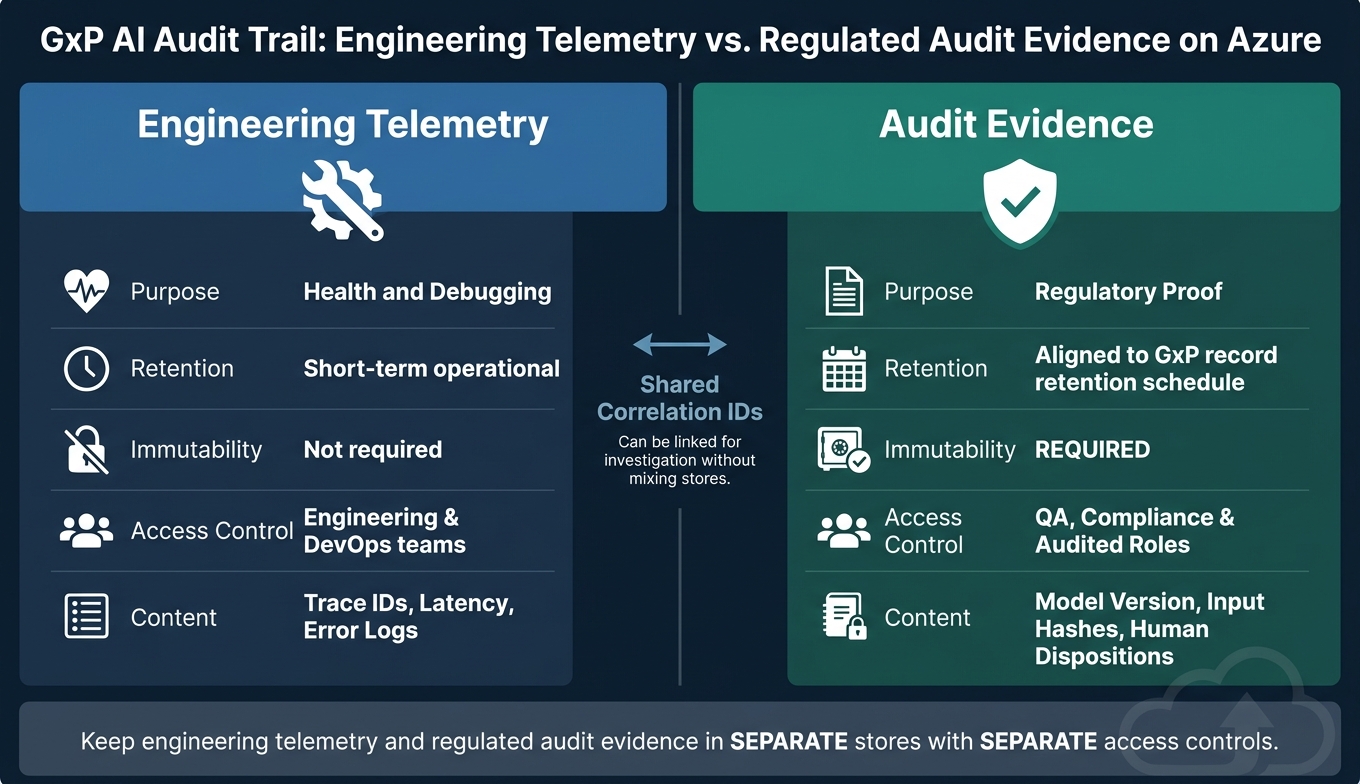
GxP AI Audit Trail: Engineering Telemetry vs. Regulated Audit Evidence on Azure
Log the minimum event set across Azure services
Start by mapping the Section 2 field schema to Azure service events, then send those events into one governed audit trail. In practice, the Section 2 field map becomes the payload schema for each service event.
Set up diagnostic settings on Azure Machine Learning or Azure AI Foundry, Azure OpenAI, Blob Storage, API Management, and orchestration tools like Data Factory or Logic Apps. Route those logs to a central Log Analytics workspace for regulated workloads. Then use Azure Policy to enforce that setup so it doesn’t drift over time.
The minimum event catalog should cover:
- Interactive user sign-ins
- Service principal and managed identity activity
- Model registration and versioning
- Deployment updates
- Pipeline run starts and completions
- Configuration changes to AI resources, such as prompt templates, safety filters, token limits, and firewall rules
- Privileged role assignments
- Changes to logging or retention settings
That last item matters more than it might seem. If someone changes logging or retention, they can weaken the audit trail itself. So those changes need to be in the minimum event catalog too.
Capture user actions, model inputs, and outputs with full attribution
At this layer, the goal is simple: source-to-identity attribution across every inference and review step.
Use individual Entra ID accounts for people. For automation, use managed identities or service principals. In both cases, the identity should pass a stable identifier like objectId or servicePrincipalId into the log record.
For application-level workflows, log two identities at once:
- The Entra ID identity of the app or API gateway
- The application-level user identity
This gives you both views. So if a reviewer approves an AI-generated record through a custom app, you can trace the action at the system level and at the business-process level.
Each event should show who acted and under what authority. Reuse the Section 2 schema at every step, and add actorId, actorType (user, service principal, or managed identity), sourceSystem, and roleAtTime.
Store records in append-only, tamper-evident formats
Export curated audit records into immutable Azure Blob Storage for long-term retention. Move those curated records into Blob Storage with immutable storage policies, such as time-based retention or legal holds. Once a time-based policy is locked, blobs can’t be deleted or overwritten until the retention period ends.
For steady ingestion, append blobs with allowProtectedAppendWrites enabled let you add new records without breaking immutability. That’s the key tradeoff here: you still need records to flow in, but you don’t want old ones quietly changed after the fact.
It also helps to pair the storage layer with SHA-256 hashes on input documents and output records. That gives you a second way to verify content integrity, separate from the storage mechanism itself.
Keep engineering telemetry and regulated audit evidence in separate stores with separate access controls. Don’t mix them together.
| Dimension | Engineering Telemetry | Audit Evidence |
|---|---|---|
| Purpose | Health and debugging | Regulatory proof |
| Retention | Short-term operational | Aligned to record retention schedule |
| Immutability | Not required | Required |
| Access control | Engineering and DevOps teams | QA, compliance, and audited roles |
| Content | Trace IDs, latency, error logs | Model version, input hashes, human dispositions |
Shared correlation IDs across both tiers make investigation much easier. They let you trace from an audit record back to detailed telemetry when you need a deeper review, without mixing the two stores. These immutable records then support the retention and review controls in the next section.
Once records are immutable, define retention, review, and validation procedures.
4. Set retention, review, and validation procedures
Align retention rules with record life and inspection needs
Once audit records are immutable, the next step is setting rules for retention, review, and validation.
Retention is a compliance control, not just a storage setting. Keep audit trail records for at least as long as the related batch, study, or quality record. Store them in immutable Azure Blob Storage with encryption at rest and in transit. You also need to keep the evidence required to rebuild the full AI decision path, from the original input through human approval.
Build periodic audit trail review into quality workflows
An audit trail that nobody reviews won’t help much during an inspection.
Start with exceptions. Use the same workflow_id, model_version, reviewer_id, and input_hash fields from the audit trail to sample records during review. Check AI output exceptions, approvals, overrides, and access changes first. Flag unauthorized changes, data integrity issues, and odd model behavior. Consider red team testing to identify these vulnerabilities before deployment. If you use Application Insights, include its exception reports in the review package. Then run reviews monthly or at each release to spot patterns that alerts can miss.
Log every AI decision, classification, routing action, timestamp, user context, and rationale.
Tie these reviews into your current quality workflows and document the results in your quality system. That keeps ownership, timing, and evidence collection in sync.
Validate the audit trail and revalidate after change
Use review findings to update controls, tests, and change-impact assessments.
Treat the audit trail as a regulated system component and validate it that way. Validation should confirm:
- Required events are logged
- Timestamps stay consistent
- Access controls are enforced
- Archived records can be recovered
Revalidate after any change that affects logging, access, models, prompts, pipelines, or retention. That includes model updates, prompt edits, pipeline changes, role changes, and logging changes. Review each change for audit trail impact, and revalidate before production when needed.
| Governance Activity | Responsible Role | Frequency | Evidence Produced |
|---|---|---|---|
| Audit Trail Review | Quality Manager / Data Steward | Monthly / Per Release | Review logs, deviation reports |
| Automated Control Checks | Solution Architect | Continuous (Automated) | Quality dashboards, error alerts |
| Access Control Audit | IT / Security Officer | Quarterly | User access reports, Entra ID logs |
| Archive Retrieval Test | Data Engineer | Annually | Retrieval success report, integrity check |
| Change Impact Review | AI Delivery Engineer | Per Change | Change assessment, validation protocol |
Document every governance activity in your quality system. Map each row to a procedure, owner, and inspection record.
5. Use Ryshe Quanta to centralize AI audit records and observability
Where Quanta fits in a GxP AI control stack
Audit reviews get a lot simpler when AI traffic goes through one gateway. In manufacturing and aerospace, AI requests often come from MES, QMS, PLM, and automation pipelines. That split is exactly why the audit trail needs one capture point at the moment of AI invocation.
Ryshe Quanta sits between business systems and Azure AI services as a single enforcement point for AI requests. Before inference, Quanta checks identity, evaluates policy, assigns a correlation ID, and writes an append-only interaction record. Put plainly, Quanta covers the AI capture layer that Azure platform controls don’t touch.
What Quanta should record for regulated AI workflows
Use the gateway record to supplement, not replace, Azure platform logs and quality-system records.
| Record Category | Fields Captured |
|---|---|
| Identity & Attribution | User ID, system/client ID, role at time of invocation |
| Policy & Governance | Policy set version, decision (allowed/blocked/conditionally allowed), reason codes |
| Context Supplied | Versioned prompt templates, referenced document IDs |
| Model Invocation | Azure endpoint, deployment ID, runtime parameters |
| Output & Disposition | Output reference, post-processing steps, final disposition |
| Downstream Links | CAPA, batch, change-control, and workflow IDs |
Send these logs to Azure Monitor and Log Analytics for inspection and deviation queries. That keeps them queryable alongside your existing platform data, which makes review work far less messy.
Quanta blocks restricted data such as CUI or PII before model invocation and logs the block reason. That block event should be kept as audit evidence, not treated only as a runtime control.
FAQs
What should a GxP AI audit trail capture on Azure?
A GxP-compliant AI audit trail on Azure needs to log every AI action so you have full traceability.
That means recording:
- Timestamps
- User attribution
- Decision reasoning
- The inputs behind each output
- The model version used
- A traceable link to the source data
It should also keep immutable records of every generated document, suggested classification, and routing decision.
Why does that matter? Because it keeps AI interactions transparent, compliant, and ready for regulatory review.
Why aren’t Azure service logs enough for Part 11 and Annex 11?
Azure service logs alone don’t meet Part 11 and Annex 11 needs. The main issue is simple: they don’t give enough context to rebuild a specific AI-driven decision.
In a GxP setting, you need a traceable record that ties each AI output back to the data that fed it, the model version in use, the user context, and the reasoning behind the result. Standard Azure logs show technical activity, but they stop short of that full audit trail.
When do AI audit trails need review or revalidation?
AI audit trails need to be revalidated when the model is updated or its scope expands. They also need periodic review against the manual process.
In practice, this means reviewing them before any scope increase and any time standards or regulatory requirements change, so the living audit package stays current.