Most NCR problems are data problems first. I’d sum up the article like this: if I use Azure to read scanned NCRs, sort free text, group similar defect language, and watch those groups over time, I can spot repeat issues sooner and cut manual review.
Here’s the core idea in plain English:
- Step 1: Read the records. Azure Document Intelligence turns PDFs, TIFFs, photos, and forms into text and fields.
- Step 2: Route the narratives. Azure AI Language sorts emails, notes, and supplier replies by issue type.
- Step 3: Group repeat defects. Embeddings link phrases like “surface blemish,” “finish mark,” and “cosmetic damage” when they point to the same issue.
- Step 4: Watch for shifts. Trend monitoring flags volume spikes, repeated clusters, and supplier-language changes before they turn into escapes.
What stands out to me is the data-quality angle. One aerospace example in the article moved key field accuracy from 68% to 97.2% and cut annual scrap by $420,000. That tells me the AI part only works when the intake and labeling work is clean enough to trust.
A few practical points matter most:
- Use scan quality of 300 DPI or higher
- Keep metadata consistent across NCR sources
- Make grouped matches easy for teams to review
- Track model drift as supplier wording changes
- Use rules for clear thresholds and semantic methods for gray-area defect signals
If I had to reduce the whole piece to one line, it would be this: Azure can help turn messy NCR text into searchable, routed, grouped, and monitored defect signals - if the input data is cleaned up first.
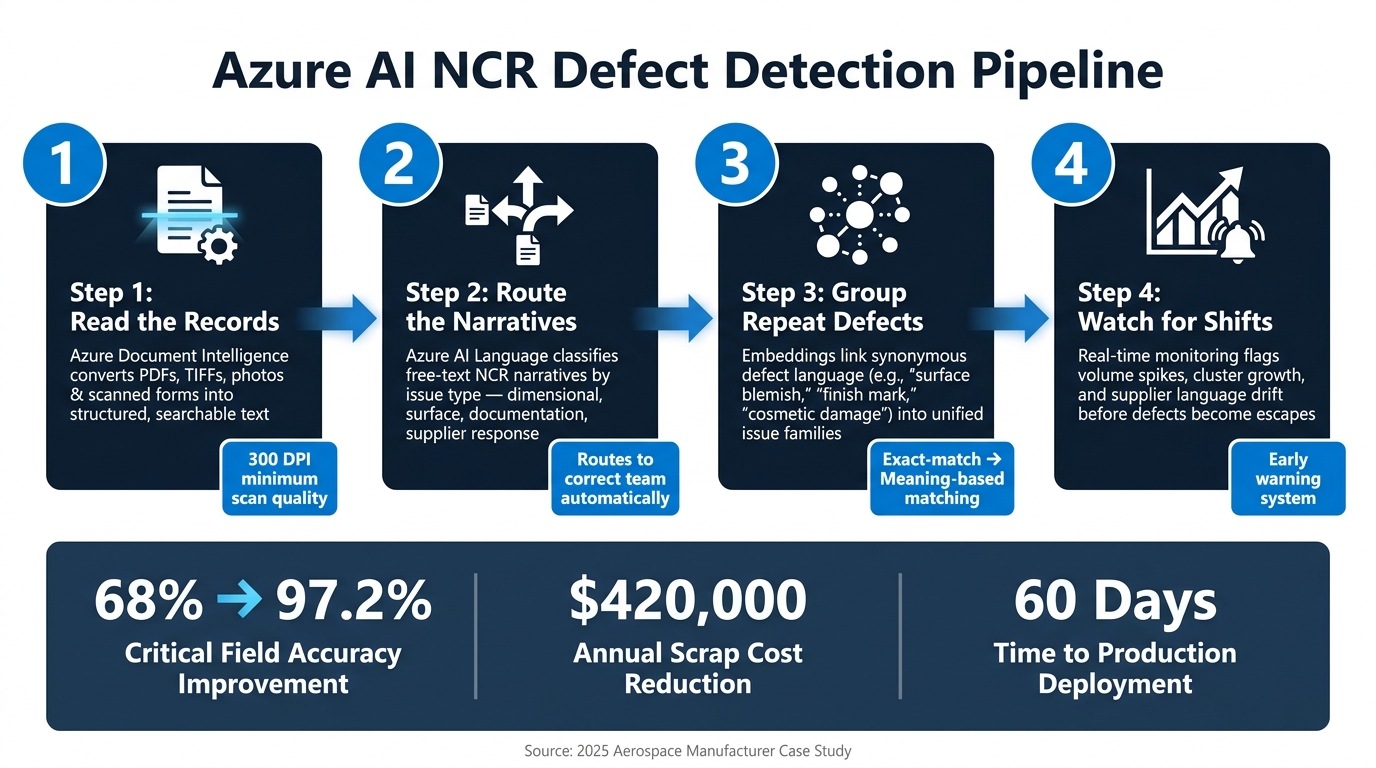
Azure AI NCR Defect Detection Pipeline: 4-Step Process
The NCR problem in supplier quality
NCR intake in manufacturing and aerospace comes in from all over the place: scanned PDFs, TIFFs, photos, Office files, and email threads scattered across different repositories. The biggest drain isn’t just the volume. It’s the time teams burn trying to find the right record, match it with the rest, and figure out what belongs together.
Why fragmented NCR intake slows decisions
When there isn’t one shared defect taxonomy, the same nonconformance can end up logged as several different issues. That creates confusion fast.
In one Tier 2 aerospace components manufacturer, “defect” had four department-specific definitions, and key quality fields were only 68% accurate across disconnected systems [1]. With data split up like that, root-cause analysis starts on shaky ground.
Where missed patterns create business risk
If NCR records aren’t connected, repeat defects can stay buried until someone digs through the history by hand. That slows investigations and keeps rework in the loop longer than it should be.
That’s why the first Azure step is document intake: make every NCR readable, searchable, and routable. After that, teams can extract and classify those records so quality staff can route, group, and trend them.
Azure AI document intake for scanned forms, emails, and inspection notes
The first step is intake: make every NCR readable, typed, and easy to route. Azure Document Intelligence and Azure AI Language can process scanned forms, photos, PDFs/TIFFs, and email bodies. That helps turn scattered NCR intake into one queue that downstream models can handle the same way every time.
Classify document types before extraction
Azure Document Intelligence can classify an incoming file as an NCR form, SCAR/8D, inspection report, or complaint email. That document type decides which extraction model and workflow to use. NCR forms can pull fields like NCR number, part number, defect code, supplier ID, lot number, and disposition. SCARs can pull containment, root cause, corrective actions, and due dates. Complaint emails and narrative-only records are better sent to Azure AI Language for text classification instead of form-field extraction.
Scan quality matters more than many teams expect. Use clean scans at 300 DPI or higher, with strong contrast and as little skew as possible. For fields that can’t be wrong - like NCR number or part number - some organizations add barcodes or QR codes so they rely less on handwriting recognition.
Once the document type is known, narrative records can move by issue type instead of sitting in the wrong inbox.
Classify free text for routing and triage
After type is known, Azure AI Language can classify unstructured NCR text for routing. Teams usually set labels such as dimensional defect, surface/coating issue, packaging damage, documentation gap, or late supplier response. The model is trained on annotated historical NCRs and complaint emails, so it learns patterns like “out of tolerance”, “paint peeling”, “missing certs”, or “PO not acknowledged.”
The payoff is simple: routing gets faster and more consistent. Dimensional and functional defects go to quality engineering. Coating or surface issues go to materials specialists. Documentation gaps route to supplier quality or regulatory. Late response flags go to supplier management. In high-volume NCR inboxes, that kind of speed and consistency often matters more than another round of manual review.
Comparison table: document classification vs. text classification vs. pattern detection
| Capability | Purpose | Input Type | Outcome |
|---|---|---|---|
| Document Classification | Identify the document type and route it to the right extraction template | Scanned forms, PDFs, TIFFs, Office files, photos | NCR form, inspection report, or SCAR routed to the correct extraction model and workflow |
| Text Classification | Assign issue categories to unstructured narratives for triage | Email bodies, inspection notes, supplier responses | Routing to quality engineering, supplier quality, operations, or compliance |
| Pattern Detection | Surface recurring issues and trend shifts across NCR history | Aggregated historical NCR data and real-time signals | Early warning of emerging defect patterns or supplier performance decline |
Once records are classified, semantic grouping can link repeated defects across forms, emails, and supplier responses.
Grouping similar NCRs with language models
After classification, embeddings can group NCRs into issue families across plants, inspectors, and suppliers. That shifts routed NCRs from one-off records into reusable issue families you can track over time.
This matters because the same defect often shows up under different wording. One inspector may write “surface blemish.” Another may log “finish mark” or “cosmetic damage.” Exact text matching treats those as separate issues. Embeddings group them by meaning instead of wording.
How semantic grouping links repeated issues
Embeddings convert defect descriptions into vectors that cluster by meaning, not exact wording. For quality teams, that creates a cleaner starting point for root-cause analysis because repeated problems stop getting buried under inconsistent language.
| Matching Approach | How It Works | Handles Different Wording? |
|---|---|---|
| Exact-match search | Matches exact text strings | No - requires manual alias lists |
| Embedding-based grouping | Matches by meaning via vector proximity | Yes - automatically groups synonyms and related phrases |
How grouped NCRs improve root-cause work
The payoff can be large. In one 2025 aerospace case, AI resolved 47 conflicting term definitions - including different uses of the word “defect” - raised critical field-data quality from 68% to 97.2%, moved a predictive quality model into production in 60 days, and cut annual scrap by $420,000. [1]
When similar NCRs are grouped well, teams can spot repeat patterns faster, trace them across suppliers or sites, and spend less time sorting through duplicate issue labels.
Production delivery considerations
In production, this only works if the setup stays disciplined. You need consistent metadata, explainable matches, exception handling, and drift monitoring so clustered NCRs remain reliable as supplier language changes over time.
Once those clusters settle down, they can support trend monitoring and early anomaly detection.
Detecting emerging defect patterns and trend shifts
Once NCRs are grouped into issue families, the next job is to watch how those families change over time. At that point, you’re no longer just sorting records. You’re watching for movement.
Track trend changes before they become escapes
Watch for rising complaint volume, defect families that start to spread, and shifts in supplier response records or inspection-note language. One signal alone can be noisy. Put them together, and the picture gets a lot clearer.
Use short alert tiers so teams can act fast:
- Volume spikes trigger containment
- Related clusters within 24 hours trigger engineering review
- ERP-MES mismatches trigger immediate data-steward alerts [1]
This only works if the input data is clean and dependable. Automated data quality checks can push critical field accuracy from 68% to over 97% [1]. That gives trend models a much stronger base to work from.
Comparison table: rules-based checks vs. semantic clustering and anomaly detection
Use rules when you know the threshold. Use semantic methods when the shift is less obvious.
| Feature | Rules-Based Checks | Semantic Clustering & Anomaly Detection |
|---|---|---|
| Detection Strength | Limited to known thresholds and “if-then” logic. | Identifies unknown patterns and subtle drifts in data. |
| Data Inputs | Structured, numerical data (e.g., sensor > X). | Unstructured text (NCR notes), images, and multi-variate sensor data. |
| Use Case | Simple pass/fail alerts and inventory triggers. | Root-cause analysis, defect family grouping, and predictive maintenance. |
| False Alarm Risk | High if thresholds are too tight. | Lower, as it looks for deviations from “normal” semantic clusters. |
| Maintenance | High; rules must be manually updated as processes change. | Lower-touch; retrain as new patterns emerge. |
Both methods matter. Rules are good at the obvious cases. Semantic clustering is better for the gray area - the cases that don’t break one clean threshold but still point to a shift in quality behavior.
Conclusion: A practical Azure path from messy NCR text to earlier action
The pipeline follows four steps: document intake and OCR to turn unstructured records into usable data, text classification to route and triage by issue type, semantic grouping to connect repeat problems across suppliers and sites, and trend monitoring to spot pattern shifts before they become escapes. Each step builds on the one before it.
For U.S. manufacturers and aerospace suppliers, the payoff is pretty direct: faster triage, stronger supplier quality visibility, lower rework risk, and steadier quality decisions across plants and inspectors. Azure already has the tools for this. The hard part - and the part that matters most - is getting the data clean enough to trust.
FAQs
How much training data is needed?
There’s no one-size-fits-all training data requirement.
These models are trained on your firm’s actual documents, so what matters most is the quality and fit of the records you already have - things like NCRs, inspection notes, email complaints, and similar files.
And let’s be honest: those documents are often messy, inconsistent, or even handwritten. That’s why Ryshe starts by reviewing your document volume and day-to-day workflows to see what your setup calls for. From there, the team configures and validates the models over several weeks.
What NCR fields should be standardized first?
Start with the fields that make tracing issues back to the source much easier: project numbers, supplier names, and defect codes. From there, standardize defect descriptions, technical specs, and responsible party details so the data says the same thing every time, no matter where it came from.
Then clean up dates, currency values, and unit measurements across emails, inspection notes, and scanned supplier responses. That way, AI can group related issues with far less confusion and spot defect patterns before they turn into a bigger headache.
How do teams review AI-grouped defect matches?
Teams can review AI-grouped defect matches with the full context behind each pattern the system flags.
When the AI spots repeat defect types, it sends them to engineering with correlation analysis that ties the issue to production data, including machine settings, material lots, and shop-floor conditions.
That cuts down the time spent on manual investigation, so quality teams can spend more time on validation and fixing the problem. Each classification and grouping decision is also logged in a full audit trail, which makes it easy to see what happened and why.