If I skip webhook validation, I leave a public Azure endpoint open to spoofed, changed, old, or replayed requests.
Here’s the short version: I should verify the raw request body with HMAC, check the timestamp window, block duplicate event IDs, keep secrets in Azure Key Vault, and stop bad requests before any app code runs. If I don’t, one bad call can start the wrong workflow, create duplicate records, or write bad data into downstream systems.
A few facts the article makes clear:
- I must validate the exact raw bytes before parsing JSON
- I should use constant-time comparison for signature checks
- I should reject bad or stale requests with
400or403 - I should return
200 OKfor duplicate deliveries to keep handling idempotent - I should store replay IDs in a durable store like Azure Cosmos DB
- I should support two active secret versions during key rotation
- I should use API Management for edge filtering, but keep crypto checks in the app
- I should log reason code, correlation ID, and failure time in Application Insights
A 2025 deployment cited in the article used seven disconnected systems and 340+ automated data-quality rules. That’s a good reminder: validation is not a nice-to-have. It is the first gate.
Implementing Signature Verification for Webhooks (GitHub HMAC verification)
Quick comparison
| Area | What I should do |
|---|---|
| Signature check | Compute HMAC from the raw body and compare it to the header |
| Time check | Reject requests outside a tight UTC tolerance window |
| Replay check | Store and check event ID or nonce before processing |
| Azure Functions | Validate at the top of the HTTP trigger |
| App Service | Put validation middleware early in the pipeline |
| API Management | Check headers, rate limits, and filtering before forwarding |
| Secrets | Store in Azure Key Vault with RBAC |
| Rotation | Accept current and previous secrets during cutover |
| Logging | Send validation outcomes to Application Insights |
| Alerts | Use Azure Monitor for near-real-time failure alerts |
If I had to reduce the whole article to one rule, it would be this: verify first, process second, and fail closed every time.
How HMAC-Signed Webhooks Work
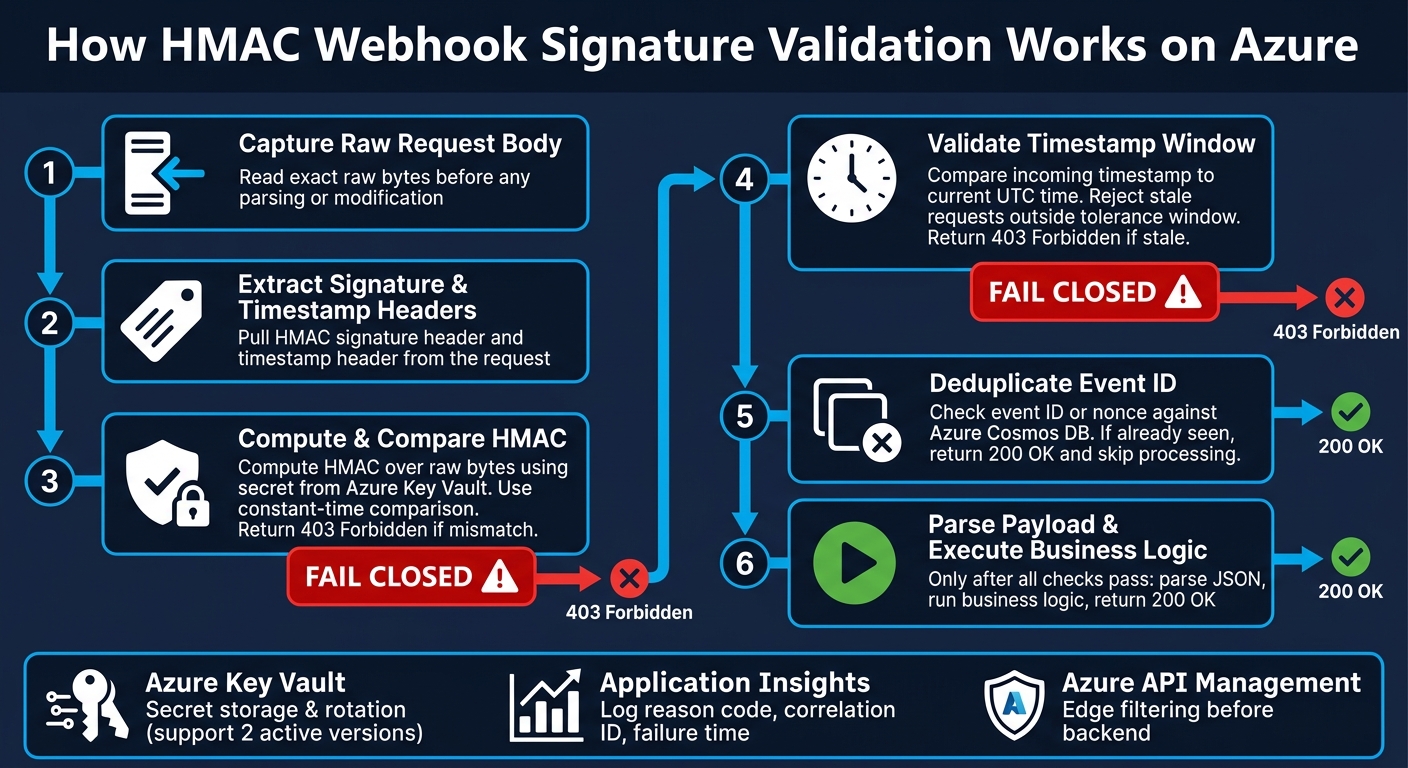
Azure Webhook Signature Validation: Verify First, Process Second
A webhook provider signs the raw request body with an HMAC and sends that signature in a header. Your receiver then computes its own HMAC from the same raw bytes and compares the two values. If they match, you can treat the request as signed and unchanged.
That check only works if your receiver uses the exact bytes and headers that the provider used.
If the provider also sends a timestamp header, validate that too. This helps you reject stale requests and reduce replay risk.
Validate the Raw Request Body and Headers Exactly
The most common mistake is changing the body before validation.
JSON parsing, reserializing, whitespace edits, or encoding changes can all alter the byte sequence and break the HMAC check. Even if the JSON looks the same, the bytes may not be. And for HMAC, bytes are what count.
So the flow should be simple:
- Capture the raw request bytes first
- Validate the signature against those exact bytes
- Parse the payload only after the signature passes
If the body changes before validation, reject the request and stop.
Also, use constant-time comparison for signature checks. Plain string equality can leak timing differences. After signature verification, add freshness checks and duplicate detection.
Use Timestamps and Event IDs to Cut Replay Risk
An HMAC proves that the sender knows the shared secret. It does not prove that the request is fresh.
That’s why timestamps matter. Compare the incoming timestamp to the current UTC time and reject requests outside your allowed tolerance window.
Timestamps help block stale requests. Event IDs help block duplicates that arrive inside that window. Used together, they give you much stronger replay protection.
Payload-Only vs. Timestamped Signatures: A Comparison
| Factor | Payload-Only Signature | Timestamped Signature |
|---|---|---|
| Security strength | Proves integrity only | Proves integrity and freshness |
| Replay resistance | Depends on event ID deduplication | Uses freshness checks plus event ID deduplication |
| Implementation effort | Lower - compute HMAC over the body only | Higher - validate the timestamp header too |
| Operational tradeoffs | Simpler, but replay risk is higher without duplicate tracking | Requires clock synchronization and added validation |
If your provider only supports payload-only signatures, event ID deduplication matters even more. If it supports timestamped signatures, use both the timestamp window and duplicate detection.
Apply the same validation rules in Azure Functions, App Service, and API Management before any request reaches business logic. The next step is deciding where those checks should live: at the function, middleware, or gateway layer.
Validation Patterns for Azure Functions, App Service, and API Management
Once you know what to validate, the next step is deciding where to do it. The checks don’t change. The place where you run them does, depending on the Azure service.
Azure Functions: Verify First, Then Process
For an HTTP-triggered Azure Function, put validation at the very top of the handler. Start by reading the raw request body. Then pull the signature and timestamp headers.
If either header is missing or malformed, return 400 Bad Request right away. If the signature fails validation, return 403 Forbidden. Only parse the payload after both checks pass.
Azure Functions are the first application boundary. That means stale or invalid requests should be rejected there, before any parsing or I/O starts.
Azure App Service: Put Validation in Middleware
On App Service, add a middleware component early in the pipeline, before routing or controller logic runs. The middleware needs to preserve the raw request body so signature verification happens before the payload is parsed.
Log failures to Application Insights so you have a structured audit trail. That gives you a clear record of what failed and where, which matters when you need to trace request issues later.
Azure API Management: Enforce Gateway Checks Before Forwarding to the Backend
Azure API Management (APIM) sits in front of your backend, so it can enforce header presence checks, rate limits, and request filtering before a request ever reaches your Azure Function or App Service. That’s a good place to stop bad traffic early.
But keep signature verification in the app. The app is still the source of truth for signature checks.
Put simply: use APIM for front-door filtering, and use the app for cryptographic verification.
| Factor | APIM gateway checks | App-level signature checks |
|---|---|---|
| Validation depth | Header checks and rate limits | Signature verification and application checks |
| Edge filtering | High - bad requests are stopped before the backend | Moderate - backend work starts when the request reaches the app |
| Logging | High-level traffic analytics and rate limiting | Detailed audit trails via Application Insights |
| Operations | Centralized policy management | Code-level control; supports middleware |
Replay Protection, Secret Management, and Failure Handling
After signature verification, production receivers still need replay controls, secret rotation, and fail-closed handling.
Reject Stale and Duplicate Deliveries Safely
Compare the request timestamp with the current UTC time and reject anything outside a tight tolerance window.
Then check the event ID or nonce in a durable store such as Azure Cosmos DB before you process the request. If the ID has already been seen, skip processing and return 200 OK. That keeps the endpoint idempotent and avoids double-processing when a sender retries the same delivery.
Store and Rotate Shared Secrets Safely
Shared secrets should never sit in application code or generic app settings. Put them in Azure Key Vault and use RBAC so only the Azure resources that need access can read them.
Rotation is where downtime often sneaks in. The safe pattern is simple: support two active secret versions during the cutover window. When a new secret is issued, validate incoming signatures against both the current and previous versions. After the cutover is done, retire the old version so deliveries keep flowing without interruption.
Return the Right HTTP Status Codes and Log the Right Details
Each failure should map to one of three outcomes: reject, acknowledge, or retry.
| Failure Scenario | HTTP Status Code | Log |
|---|---|---|
| Missing or malformed inputs | 400 Bad Request | Correlation ID, input validation error |
| Invalid signature | 403 Forbidden | Reason code, source IP, timestamp |
| Stale timestamp | 403 Forbidden | Server time vs. payload timestamp |
| Duplicate delivery | 200 OK | Event ID, idempotency key match |
| Key Vault access failure | 500 Internal Server Error | Key Vault access error (internal only) |
Log the reason code, correlation ID, and failure time in Application Insights. Never log the secret or the full payload.
Production Checklist and Conclusion
Go-Live Checklist for Azure Webhook Receivers
After validation, replay protection, and rotation are in place, use this checklist before go-live.
| Control | What to Verify |
|---|---|
| Validation gate | Invalid requests stop before any business logic runs |
| Secret storage | All signing keys live in Azure Key Vault |
| Secret rotation | Rotation is tested and supports the current valid key without downtime |
| Structured logging | Application Insights records validation outcomes and audit trails |
| Alerting | Azure Monitor is configured for near-real-time validation failure alerts |
| Identity and access control | Microsoft Entra ID and RBAC restrict access to the receiver and its secrets |
Key Points to Carry Into Production
The checklist above sums up the controls covered in the earlier sections.
Webhook security is an operational control, not a one-and-done setup. Validate before you process, and fail closed.
Keep the raw payload unchanged until validation completes [2]. That rule runs through signature validation, freshness checks, replay defense, and key rotation. Store keys in Azure Key Vault, use Application Insights for audit trails, and set up Azure Monitor so your team sees validation failures fast [1][2].
When these controls are in place, downstream automation is far more dependable.
FAQs
How tight should the timestamp window be?
Use a tight timestamp window - seconds to a few minutes - and reject requests when the timestamp is too far from server time. That puts a hard age limit on each message and cuts down replay attempts.
In the provided codebase, replayed webhooks get a response only when they’re still recent. If the timestamp is missing or invalid, the code plays it safe and does not answer.
What should I use as the replay ID?
Use the platform’s own message ID as your replay ID, like a WhatsApp wamid. That gives your system a simple way to track what it has already handled and skip duplicate deliveries caused by retries or relay-mode reconnects.
Before you process an incoming request, check its ID against your local store of handled IDs. If you’ve seen that ID before, ignore it.
If the ID is empty, let the request pass through. That way, you don’t silently drop a message that may be valid but can’t be deduplicated.
When should APIM reject a webhook?
APIM should reject a webhook when required security or validation checks fail. Return 401 Unauthorized if the HMAC signature is invalid or the signature header is missing.
It should also reject requests that fail authentication, hit rate limits, go over budget, use unauthorized AI models, come from bot authors instead of human users, or try unsupported operations.