If you sell SaaS on Microsoft Marketplace, this is the rule: Fulfillment controls access. Metering controls billing. Get that split wrong, and you can end up with blocked revenue, rejected usage records, or customers keeping access after cancellation.
Here’s the short version:
- I use the Fulfillment API to confirm the purchase, provision the customer, activate the subscription, and react to status changes like suspension or cancellation.
- I use the Metering API only after the subscription is active to report billable usage such as API calls, tokens, or data processed.
- If the subscription is not in
Subscribedstate, I should stop usage submissions at once. - Most usage-billed SaaS offers need both APIs working together.
- The launch check is simple: activate first, meter second.
A few points matter most before go-live:
- 100% of transactable SaaS offers on Microsoft Marketplace need the Fulfillment API.
- The Metering API matters when I bill for consumption beyond a flat monthly or annual price.
- Common states I need to handle are
PendingFulfillmentStart,Subscribed,Suspended, andUnsubscribed. - A bad state check or wrong dimension ID can lead to failed billing submissions and cleanup work later.
Quick Comparison
| Area | Fulfillment API | Metering API |
|---|---|---|
| Main job | Subscription status and entitlement | Usage reporting for billing |
| Starts when | After purchase | After activation |
| Used for | Resolve, activate, update, suspend, cancel | Submit usage events |
| Controls | Who gets access | What gets charged |
| Stops on status change | Access stops on suspended/canceled states | Usage submissions stop when not Subscribed |
That’s the whole model in one view: one API decides who can use the product, and the other records how much they used.
Using the SaaS offer Fulfillment API
SaaS Fulfillment API: What It Controls
The Fulfillment API handles subscription state and entitlement. It connects a Marketplace purchase to access inside your app.
Put simply, it’s the link between “the customer bought it” and “the customer can use it.”
Without this API, you can’t:
- validate the purchase
- assign entitlement
- keep subscription status synced with your app
Core Fulfillment Operations and Subscription States
The lifecycle begins when a customer finishes a purchase. From there, the Fulfillment API moves the subscription from checkout to active access.
Here’s what each operation does:
- Resolve: Turns the Marketplace token into a subscription record.
- Activate: Confirms provisioning and marks the subscription as live.
- Update: Applies plan changes.
- Suspend / Reinstate: Pauses or restores access based on subscription status.
- Cancel / Unsubscribe: Ends the subscription and removes entitlement.
Each operation ties to a subscription state that your product needs to honor. Common states include pending, subscribed, suspended, and unsubscribed.
This part matters. Your app has to enforce those states. If a subscription is suspended, tenant access should stop right away.
Once the subscription is live, usage reporting shifts to the Metering API.
Where the Fulfillment API Stops
The Fulfillment API ends at entitlement and subscription state. After the subscription is active, usage billing moves to the Metering API. That’s the handoff point.
After activation, charges are driven by usage events, not by subscription state.
Metering API: What It Bills
The Metering API reports billable usage to Microsoft Marketplace. Those usage records start only after activation.
So instead of a flat monthly charge, you set up metered dimensions on your SaaS plan. These are the units of use your product tracks and reports.
Metered Dimensions, Usage Events, and Billing Rules
A metered dimension is a billable usage unit. Common examples include documents processed, API calls made, GB of data transferred, or inspection reports generated.
When your product logs activity, it turns that internal event into a usage submission linked to the customer’s subscription. Each submission has to match the customer’s current subscription state. Microsoft then uses those submissions for billing.
If the subscription is suspended or canceled, stop sending submissions.
Where Metering Starts
Metering can begin only after the Fulfillment API has activated the subscription. Usage submissions require an active subscription.
Your metering logic should always check the subscription state before sending usage. If a subscription moves to suspended or canceled, submissions must stop right away. That’s the dividing line between the two APIs.
The next section compares this billing role with fulfillment’s access role.
Fulfillment API vs. Metering API: Direct Comparison
Fulfillment governs access. Metering governs charges. They work on the same subscription, but they do two different jobs.
The split matters most at activation. That’s the moment where entitlement stops being the main concern and usage tracking starts.
| Feature | Fulfillment API | Metering API |
|---|---|---|
| Primary Purpose | Governs subscription entitlement and access | Governs charges based on billable usage |
| When Used | At purchase, renewal, plan change, and cancellation | As usage occurs |
| Key Operations | Resolve token, provision tenant, activate subscription | Record usage and submit batches |
| Required Identifiers | Marketplace token, Subscription ID | Subscription ID, Plan ID, Dimension ID |
| Depends on | Must be completed before metering starts | Depends on an active Subscribed state |
| Status effect | Blocks access on Suspended and ends access on Unsubscribed | Usage events are rejected when the subscription is not Subscribed |
The Handoff Point Between Entitlement and Consumption
A customer buys the offer in Microsoft Marketplace. Your app resolves the Marketplace token, provisions the tenant, and activates the subscription. Once the status becomes Subscribed, access starts and metering begins.
That’s the handoff point in plain English: fulfillment controls who gets in, and metering tracks what they use. If that line gets blurry in your app, billing problems tend to show up fast.
What Decision-Makers Should Verify Before Launch
Before launch, test the state transitions that separate access from billing.
The biggest launch risk is state handling. Your application needs to respond the right way to each status: PendingFulfillmentStart, Subscribed, Suspended, and Unsubscribed.
Here’s the part teams often trip over:
- In
PendingFulfillmentStart, allow only the configuration or landing page and do not record billable usage. - In
Subscribed, access is live and metering can run. - In
Suspended, access should be blocked. - In
Unsubscribed, access ends, and usage events should no longer go through.
You should also verify that metering stops the moment the status leaves Subscribed. That check sounds simple, but it’s one of those small details that can save a lot of cleanup later.
Retries are part of the job. If you don’t handle idempotency, fulfillment actions and usage submissions can be sent more than once.
Usage logs also need to match the dimensions defined in Partner Center. If they don’t line up, the whole billing flow can get messy fast.
How Both APIs Work Together in One SaaS Product
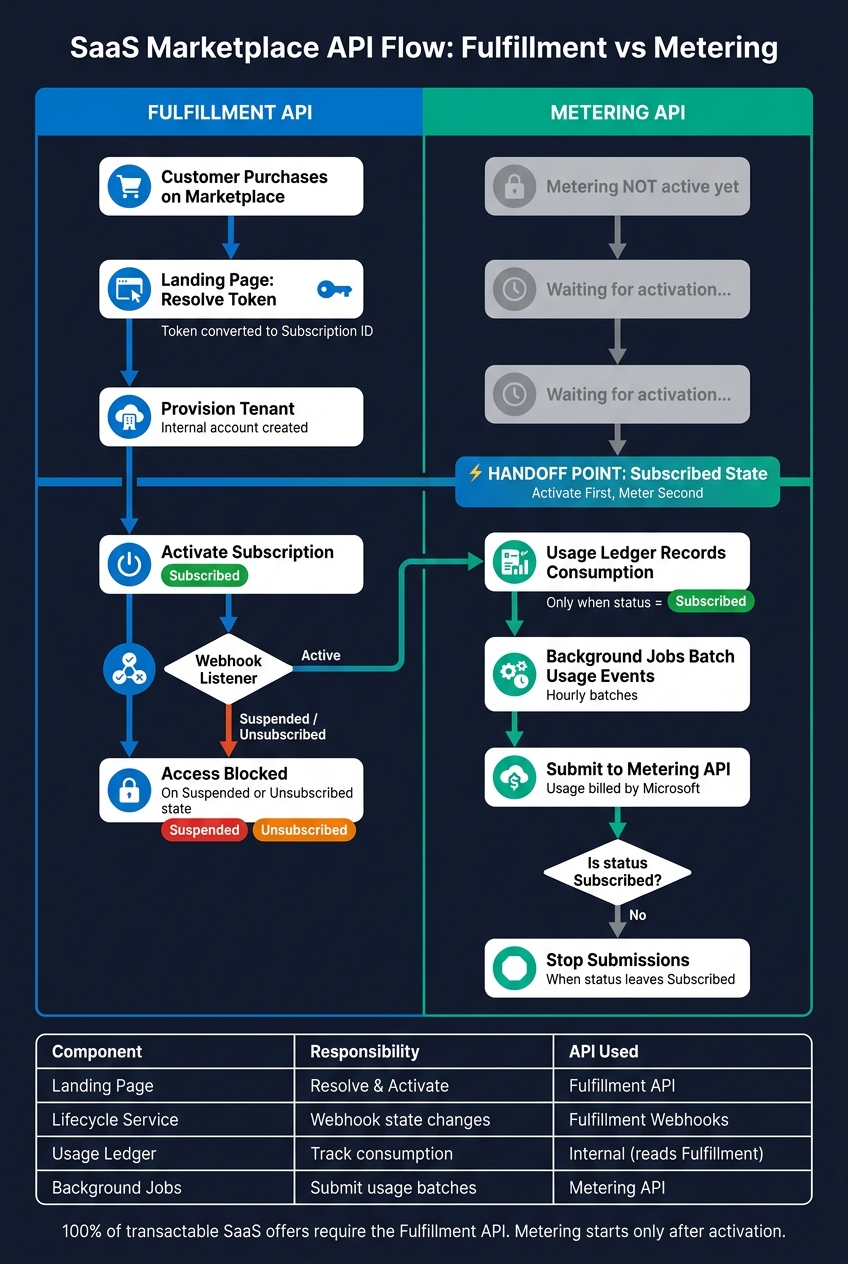
SaaS Marketplace API Flow: Fulfillment vs Metering
Reference Architecture for a Marketplace SaaS Product
This is the handoff in plain terms: Fulfillment turns access on. Metering logs what gets used.
Those two jobs should stay in separate layers. Each layer does one thing, then passes control to the next. That sounds simple, but in practice, this split keeps billing logic clean and cuts down on avoidable mistakes.
The flow starts on the landing page. That’s where the Marketplace token gets resolved into a subscription and activated through the Fulfillment API. After that, a subscription lifecycle service takes over. It handles Fulfillment webhooks for suspension and cancellation, then updates internal subscription state to match. Metering should not live in this layer.
Once the subscription reaches Subscribed, a usage ledger starts recording consumption. It should write only when the subscription is Subscribed. Before logging any usage, the ledger checks Fulfillment state. Then background jobs or Azure Functions batch those ledger entries and send them to the Metering API in hourly batches.
In day-to-day use, that split turns into separate services with a strict state gate.
| Component | Responsibility | API Interaction |
|---|---|---|
| Landing Page / Web App | Purchase activation, account linking, and initial entitlement | Fulfillment API (Resolve/Activate) |
| Subscription Lifecycle Service | Handles webhooks for state changes | Fulfillment API webhooks |
| Usage Ledger | Internal consumption tracking and subscription-state validation | Internal only (reads Fulfillment state) |
| Background Jobs / Azure Functions | Batch ledger entries and submit hourly usage batches | Metering API (Usage Submission) |
This is the working form of the handoff point. Most failures show up when a team crosses that line too early or too late.
Common Implementation Mistakes and Operational Risks
The most common mistake is sending usage events before the subscription is fully activated. When usage starts too early, those events can turn into billing disputes. Nobody wants to explain charges tied to a subscription that was not ready yet.
Another common problem is dimension misconfiguration in Partner Center. It’s less obvious, which makes it dangerous. If your code uses one dimension name and Partner Center uses another, usage submissions fail and billing stops. On top of that, the mismatch can be hard to trace because the problem often sits between app logic and billing setup.
For production AI delivery, correct billing logic alone isn’t enough. You also need auditability, so teams can track what happened, when it happened, and why.
Where Ryshe Fits in Production Delivery
For enterprise SaaS products in regulated industries - AEC, manufacturing, aerospace - Ryshe provides senior-led AI, data, and automation delivery on Azure, including secure entitlement flows and usage ledgers for Marketplace implementations. Its Quanta enterprise AI context gateway adds governance and observability, and a usage ledger with append-only audit records closes the loop between app consumption and Marketplace billing.
Conclusion: Fulfillment Governs Access, Metering Governs Charges
Fulfillment controls entitlement. Metering reports billable usage after activation. That line sets the launch rule: activate first, meter second.
If you skip Fulfillment, entitlement never gets checked. If you skip Metering, usage-based charges never get billed. In day-to-day operation, enforce that line with a simple state check before every usage event.
On the ops side, keep entitlement checks separate from usage reporting. Then tie them together with audit logs that link activation to usage. That’s what keeps billing accurate and easy to audit.
FAQs
Do I always need both APIs?
No. The Fulfillment API and Metering API play different roles in Microsoft Marketplace.
Use the Metering API only when your product has usage-based billing, like per-token charges for an AI workflow. If your SaaS product has only a fixed-rate subscription, the Fulfillment API is enough to handle the subscription lifecycle.
What happens if I send usage before activation?
If you send usage data before a subscription is activated, the system can’t verify your tenant or your authorization.
That creates a simple problem: usage metering and billing rely on an established ledger relationship. Until that relationship exists, the system can’t tie the usage to a valid account.
As a result, the request is usually rejected.
How should my app handle plan changes?
When a user switches plans, update your app’s internal state to match the new entitlement in Microsoft Marketplace. Run the change through the Fulfillment API to confirm the new subscription status, then adjust access so it lines up with the new features or limits.
If the plan change also affects resource usage, update your Metering API integration too. That way, usage is tracked against the right plan-based meters and billing stays accurate.