If your Azure webhook can be delivered more than once, you should assume it will be. The fix is simple in theory: use one stable key, claim it once in a durable store, and skip every repeat after that.
If I had to boil the article down, it comes to this:
- Azure services use at-least-once delivery, so duplicate events are normal
- Event IDs track the delivered event
- Idempotency keys track the business action behind it
- Azure Functions should make the first atomic claim before side effects
- API Management should validate and normalize inbound requests
- Logic Apps should handle workflow steps after the claim
- Service Bus should move messages, not decide whether work runs twice
- Cosmos DB or Azure SQL should store claimed keys for audit and replay control
- Dead-letter and replay flows should stay separate from normal duplicate checks
Here’s the part that matters most to you: a webhook can succeed, the 200 OK can get lost, and the sender can retry the same event. That single gap can create 2 writes from 1 business action. In AEC, manufacturing, and aerospace, that can mean duplicate RFIs, work orders, inspection records, or maintenance entries.
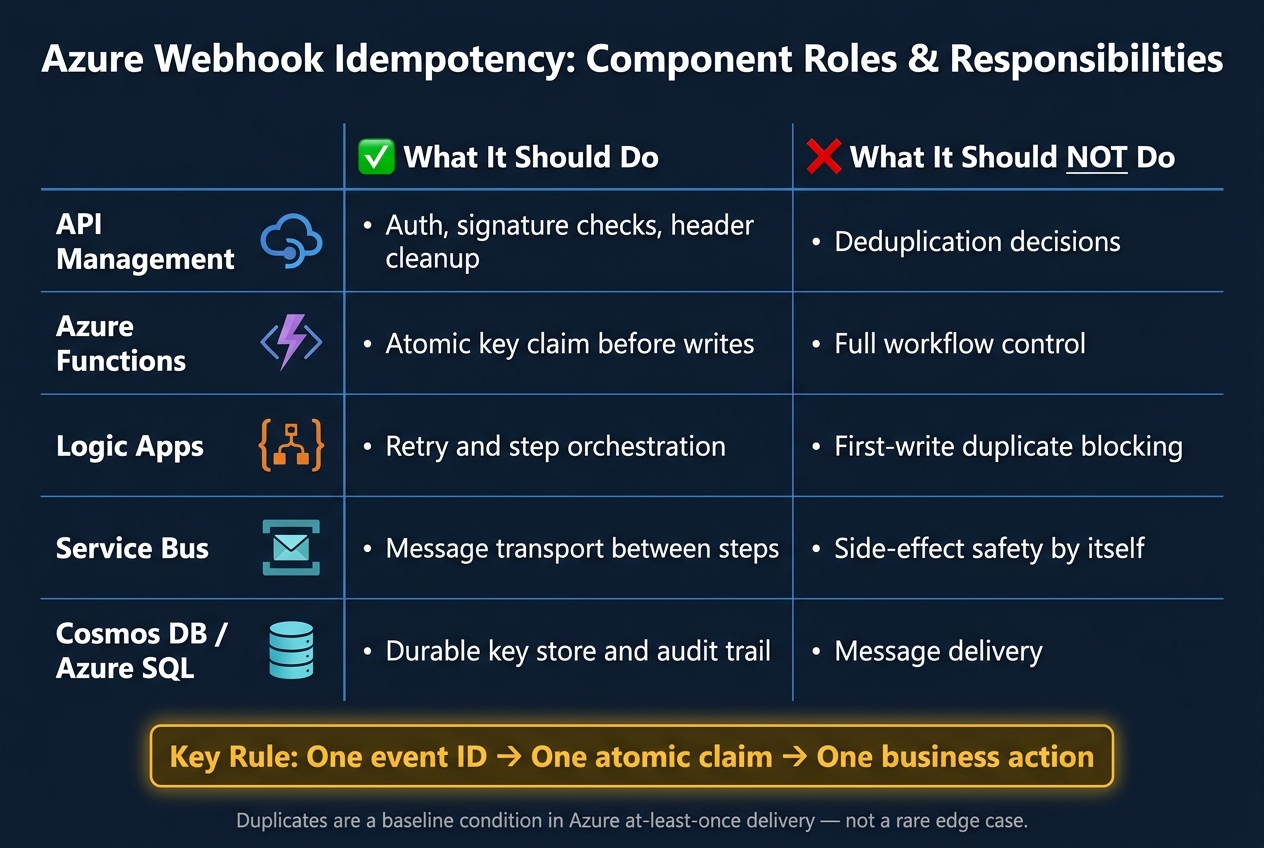
Azure Webhook Idempotency: Component Roles & Responsibilities
Does Webhook Idempotency Guarantee Reliable Event Handling?
Quick comparison
| Azure component | What I’d use it for | What it should not do |
|---|---|---|
| API Management | Auth, signature checks, header cleanup | Deduplication decisions |
| Azure Functions | Atomic key claim before writes | Full workflow control |
| Logic Apps | Retry and step orchestration | First-write duplicate blocking |
| Service Bus | Message transport | Side-effect safety by itself |
| Cosmos DB / Azure SQL | Durable key store and audit trail | Message delivery |
Bottom line: if you want one approval, one inventory move, or one maintenance update, your consumer has to treat duplicates as a baseline condition, not a rare bug.
How duplicate webhooks create problems in AEC, manufacturing, and aerospace
Duplicate events don’t just make logs messy. They create operational problems and compliance headaches that can be tough to spot until the damage has already spread.
That’s why Azure retry paths matter. The impact usually doesn’t show up in the webhook itself. It shows up later, inside the systems that act on that event.
AEC: repeated RFIs, submittals, and change-order actions
In AEC workflows, one webhook event often kicks off document routing, approvals, or follow-up tasks. If that same event lands twice, the downstream mess can grow fast.
A duplicate RFI submission, for example, can create two open items in a project management system. Each one may get routed to a different reviewer. From there, things drift out of sync: responses don’t match, records conflict, and the team has to untangle what should have been a single action.
It gets worse when systems rely on automation. Duplicate or inconsistent data can cause automated systems to fail to distinguish between a specification and a submittal, leading to incorrect RFI responses and professional liability risks [2].
The same issue shows up anywhere records drive actual work, approvals, or regulated documentation.
Manufacturing and aerospace: duplicate work orders, quality events, and maintenance records
In manufacturing and aerospace, duplicate work orders can trigger double inventory movements. A duplicate inspection record or maintenance entry can leave behind conflicting audit trails, which is exactly the kind of thing auditors notice.
For aerospace teams, that’s not a small paperwork issue. Those errors can turn into ITAR/CUI compliance breaches or AS9100 audit failures [1].
Azure failure paths that make duplicates a normal occurrence
In production Azure integrations, acknowledgment loss, retries, and concurrent execution races are part of normal system behavior. In plain English: duplicates are not some edge case you might deal with later.
They’re a baseline condition. So duplicate handling has to be built into every Azure webhook consumer from the start.
The next step is to claim each event once with a durable idempotency key.
Building idempotent consumers with event IDs, idempotency keys, and durable stores
The next step is to make that claim stick across retries and parallel runs. Check each webhook key before processing. If the key is already there, skip it. If not, claim it and process the event once.
That sounds simple. The tricky part is making the check hold up during retries, parallel runs, and partial failures. In Azure pipelines, that claim usually happens in Functions, Logic Apps, or Service Bus consumers.
Choosing the right deduplication key
Your deduplication key is the value that marks one event as different from another. Pick the wrong key and you can end up blocking valid events or letting duplicates slip through.
Start with the provider’s event ID. That’s usually the cleanest option when the sender guarantees that each ID appears only once. If no event ID exists, hash only stable fields. Leave out timestamps and other values that can change between retries. Otherwise, tiny payload changes can look like brand-new events and trigger false duplicates [3].
| Key Type | Best Fit | Tradeoff |
|---|---|---|
| Provider event ID | Direct system-to-system webhooks | Depends on the sender maintaining unique IDs [1] |
| Payload hash | Systems without a native event ID | Can produce false duplicates if mutable fields are included [3] |
Even the best key won’t help if consumers don’t store it first. Each consumer needs to write that key to a durable store before processing begins.
Selecting a storage layer for duplicate detection
Once you have a key, write it to a durable store that supports audit and governance. This store becomes the system of record for whether a webhook already created an RFI, work order, or maintenance entry.
Azure Cosmos DB works well for durable event records in serverless workflows [2]. Azure SQL Database is a better fit when you need SQL queries across operational data [2].
For aerospace and AEC workflows, this store also needs to support audit trails tied to liability and compliance [1][2].
| Store | Best Fit |
|---|---|
| Azure Cosmos DB | Durable event records in serverless workflows [2] |
| Azure SQL Database | Complex SQL queries across operational data [2] |
One more thing matters here: the store must support an atomic claim. If two duplicate arrivals hit at the same time, they can’t both pass the check.
Handling race conditions, TTL windows, and authorized replays
Race conditions are where idempotency plans often wobble. Two function instances can receive the same event at the same moment. Without an atomic claim, both may think they’re first. With an atomic claim, only one wins.
Set the retention window so it covers sender retries and audit needs, especially in aerospace and AEC workflows [1][2]. A short TTL might look fine on paper, but if it expires before the sender stops retrying, duplicates can sneak back in.
Approved replays are a different case. They are not the same as duplicates. Duplicate blocking stops accidental repeat processing. Incident replay is a recovery step after something went wrong. That means approved reprocessing should go through a separate replay path, not the normal deduplication flow. Use that path only for approved recovery after an incident.
Applying idempotency across API Management, Functions, Logic Apps, and Service Bus
No single Azure service handles deduplication end to end. Each one has a tight, specific job.
With the deduplication key and durable store in place, the goal is simple: let each service do ONE thing well.
| Component | Role | Limit |
|---|---|---|
| API Management | Authentication, signature validation, header normalization | Cannot write to a deduplication store or prevent race conditions |
| Azure Functions | Atomically claim the event key before side effects [2] | Cannot orchestrate multi-step workflows on its own |
| Logic Apps | Orchestrate retries after the event is claimed [2] | Cannot perform atomic deduplication writes on its own |
| Service Bus | Transport between steps | Cannot replace consumer-side idempotency for downstream side effects |
API Management and Azure Functions: validate, normalize, and claim the event once
API Management is the right place to stop bad events before they move any farther. It validates signatures, checks authentication, normalizes headers, and blocks anything that should not enter the pipeline [2].
After an event clears APIM, Azure Functions picks it up. This is where the consumer claims the event key exactly once. The function checks the deduplication store for that key. If the key is missing, the function writes it atomically and continues. If the key is already there, the function exits and does not trigger side effects [2].
That atomic write is the dividing line between “processed once” and “processed twice.” It’s the handoff point that keeps the rest of the flow clean.
From there, Logic Apps and Service Bus can move approved work through the workflow without sending the same event back through the same side effects.
Logic Apps and Service Bus: orchestrate retries without double-processing
In multi-step workflows - like RFI submittals or work orders - Logic Apps handles orchestration and retries after the event is claimed [2]. That matters because retries are normal. The trick is making sure a retry does not re-run work that already succeeded.
Service Bus handles message transport between steps, but it does not replace consumer-side idempotency for downstream side effects. Put plainly: Service Bus moves the message, and the consumer decides whether that message should act again.
Next, define replay controls so approved recovery does not look like a duplicate.
Governance, replay controls, and closing summary
Dead-letter queues, incident recovery, and replay safety
Once an event has been claimed, replay control shifts into a governance issue, not a delivery issue.
Keep failed events in a dead-letter queue or a dead-letter record. Reprocess them only through the original event ID. If that key is already present, skip the replay.
That rule sounds simple, but it depends on one thing: every decision needs to be logged.
Audit trails, reporting, and operational ownership
Log the event ID, source, decision, UTC timestamp, and downstream result. Application Insights and Cosmos DB work well for this setup. In regulated workflows, that log becomes the evidence trail for compliance reviews, incident investigations, and replay approvals.
RBAC decides who can approve a replay, and Entra ID SSO should control access to the deduplication store and DLQ management tools. That record also supports incident review, compliance checks, and replay approval.
Operations owns replay approval. Engineering owns deduplication logic.
Idempotency stops accidental duplicates. Governance keeps approved replays under control.
FAQs
How do I choose the right idempotency key?
Use a separate identifier for each logical operation so the server can spot and ignore duplicate requests. A common pattern is to use a base request ID plus a bit of metadata, like a chunk index.
For example, base:chunkIndex lets the system handle chunks one by one while still avoiding collisions from re-sent messages. If you can’t create a reliable base ID, return an empty key to skip deduplication for that request.
Where should duplicate checks happen in Azure?
Duplicate checks should happen at the entry point of message processing. In most setups, that means your application code or the adapter that handles the incoming webhook payload.
Use the event source’s unique identifier, such as a message ID, and compare it against a persisted, bounded store before processing or enqueuing the event.
That timing matters. If you wait until later in the flow, retries or replayed event streams can slip through and trigger the same action twice. By checking first, you stop duplicate responses and duplicate side effects before they start.
How should authorized replays be handled?
Handle authorized replays in a way that keeps the data but avoids stale, unprompted replies.
The goal of a replay is simple: recover messages after a disconnect. It is not there to trigger automated responses to old traffic.
Always store replayed messages so an operator can review them later. Then compare each message to the replay window:
- If the message falls inside the replay window, it can follow the normal auto-response flow.
- If the message is older than the replay window, record it, but do not auto-answer it.
Also move the watermark forward for all replayed messages, including stale ones. That stops the system from pulling the same old data again and again.