If an event is just a signal, I use Event Grid. If it starts work that must finish, I use Service Bus. That is the main choice.
Here’s the article in plain English:
- Event Grid is for fast fan-out
- Service Bus is for durable message handling
- Event Grid works well for notifications, triggers, and broadcast events
- Service Bus works well for orders, approvals, invoices, and other work items
- Event Grid retries for up to 24 hours and can dead-letter to storage
- Service Bus uses locks, retries, DLQs, duplicate detection, and sessions
- Event Grid does not guarantee order
- Service Bus can keep FIFO order per session
- Both support routing and fan-out, but they solve different problems
If you want the short version, it’s this:
- Use Event Grid for who needs to know
- Use Service Bus for what needs to get done
That matters in ERP, CRM, and document flows, where one event may need filtering, retries, failure handling, and sometimes ordered processing.
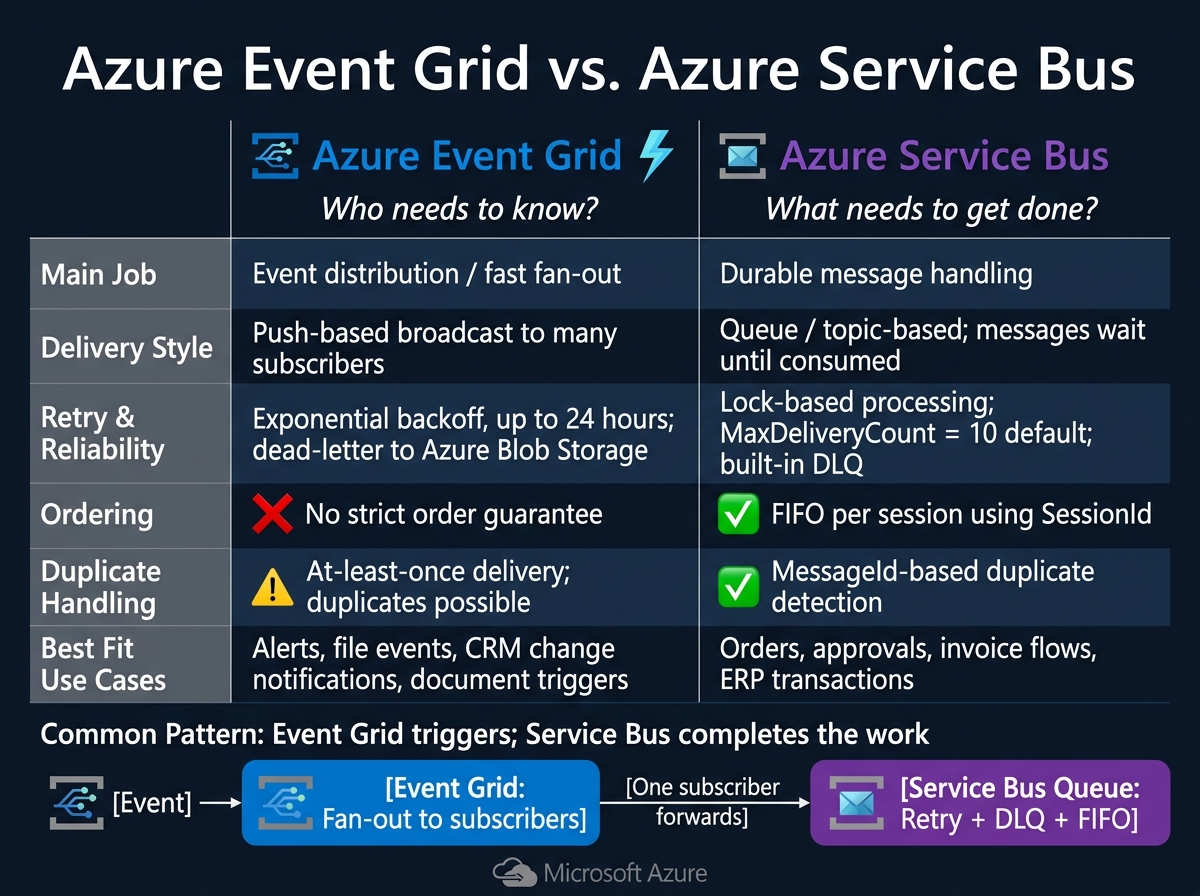
Azure Event Grid vs Service Bus: When to Use Which
Event-Driven Architecture - Service Bus vs Event Grid
Quick Comparison
| Criteria | Azure Event Grid | Azure Service Bus |
|---|---|---|
| Main job | Event distribution | Durable messaging |
| Delivery style | Push-based by default | Queue/topic-based |
| Fan-out | Sends one event to many subscribers | Topics copy one message to many subscriptions |
| Filtering | Subject and payload filters | SQL-like subscription rules |
| Retry behavior | Exponential backoff, up to 24 hours by default | Retry through message re-delivery |
| Failure handling | Dead-letter to storage | Built-in DLQ |
| Ordering | No strict order guarantee | FIFO with sessions |
| Duplicate handling | At-least-once delivery; duplicates can happen | Duplicate detection supported |
| Best fit | Alerts, file events, trigger signals | Orders, approvals, invoice flows |
I see these two services as complements, not rivals. One tells systems something happened. The other makes sure work waits until a consumer is ready.
1. Azure Event Grid
Azure Event Grid is a managed publish-subscribe routing service that sends events to many subscribers. If your trigger routing needs fast fan-out, Event Grid is the lightweight pick.
Delivery and Fan-Out
Event Grid uses push delivery by default. That means it calls endpoints like Azure Functions, Logic Apps, webhooks, and Service Bus as soon as an event comes in.[12][4] In plain English, it reacts fast and sends the same event wherever it needs to go.
That makes it a good match for event-driven ERP, CRM, and document workflows where one event needs to notify many systems at once. Pull delivery through Event Grid namespaces gives consumers a way to read events on their own schedule, which works better when downstream systems have uneven capacity.[4][12] A single event can fan out to many subscribers, and each subscriber can have its own rule and destination.[12]
Filtering and Routing
Event Grid can filter events before they’re delivered, so each subscriber gets only the events it needs.[14][15] Basic filters match fields like event type and subject. Advanced filters go deeper and check fields inside the event’s data payload with operators such as StringContains, NumberGreaterThan, and BoolEquals.[8][10]
You can apply up to 25 advanced filters per subscription, and they use AND logic.[9][10] That makes it easy to do things like route only purchase orders above a set USD amount to an ERP approval workflow, while sending the rest through a standard processing path. Since the filtering happens on the server side, non-matching events are dropped before delivery, which cuts downstream load and cost.[9][10]
Reliability and Failure Handling
Event Grid delivers events at least once, so duplicates can happen.[3][6] That’s an important detail. If a handler can’t safely process the same event twice, you’ll want idempotency in place.
When delivery fails, Event Grid retries with exponential backoff for up to 24 hours by default.[3][1] If it still can’t deliver the event, the event goes to a dead-letter destination, usually Azure Blob Storage, for inspection and reprocessing.[13][16] For ERP and CRM integrations, it’s smart to set a dead-letter endpoint on each subscription when reprocessing matters.
Ordering and Workflow Fit
Event Grid does not guarantee delivery order.[17][18][19] Under load, or during retries, events may show up out of sequence. So downstream handlers shouldn’t trust arrival order. They should use sequence numbers, timestamps, or version fields in the event payload instead.[9]
This is where Event Grid’s sweet spot becomes clear. It works well when speed matters more than strict sequencing - for example, document classification or compliance tagging. If a route needs durable processing or strict sequencing, move that workflow to Service Bus.
2. Azure Service Bus
When an event needs to turn into durable work, Azure Service Bus steps in. It’s a fully managed enterprise message broker built for workflows that can’t afford to drop messages. Service Bus keeps messages until a consumer is ready to handle them, which makes it a better choice when reliability and control matter more than raw speed. That’s why it fits business processes, not just simple notifications.
Delivery and Fan-Out
Service Bus handles fan-out with topics and subscriptions. A producer can publish one message to a topic, and each subscription gets its own copy. So a single OrderPlaced message can go to ERP, CRM, and analytics at the same time, with each subscriber processing it on its own path.[26][28][32]
Filtering and Routing
Each subscription can use SQL-like filters based on message properties, so only matching messages land in that subscription. For example, OrderPlaced messages can be routed to high-priority-orders, international-orders, and all-orders, with each subscription using its own filter rules.
The nice part is that the routing logic lives inside the broker. Producers don’t need to know which systems are listening, and they don’t need code changes every time a new consumer is added.[21][27][28][29][30]
Reliability and Failure Handling
Service Bus locks a message while a consumer processes it, then the consumer either completes it or abandons it. If processing fails, the message becomes available again for another try. Once a message passes its MaxDeliveryCount - 10 by default - Service Bus automatically moves it to a dead-letter queue (DLQ), where support teams can inspect it or replay it later.[23]
That means failed ERP and CRM messages stay visible in the DLQ instead of disappearing into the main flow. Service Bus also supports duplicate detection, which helps avoid processing the same business event twice when send results are unclear. It also supports transactions.[31][34]
Ordering and Workflow Fit
After routing and retries, the next issue is sequence. By default, Service Bus does not guarantee strict ordering across all messages. If you need strict ordering, you can enable sessions and assign a SessionId, such as an order ID or customer ID. That keeps related messages in sequence and handled by one consumer.[23][24]
This works well for things like document approvals and invoice processing, where the order of steps matters for each order, invoice, or approval record.[22][24] One catch: sessions must be enabled when the queue is created. You can’t turn them on later.[33]
Head-to-Head Comparison by Integration Need
The choice comes down to one thing: what has to happen after the message is delivered.
Choose Event Grid when you need fast notifications sent to many endpoints at the same time. Choose Service Bus when the work must stick around, wait its turn, survive retries, and be processed later if needed.
Delivery and Fan-Out
Event Grid sends one event to many subscribers at once. Service Bus can also fan out through topic subscriptions, but each subscription gets its own copy to process on its own path.[19][36][38]
Use the table below to match the integration need to the right service.
| Criterion | Azure Event Grid | Azure Service Bus |
|---|---|---|
| Delivery model | Push-based broadcast | Durable queue / topic subscription |
| Fan-out style | All subscribers notified at once | Each subscription receives its own copy |
| Best for | ERP status broadcasts, CRM change alerts | Fulfillment steps, invoice processing |
| Consumer downtime behavior | Limited retry window | Messages remain available until processed |
Filtering decides who gets the message next.
Filtering and Routing
Use Event Grid for simple subject-based or field-based routing. It works well when the rules are straightforward.
Use Service Bus when routing depends on business logic, like approval level, region, or order type.[11][37][38][2] That’s the big difference: Event Grid is great for who should hear this, while Service Bus is better for who should handle this, and under what rule.
Reliability and Failure Handling
Event Grid retries failed deliveries for up to 24 hours. Service Bus goes much further with lock-based processing, built-in dead-letter queues, configurable TTL, and duplicate detection.[19][20][25][38]
| Criterion | Azure Event Grid | Azure Service Bus |
|---|---|---|
| Retry window | Limited retry window | Configurable per queue/topic |
| Dead-letter handling | Configurable storage-based dead-lettering | Built-in DLQ |
| Duplicate detection | No built-in duplicate detection | MessageId-based duplicate detection |
| Processing lock | None | Message locked during processing |
| Best for | CRM sync, status notifications | ERP transactions, document approvals |
This is where the gap becomes clear. If a subscriber is down for too long, Event Grid may move on. Service Bus is built for jobs that can’t just disappear because a system was busy or offline.
Ordering and Workflow Fit
Event Grid does not guarantee delivery order. Service Bus sessions preserve FIFO within a shared SessionId, which makes them a strong fit for order, invoice, and approval workflows.[19][35][38][2]
If your workflow depends on controlled approval steps or order status changes, sessions make Service Bus the safer pick.
Pros and Cons
Event Grid is built for fast fan-out. Service Bus is built for durable workflow processing. So the tradeoff is pretty simple: use broadcast when systems only need awareness, and use a queue when they need to complete work.
Azure Event Grid sends events to many subscribers at once with low latency, and its per-event pricing can stay cost-efficient at scale. The catch is simple: it isn’t built for strict sequencing or durable work. That makes it a good fit for CRM alerts and document triggers, but a poor fit for ERP transactions or approval chains.
Azure Service Bus is the better pick when a message must stay available until processing is done. It offers durable storage and recovery controls, but it also brings more design overhead. That’s why it’s a stronger match for ERP orders, invoice processing, and document approvals.
| Dimension | Azure Event Grid | Azure Service Bus |
|---|---|---|
| Fan-out and latency | ✅ Low-latency push to many subscribers | ⚠️ Fan-out via topics and subscriptions; more configuration required |
| Durability and reliability | ⚠️ Short-lived event delivery; no durable message storage | ✅ Messages persist until successfully processed |
| Ordering | ❌ Not guaranteed | ✅ Per-session FIFO using SessionId |
| Failure handling | ⚠️ Retries and dead-lettering to storage | ✅ Built-in recovery controls |
| Operational complexity | ✅ Low; simple subscription model | ⚠️ Higher; requires deliberate design and ongoing configuration |
| Pricing model | ✅ Per-event; cost-efficient at scale | ⚠️ Higher baseline, especially on Premium tier |
At the end of the day, the decision comes down to one thing: is the trigger just a signal, or is it the start of work that must be completed?
Conclusion
The choice between Azure Event Grid and Azure Service Bus comes down to a simple call: does the event just need to notify ERP, CRM, or document systems, or does it need to kick off durable work?
Use Event Grid for fast fan-out across many subscribers. Use Service Bus when you need reliable, ordered processing and stronger failure handling.
A common pattern uses both. Event Grid sends the event to everyone who needs to know, and one subscriber then forwards a durable command to a Service Bus queue. From there, the message gets retry logic, dead-lettering, and FIFO ordering.[4][5][7] Event Grid answers who needs to know; Service Bus answers what needs to get done.
For AEC, manufacturing, and aerospace teams, Ryshe designs governed event and queue architectures for ERP, PLM, MES, and document automation. In plain terms, event schemas, queue structure, and trigger points are planned for governance from day one.
FAQs
Can I use Event Grid and Service Bus together?
Yes - you can use Azure Event Grid and Azure Service Bus together in an event-driven architecture.
Here’s the simple split:
- Event Grid handles event routing and reacts to system changes.
- Service Bus handles reliable messaging for downstream processing.
When you route events from Event Grid to a Service Bus queue or topic, you add a buffer between event intake and processing. That helps keep critical workflows resilient and scalable.
How do I choose between a signal and durable work?
Use a signal for lightweight, short-lived notifications or simple triggers when fire-and-forget is enough.
In plain English: send it, move on, and don’t expect the system to track progress or recover the task after a failure. That works well when you don’t need state, confirmation, or follow-up handling.
Choose durable work when you need reliability and more control. That includes state management, retries, ordering, failure handling, and long-running processes.
This is the better fit for systems like ERP, CRM, or document workflows, where the work can’t just disappear if something goes wrong.
What should I do if events arrive out of order?
The available sources do not describe any specific technical mechanism for handling out-of-order events in Azure Event Grid or Azure Service Bus.
Put simply: there’s no source-backed detail here on how those services are set up or tuned for event ordering.
Ryshe’s documented services focus on areas like:
- AI delivery
- Data foundations
- Workflow automation
- Data platform architecture
- Document intelligence
- Enterprise AI hub deployments
What’s missing is just as important: the sources do not cover the configuration of these Azure messaging services.