If you can’t trace a part, lot, or serial fast, recalls get bigger, root-cause work takes longer, and costs climb fast. In 2025, U.S. recalls across five industries reached 3,295 events, and affected units climbed to 858 million, up 26% year over year. Direct recall cost can land between $10 million and $50 million per event, with some automotive cases going past $100 million.
I’d sum up the article like this: track and trace AI links machine events, MES records, and ERP data into one searchable product history. That history should connect lots, batches, serial numbers, and work orders so I can answer basic but high-stakes questions fast: What went into this unit? Which machine touched it? Which customers got affected product?
Here’s the short version:
- Tracking tells me where something is now.
- Traceability tells me where it came from and where it went.
- Genealogy shows the item’s history across material, process steps, inspections, rework, and shipment.
- AI helps most when data is tied together at the right level: lot, batch, serial, and work order.
- Azure’s role is to move plant-floor events into a searchable record using tools like IoT Edge, IoT Hub, Event Hubs, Stream Analytics, Data Lake, and Cosmos DB.
- ERP and MES flow matters: orders and BOMs move down; completions, quality events, and material use move back up.
- Rollout works best when I start with one high-risk process, clean up IDs first, and track three outcomes: genealogy completeness, containment time, and manual investigation hours.
A few points stand out. Serial-level trace is most useful for aerospace, automotive, medical devices, and high-value electronics. Lot and batch trace help narrow recall scope. Work order data adds WIP status and exception history. And if lot or serial consumption is missed, the trace record breaks.
The article also makes the timing rules plain. It suggests sending equipment state changes within 5 minutes, production and quality updates within 30 minutes, and lot or serial consumption within 1 hour. For safety-critical products, it targets 95%+ genealogy completeness and says teams can cut recall scope by 70% to 90% when the data model and controls are in place.
If I had to put the whole piece into one sentence, it would be this: AI-based traceability is less about dashboards and more about building a clean, connected event history that lets plants contain problems fast and limit cost.
Core Traceability Models: Lot, Batch, Serial, and Work Order Visibility
Most plants don’t rely on just one traceability model. They use a mix. The trick is simple in theory and hard in practice: use the right model at the right step, then connect every event into one usable record.
The four models below show what that looks like on the shop floor.
Lot and Batch Traceability for Material Control and Recall Scope
A lot is a received or produced quantity. A batch is a defined production run. On the plant floor, a supplier lot often feeds a WIP batch, which then feeds a subassembly or finished good.
What matters day to day is the upstream-downstream link. When a lot is consumed into a batch, that event needs to be recorded. If that record is complete, teams can trace forward from a suspect lot to every affected shipment, or trace backward from a field failure to every upstream input. If the record has gaps, recall decisions get expensive fast.
AI helps in both directions. A genealogy graph lets AI trace impact in seconds instead of forcing teams into manual spreadsheet work. Anomaly detection can spot broken chains such as negative inventory, overlapping batches, or missing consumption records before they turn into compliance issues. And when a nonconformance is confirmed, AI can rank affected inventory by risk using process parameter deviations, rework history, and machine alarms. That makes a targeted recall possible, instead of pulling a much larger group than needed.
Serial Traceability for Per-Unit Quality, Warranty, and Compliance
Serial traceability gives each unit its own identifier and keeps a time-stamped record of everything that happened to it. That includes process parameters, machine states, inspection results, rework actions, sub-component lot and serial numbers, and shipment details.
This level of detail matters most in aerospace, automotive, medical devices, and high-value electronics. In those settings, regulations and warranty exposure require unit-specific documentation.
The hard part is capturing each serial at line speed and doing it cleanly. That’s where AI makes a big difference on the shop floor. Vision-based systems with AI-enhanced OCR can read serials in real time without slowing production. They can also recover partially damaged or low-contrast markings that older scanners miss and flag missing or misplaced labels on the spot. Manual data entry in mid-market manufacturing carries an average error rate of 12% [1]. Vision capture cuts that sharply.
Once the serial record is clean, AI can go further. It can link final defects or field failures back to specific process steps, machines, or material lots by using the full unit history as input.
Work Order Visibility for WIP Status and Execution Control
Work orders connect what ERP planned with what the shop floor is doing right now. A full work order record includes the routing sequence, required machines and work centers, planned and actual material consumption by lot or batch, labor and shift assignments, WIP status at each operation, and exception events such as downtime, quality holds, scrap, and rework loops.
When work order data is combined with machine signals and MES events, AI has enough context to spot jobs that may slip before they actually do. Models trained on past data can score active orders against expected completion time versus plan, flag abnormal cycle times or repeated machine alarms, and suggest actions such as resequencing, labor reallocation, or material expediting based on patterns seen in earlier interventions.
Together, these models define the event data that must flow into the Azure architecture described next.
| Traceability Model | Primary Data Captured | Typical Use Case |
|---|---|---|
| Lot / Batch | Supplier material, batch characteristics, expiration dates, upstream-downstream links | Material control, recall scope limitation |
| Serial | Unique unit ID, per-unit sensor data, inspection results, sub-component genealogy | High-value components, warranty, compliance |
| Work Order | Labor, routing steps, material consumption, WIP status, exception events | Execution control, production scheduling |
These records only help if shop-floor events are captured the same way every time and linked into one data model. The next section shows how Azure ingests, links, and governs those events across systems.
Azure Architecture for Track & Trace AI
A production-ready Azure traceability setup is a group of services connected by clear data contracts. The aim is simple: move shop-floor events into a trusted, searchable traceability record without disrupting current controls or ripping out the MES and ERP systems already running the plant.
From Machine Data to Traceability Records: Edge and Azure Ingestion
This architecture starts at the machine and ends in a traceability record. Most U.S. plants run a mixed set of controls - Siemens, Rockwell, Fanuc, and others - and each one tends to speak a different protocol. Azure IoT Edge, running on an industrial PC or gateway, normalizes PLC signals through OPC UA and sends read-only telemetry to Azure IoT Hub.
After events hit Azure, Azure IoT Hub or Azure Event Hubs handle high-volume ingestion. Azure Stream Analytics then cleans up and aligns the stream by converting units, tagging events with work order and operation codes, and putting timestamps in sequence. Sequence events with device and ingestion timestamps before writing to the traceability store.
After normalization, those events can be tied back to orders, BOMs, and work instructions inside the traceability model.
Data Model, Genealogy Graph, and MES or ERP Integration
Normalized events land in two places:
- Azure Data Lake Storage Gen2 for history
- Azure Cosmos DB (Gremlin API) for the live genealogy graph
The graph maps entities - raw material lots, WIP items, finished goods serials, pallets, and shipments - as nodes, with transformation or consumption events as edges. That setup makes fast impact analysis, root-cause tracing, and affected-shipment searches much easier.
MES and ERP integration runs in both directions through Azure Data Factory, Azure Service Bus, and Logic Apps. ERP sends planned orders, BOMs, and routings down to execution systems. MES sends execution details back up. Clear data contracts - JSON schemas, shared ID conventions, and consistent units of measure - help keep records linked across all three systems.
That same model also supports the business systems flow covered in the next section.
AI, Governance, and Observability in an Enterprise Setup
Governance is what keeps each traceability record auditable from the raw signal all the way to the reported quality decision. Microsoft Purview tracks data lineage from raw ingestion through transformation pipelines to analytical outputs. That matters when traceability records need to stand up in an FDA or ISO 9001 audit.
For AI use cases, teams can use Azure Machine Learning or Databricks for anomaly detection, and Azure Cognitive Search with Azure OpenAI for natural-language access to genealogy and quality records. Azure AI Anomaly Detector can flag correlated sensor anomalies across equipment streams. Risk-scoring models blend supplier history, machine health, and process conditions to flag suspect lots, batches, or serials. Azure Monitor and Power BI track ingestion lag, write failures, and inference latency.
Three common patterns are shown below.
| Architecture Pattern | Data Latency | Implementation Complexity | Traceability Granularity | Best Fit |
|---|---|---|---|---|
| Edge to Azure to ERP | Low to medium | Moderate | High (machine-level, per-serial) | Mid-sized and large plants wanting a cloud-centric stack without replacing MES |
| Unified Namespace to Azure Services | Very low (in-plant); low to medium (Azure) | Higher (namespace design + governance) | Very high (depends on namespace quality) | Large, multi-line plants standardizing across many sites |
| MES-as-Hub with Selective IoT | Depends on MES (near-real-time to batch) | Lower (fewer controls changes) | Moderate (lot/batch; limited serial) | Mid-sized plants with robust MES and limited IT resources |
Most plants start with Edge to Azure to ERP or MES-as-Hub with Selective IoT. As they grow across lines and sites, many move toward a unified namespace. The next section shows how those Azure services connect with ERP and MES in both directions.
Data Flow from Shop Floor to ERP
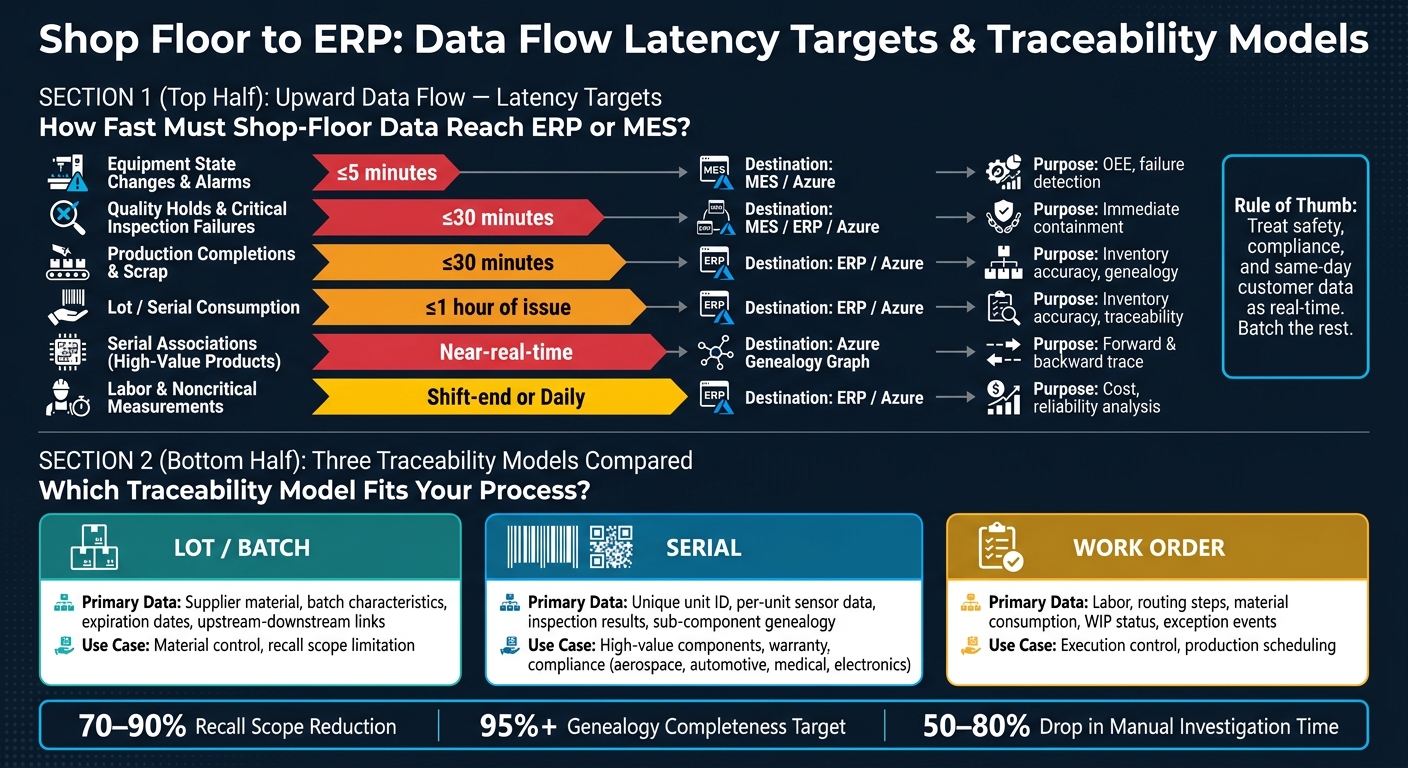
Track & Trace AI: Data Latency Targets & Traceability Models for Manufacturing
Traceability lives or dies on two data flows: instructions moving down from ERP, and production data moving back up. If either side breaks, the genealogy record gets holes in it. That shared data contract is what ties the whole record together.
Downward Flow: Orders, BOMs, Routings, and Traceability Requirements
Before a job is released, ERP needs to send the work order ID, BOM revision, routing, and traceability rules. Use one ID scheme across ERP, MES, edge, and Azure so every event maps to the same record.
Timing matters. Release orders to MES within 15 minutes, and send any BOM or routing change before production begins [5]. Traceability rules should go out as machine-readable configuration objects, so MES and Azure can enforce what needs to be captured in near-real-time and what can wait for later summarization.
Once the order is live, those rules drive the return flow from the shop floor.
Upward Flow: Production Actuals, Consumption, Quality, and Equipment Events
Every completion, scrap event, lot consumption, serial link, inspection result, hold, and machine-state change needs to flow back to MES, ERP, or Azure. Miss even one, and you create a gap that breaks both forward trace and backward trace.
Freshness targets matter here too. Equipment status changes should reach ERP or MES within 5 minutes. Production reports and critical quality results should post within 30 minutes. Lot and serial consumption should be posted within 1 hour of issue [4]. Labor records and noncritical measurement data can batch at shift end or on a daily schedule without hurting traceability. A simple rule works well here: treat safety, compliance, and same-day customer data as real-time, and batch the rest.
| Upward Data Type | Target Latency | Primary Destination | Traceability Purpose |
|---|---|---|---|
| Equipment state changes, alarms | ≤5 minutes | MES / Azure | OEE, common-cause failure detection |
| Quality holds, critical inspection failures | ≤30 minutes | MES / ERP / Azure | Immediate containment, recall scope |
| Production completions, scrap | ≤30 minutes | ERP / Azure | Inventory accuracy, genealogy |
| Lot/serial consumption | ≤1 hour of issue | ERP / Azure | Inventory accuracy, traceability |
| Serial associations for high-value products | Near-real-time | Azure genealogy graph | Forward and backward trace |
| Labor, noncritical measurements | Shift-end or daily | ERP / Azure | Cost, reliability analysis |
Backflushing may keep inventory counts in line, but it wipes out lot-level genealogy. Use point-of-consumption lot scanning instead.
This minimum data set sets the floor for the rollout steps that come next.
Rollout Plan for Mid-Sized and Large Plants
Next: choose one pilot, roll it out in phases, and set governance early. Do that, and rollout becomes a sequencing issue instead of a tech issue.
Start with One Traceability-Critical Process and a Minimum Viable Data Model
Start small. Pick one line, one product family, or one recall-risk workflow, not all three at once. The best pilot usually sits in a safety-critical, regulated, or high-warranty area with stable routing, clean ERP master data, and a plant owner who wants to make it work. Then match the traceability model to the process: lot, batch, serial, or work order. Pilot that scope first.
Use the first one to two weeks to define the exact questions the system must answer. For example:
Which customers received parts from this raw material lot? Which serials passed through this machine during this shift?
Those questions shape the minimum viable data model: the smallest set of entities, identifiers, and events needed to rebuild genealogy for that scope. Before the pilot begins, clean up IDs. Fix duplicate lot formats, reused serial numbers, and mismatched work order IDs across ERP and MES before you instrument anything.
A Tier 2 aerospace manufacturer connected 7 disconnected systems, including Epicor ERP and Hexagon MES, and spent 16 weeks building the data foundation. The team also resolved 47 conflicting term definitions before training a single AI model. That work paid off. It helped a predictive quality model reach production within 60 days of go-live and contributed to a $420,000 annual scrap reduction [2].
Set three go-live metrics from the start:
- genealogy completeness
- containment time
- manual investigation hours
The point is simple: check whether the system shrinks containment time and speeds up root-cause analysis. For safety-critical products, aim for 95%+ genealogy completeness, containment in minutes or hours, and a 50% to 80% drop in manual investigation time. Run mock recalls early in the pilot so the system gets tested under a real-world scenario, not just on paper.
Once the pilot scope is locked, governance becomes the main limit on scale.
Scale Across Plants, Lines, and Use Cases with Governance Built In
Before you move to the next plant, turn the pilot into a reusable template. That means a documented data model, event catalog, identifier standards, integration patterns, and operator workflows. If the first plant figures things out by trial and error, the second plant shouldn’t have to repeat that pain.
Typical multi-site rollouts take 12 to 24+ months. A common pattern looks like this: 3 to 7 months for pilot proof, 7 to 12 months for the first plant, and scaling from month 12 onward [7].
Set RBAC, plant data ownership, and exception handling rules before expanding past the pilot. Also track false positives, overrides, and time to detection. If those metrics drift, retraining should kick in. Use Ryshe’s Quanta to control AI access, log prompts and outputs, and keep an immutable audit trail.
After the template settles down, the same model can move to the next line or plant.
Key Takeaways for Production-Grade Traceability
Once the data model and integrations are in place, execution comes down to discipline. Production-grade traceability starts with clean IDs and one ERP-MES data contract. Orders move down. Actuals move back up. Governance starts on day one. Teams that follow this approach cut containment from days to hours and reduce recall scope by 70% to 90% [3] [6].
FAQs
When do plants need serial-level traceability?
Plants need serial-level traceability when they need unit-by-unit visibility for quality checks, compliance, or forensic work.
It lets teams pinpoint the exact items affected by defects, machine drift, or material problems by tying each serial number to its production context. That makes root-cause tracing faster, containment more precise, recalls narrower, and audit trails stronger.
What data gaps break product genealogy?
Product genealogy starts to fall apart when data lives in separate silos that don’t talk to each other. Instead of one clear view of the production lifecycle, teams end up with a patchwork of partial records.
A lot of those gaps come from ERP, MES, SCADA, and quality systems that use incompatible protocols, data models, and timestamps. One system logs an event one way, another stores it in a different format, and suddenly the records don’t line up.
The problem gets worse when master data isn’t consistent. Different part names, duplicate vendor lists, and mismatched records make it hard to connect data correctly. Then teams are left piecing things together by hand, often leaning on tribal knowledge to sort out conflicting counts or scrap rates.
How should a plant start a traceability AI rollout?
Start with a solid data foundation, not the AI model. Spend the first three weeks reviewing production, quality, and supply chain systems. The goal is simple: map the integration points and document the tribal knowledge people use every day but rarely write down.
Next, build a unified data platform that brings ERP and MES data into one place. Don’t try to pull in everything at once. Start with two or three high-value sources, focus on one key question, and create simple dashboards around it.
Bring production supervisors in early. They know where the numbers come from, where the gaps are, and which reports people trust. If the data doesn’t feel right to them, the whole effort can stall fast.