If your workflow runs for days or weeks, a one-shot script is not enough. I’d boil this article down to one point: Azure gives you two main ways to keep long-running work from losing its place - Durable Functions for code-first flows and Logic Apps Standard for visual, connector-heavy flows.
Here’s the short version:
- I use stateful orchestration when a process must pause, retry, wait for people, or recover after a failure.
- I keep workflow state separate from business data. The workflow tracks step history, timers, inputs/outputs, and event waits. Systems like ERP, PLM, and DMS still hold the business records.
- I pick Durable Functions when I want code control, replay-based recovery, and custom logic.
- I pick Logic Apps Standard when I want a visual flow, built-in connectors, and portal run history.
- I rely on retries for short outages, timers for deadlines, and external events for approvals or callbacks.
- I treat idempotency, audit logs, RBAC, retention, and instance control as must-haves, not extras.
A few hard facts stand out:
- Logic Apps Standard stateful runs can last up to 90 days by default.
- Azure Logic Apps includes 800+ connectors, which matters when many systems are involved.
- A common retry starting point in the article is 5 seconds, 1.5x backoff, and 5 attempts.
- A simple SLA example is a 48-hour approval timer using
PT48H.
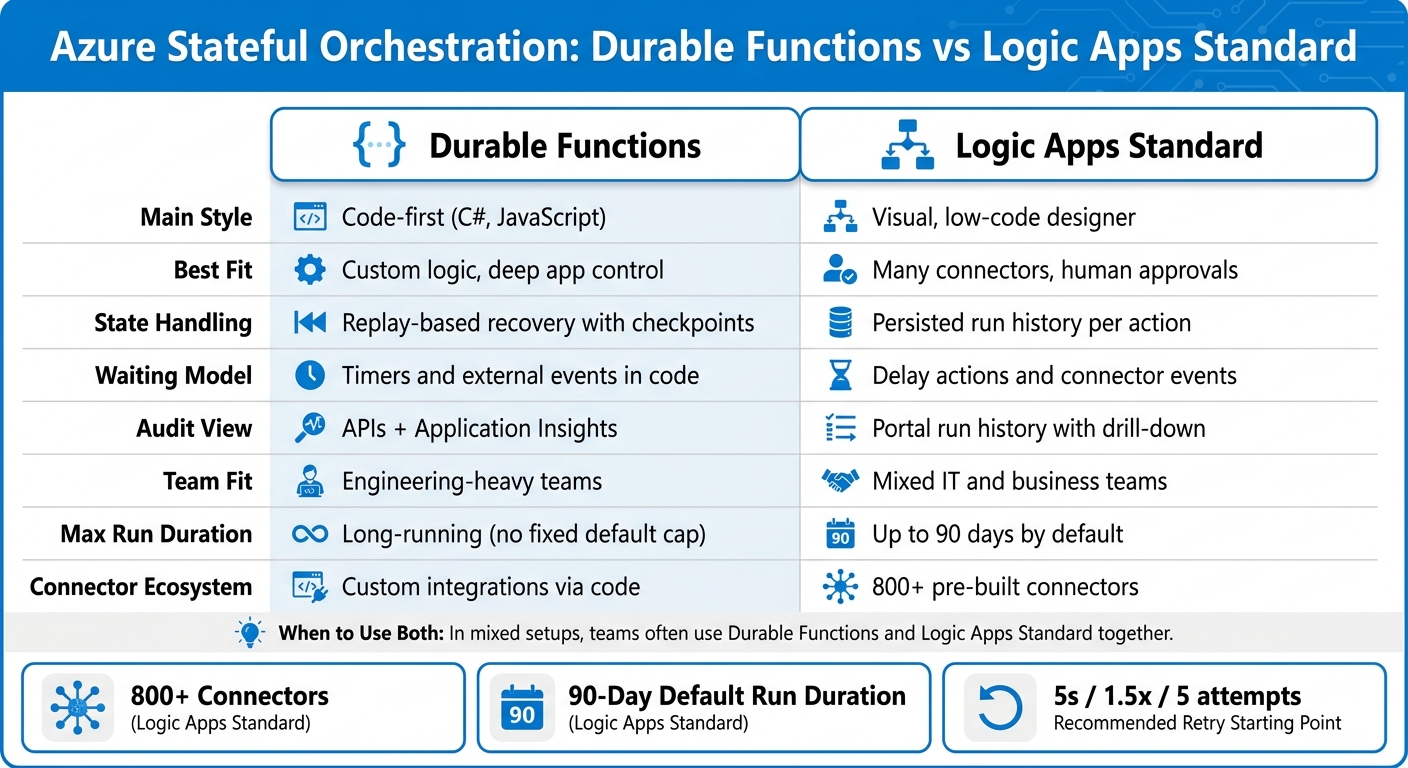
Durable Functions vs Logic Apps Standard: Azure Stateful Orchestration Compared
Azure Durable Functions for Developers • Jonah Andersson • GOTO 2024
Quick comparison
| Area | Durable Functions | Logic Apps Standard |
|---|---|---|
| Main style | Code-first | Visual, low-code |
| Best fit | Custom logic, deep app control | Many connectors, human approvals |
| State handling | Replay + checkpoints | Stored run history |
| Waiting model | Timers and external events in code | Delay actions and connector events |
| Audit view | APIs + Application Insights | Portal run history |
| Team fit | Engineering-heavy teams | Mixed IT/business teams |
My takeaway: if you need a workflow that can stop, wait, restart, and still know exactly where it is, Azure’s stateful tools are built for that job. The rest of the article explains how those pieces work together in AEC, manufacturing, and aerospace settings.
Azure Services for Stateful Orchestration
Azure has two main services for stateful orchestration in enterprise workflows: Durable Functions and Logic Apps Standard.
Durable Functions: Code-First Orchestration with Replay and Checkpoints
If your workflow is code-heavy, Durable Functions keeps the orchestration logic inside the app. It extends Azure Functions and lets engineering teams build stateful workflows fully in code with languages like C# or JavaScript.
The runtime stores workflow history in durable storage. When the workflow resumes, the orchestrator replays that history and picks up from the last checkpoint instead of running finished steps again. That means the workflow can survive restarts and deployments without any custom persistence code.
Here’s the basic setup:
- Orchestrators define the workflow
- Activities handle external work
- Durable entities store shared state
For engineering-driven teams in manufacturing or aerospace that want full programmatic control, unit testing, and clean CI/CD integration, Durable Functions is a strong fit.
Logic Apps Standard: Visual Designer Stateful Workflows with Run History
If your workflow depends on lots of connectors, Logic Apps Standard moves orchestration into a visual designer. Teams build workflows visually with more than 800 pre-built connectors for SaaS apps, on-premises systems, and Azure services [2]. Each run stores trigger and action data, which lets the workflow resume and also creates an audit history.
Run history appears in the Azure portal step by step, including retries, conditions, and loops. That makes cross-system debugging much easier and gives operations teams a clear audit trail.
Stateful workflows in Logic Apps Standard can run for up to 90 days by default [1], and retention can be set for compliance needs. For AEC and manufacturing teams routing RFIs, change orders, or supplier documents across SharePoint, email, and ERP systems, this visual, connector-rich model works well for integration specialists and business analysts.
How to Choose Between Durable Functions and Logic Apps Standard
The best choice usually comes down to workflow shape, team skills, and integration needs.
| Dimension | Durable Functions | Logic Apps Standard |
|---|---|---|
| Development model | Code-first (C#, JavaScript); Git, unit tests, CI/CD | Visual designer, low-code; visual connectors |
| State model | Replay-based recovery with checkpoints and durable entities | Persisted run history with per-action inputs and outputs |
| Monitoring | Programmatic queries, Application Insights, orchestration history | Portal run history with drill-down into each action |
| AEC fit | BIM processing, design validation pipelines, custom API orchestration | RFI routing, change-order approvals, document workflows |
| Manufacturing fit | Complex production sequencing, custom MES/SCADA integrations | ERP/CRM integration, purchase order approvals, quality incidents |
| Aerospace fit | Test campaign coordination, telemetry processing, simulation pipelines | Compliance documentation workflows, regulated document approvals |
If your team works comfortably in code and needs tight control over retry logic, sequencing, and performance, Durable Functions usually makes more sense.
If your team needs to connect a lot of systems fast, support human approvals, and give operations staff a visual audit trail they can follow without digging through code, Logic Apps Standard is often the better place to start.
In mixed setups, teams often use both.
Core Orchestration Building Blocks and Workflow Patterns
Once you choose Durable Functions, the next step is understanding how its execution model keeps workflows stateful and recoverable. Before you design a production workflow on Azure, it helps to get clear on the three core building blocks and how each one handles a different part of the job.
Orchestrator, Activity, and Entity Functions
Each type does one thing: orchestrators coordinate, activities do the work, and entities hold shared state.
Orchestrators define the sequence: what runs, in what order, and under which conditions. They must be deterministic, so no direct I/O, DateTime.Now, or random values. Use replay-safe APIs such as context.CurrentUtcDateTime instead. Activity functions handle the actual work, like calling APIs, writing to databases, and processing files. Because activities can run more than once, they need to be safe to repeat. Upserts and existence checks are common ways to handle that. Entity functions keep keyed, shared state and update it through messages, not direct writes. That makes them a good fit for project status, inventory counts, or machine health flags.
- Orchestrator - Coordinates workflow steps; handles sequencing, branching, parallelization, and waiting on timers or events
- Activity - Executes side-effecting work such as API calls, database writes, and file processing; must be idempotent
- Entity - Holds durable, keyed state across runs; updated through messages for consistency
This split makes orchestrators easier to test, lets activities scale on their own, and helps keep shared state consistent across long-running processes.
With those building blocks in place, the main orchestration patterns are much easier to use.
Common Patterns: Chaining, Fan-Out/Fan-In, Monitor, and Human Approval
These patterns cover most long-running production workflows: sequence, parallel work, waiting, and approval.
Chaining runs steps in a strict sequence, with each step passing output to the next. In manufacturing, a quality inspection chain might read sensor data, run analytics, log results to a MES, and trigger a maintenance work order if thresholds are violated. Each step starts only after the previous one finishes.
Fan-out/fan-in runs many tasks in parallel, then waits for all of them before pulling the results together. In aerospace, that might mean checking avionics, propulsion, and structural subsystem test results at the same time before producing one readiness assessment. The big risk here is simple: too much parallel work can swamp downstream systems. That’s why controlling concurrency and batch size matters in production.
The monitor pattern waits on a timer, checks a condition, and repeats until it hits a stop condition. This works well for AEC teams tracking permit approvals from municipal systems over days or weeks without manual follow-up. A smart move is to store thresholds and check intervals in entities instead of hard-coding them in the orchestrator. That makes the monitor easier to tune without redeployment.
Human approval flows pause the orchestration at a decision point, store that waiting state durably, send a notification through email or Microsoft Teams, and resume when an external event carries the approver’s response. In aerospace, engineers and compliance officers may need to approve test waivers or non-conformance dispositions before anything affects critical hardware. These flows also need SLAs, escalation rules, and durable audit trails so teams can keep control and meet regulatory traceability needs.
Reliability Features: Retries, Timers, Events, and Safe Execution
Once you’ve picked the workflow pattern, the next job is reliability. This is what decides whether the workflow can survive outages, long waits, and missing signals. In most cases, three controls carry the load: retries, durable timers, and external events.
Retries and Timeout Control for Long-Running Work
Retries are for transient technical failures. Think short network drops, API throttling, or a PLM system that’s down for a moment. In Durable Functions, you set this up with a RetryOptions object on each CallActivityWithRetryAsync call. That lets you define the first retry interval, max attempts, and backoff coefficient. You can also set a ceiling for the retry interval and for the total retry timeout. Logic Apps Standard works in a similar way on many actions and connectors, with retry count, interval, and exponential backoff set in the designer.
A solid starting point for manufacturing MES or ERP integrations is often:
- 5-second initial interval
- 1.5 backoff coefficient
- 5 attempts max
That’s usually enough to get through a short outage without hammering the downstream system.
If the downstream outage lasts longer, add an explicit timeout. Otherwise, the workflow can keep retrying far longer than it should. It’s much better to fail in a clean, predictable way.
The big design rule here is simple: separate transient errors from business exceptions. If a required field is missing or validation fails, retrying won’t fix it. That kind of issue belongs in a compensating branch or a manual review queue. Letting it spin in a retry loop is asking for trouble.
Also, every activity that causes side effects should be idempotent. In plain English, running it more than once shouldn’t create damage. A common way to do that is with upserts keyed to something stable, like a work order number, drawing ID, or aircraft tail number.
Durable Timers and External Event Handling
Durable timers let an orchestration pause until a specific future date and time without consuming compute resources during the wait. In Durable Functions, CreateTimer takes a DateTime value. In Logic Apps Standard, Delay and Delay until take either a duration or an ISO 8601 timestamp. In both cases, durable storage keeps the workflow’s position safe through restarts and patching.
One of the most useful cases is SLA enforcement. An AEC team might send a design review request and start a 48-hour timer with PT48H. If approval doesn’t arrive before the timer expires, the orchestration can escalate to a supervisor, log an exception to Application Insights, or auto-route the item based on policy.
External events handle the other half of the story. The WaitForExternalEvent<T> API pauses execution until a named signal shows up, such as a project approval, a sensor-ready signal, or a lab result. The usual pattern is to wait for the event with a timer fallback. That way, the workflow doesn’t sit there forever if the signal never comes.
Choosing Between Retries, Timers, and External Events
Use retries for recoverable failures, timers for known deadlines, and events for unknown arrival times.
| Mechanism | Primary Purpose | Reliability Impact | Common Pitfalls |
|---|---|---|---|
| Retries | Handle transient technical failures (network, throttling, short outages) | Keeps workflows moving without manual intervention | Retrying business-rule errors that will never succeed; non-idempotent activities creating duplicate records |
| Durable Timers | Enforce waiting periods, SLAs, and deadlines (e.g., 48-hour design approval, curing times) | Preserves state without consuming compute; supports predictable escalation | Using timers for unpredictable human actions; misaligned time zones; no escalation path when the timer expires |
| External Events | React to approvals, sensor signals, or third-party callbacks | Enables event-driven continuation; improves auditability | Polling instead of events; weak correlation IDs causing misrouted signals; no timeout or fallback for missing events |
Operations, Governance, and Industry Fit on Azure
Monitoring, Instance Management, and Auditability
Once a workflow becomes durable, the next job is simple to say but harder to do: see what’s happening, control what needs intervention, and keep a clear record of every action.
Retries, timers, and events help workflows keep moving. Monitoring shows where they slow down, stall, or fail. In production, orchestration usually needs three views at the same time:
- telemetry in Application Insights
- step-by-step history in Logic Apps
- instance control through Durable Functions APIs
Application Insights shows timeline views of orchestrator and activity calls. That makes bottlenecks, slow steps, and failed calls much easier to spot. Logic Apps run history gives teams a visual trace of each run, step by step, which is useful for audits and governance. And with management APIs, teams can start, query, suspend, resume, or terminate instances. When an instance is suspended or terminated, there should always be a recorded reason.
| Tooling Layer | What It Reveals | Primary Governance Use |
|---|---|---|
| Application Insights | Orchestration health, duration metrics, retry patterns, exception traces | SLA tracking, alerting, compliance telemetry, trend analysis |
| Logic Apps Run History | Per-run step status, inputs/outputs, timestamps, retry history | Audit trails for specific approvals, document routing, regulatory submissions |
| Management APIs | Instance status such as Running, Completed, Failed, Suspended, or Terminated | Automated compliance reporting, lifecycle enforcement, bulk operations |
In regulated settings, every human action should be logged. That includes approve, reject, override, and resubmit. Each record should include identity, timestamp, and context. For long-term audits, export logs to Azure Storage or Azure Data Lake.
At that point, orchestration stops being just a workflow engine. It becomes a production control system.
Where Stateful Orchestration Fits in AEC, Manufacturing, and Aerospace
These controls matter most when work moves across engineering, operations, and compliance. That’s where stateful orchestration earns its keep.
| Pattern | Delivery Use Case |
|---|---|
| Chaining | Linear compliance flows - draft, review, sign-off, regulatory submission - where every decision is auditable |
| Fan-out/fan-in | Multi-discipline engineering reviews where parallel analyses must all resolve before a production decision is made |
| Monitor | Ongoing asset tracking that checks sensor thresholds or machine telemetry over weeks or months and triggers maintenance work orders automatically, with state preserved across pauses and restarts |
| Human approval | Engineering change control capturing multi-stage sign-offs with explicit timers and persistent state for long-term auditability |
In plain English, this is where Azure orchestration fits best: long-running work, many handoffs, and no room for missing context. If a review pauses for two weeks, or a machine event arrives at 2:00 a.m., the workflow doesn’t lose its place.
Conclusion: Key Takeaways for Leaders
Stateful orchestration on Azure solves a specific problem: keeping long-running workflows on track through system failures, human delays, and outside events. The value comes from preserved state, reliable retries and timers, human-in-the-loop support, and a complete audit trail for each decision and action.
The big choice isn’t whether stateful orchestration has a place. It’s which Azure model matches your team, and how tightly you run it.
Durable Functions fits engineering-led teams that want code-level control and deep system integration. Logic Apps Standard fits mixed business and IT teams that want visual workflows and rich connectors. Either option can work well, but neither works on autopilot.
The hard truth? A workflow is only as dependable as the operating model behind it. That means retention policies, RBAC for instance management, escalation paths for overdue approvals, and regular reviews of workflow telemetry by the people accountable for delivery outcomes.
FAQs
How do I choose between Durable Functions and Logic Apps Standard?
Choose Durable Functions when you need stateful orchestration for long-running workflows. It gives you explicit state, built-in retries, and patterns driven by timers or external events.
Choose Logic Apps Standard when the job is a business workflow and you want a managed, connector-first setup for approvals, emails, and system updates.
In AEC, manufacturing, and aerospace, Durable Functions works well for complex, multi-step background execution. Logic Apps Standard is a better fit for cross-system action workflows.
What data should stay in workflow state versus business systems?
Keep workflow state light and focused on orchestration.
That usually means storing only what the workflow engine needs to keep work moving, such as:
- completed steps
- pending retries
- timer deadlines
- event or handler metadata needed to resume work
Put the source-of-truth business data in the systems that already own it, like ERP, MES, quality, and document systems, and connect to that data through integrations.
In regulated AEC, manufacturing, and aerospace environments, this matters even more. CUI/ITAR-classified and access-controlled data should stay in the governed data foundation, not get copied into workflow state.
How do I prevent duplicate actions in long-running workflows?
Design the orchestration so each step runs once per workflow instance. That starts with persisted state: store step status, inputs, outputs, timestamps, and a stable idempotency key for every activity. Before any step runs, check that state first. If the step already finished, return the stored result instead of doing the work again. That way, a retry after a crash doesn’t repeat completed actions.
Controlled execution matters just as much. Mark steps with clear states like pending, running, completed, failed, and canceled. Update those states atomically so two workers can’t pick up the same step at the same time. For work that touches outside systems, keep a request record and correlation ID so you can match retries to the same action rather than send a second charge, email, or API call.
Add retry and error handling that replays only unfinished work. Use bounded retries, backoff, and error classes that split temporary failures from hard failures. A timeout or network issue can retry the same step with the same idempotency key. A hard validation error should stop the step, mark it failed, and avoid re-triggering anything that already completed. If compensation is needed, run it as its own tracked step instead of resetting the whole workflow.
Use event handling for deadlines and alerts only when the workflow changes state. In plain terms, alerts should fire on transitions like running → overdue or failed → escalated, not on every poll or duplicate event. Persist the last processed event version or sequence number, and ignore older or repeated events. That keeps deadline logic from spamming operators and stops duplicate notifications.
Monitoring should make duplicate risk easy to spot. Track retry counts, repeated event drops, step duration, timeout rate, dead-letter volume, and cases where an idempotency key was seen more than once. Give operators a runbook with direct actions, such as:
- inspect the workflow instance state and event history
- confirm which steps finished and which are still safe to retry
- clear or replay only the blocked step
- suppress duplicate alerts
- repair bad state without restarting the full process
The runbook should also spell out when to use manual override, when to requeue a single failed activity, and when to leave a completed step untouched even if a later step failed.