If AR collections AI is not tied to your ERP, it will send the wrong message, to the wrong tenant, at the wrong time. That is the core point.
I’d sum the setup up like this: use the ERP as the record of balances, invoices, and payment status; map each handoff; clean the data; lock down triggers; log every exception; review access before live use; and start with a small pilot. The article also makes it clear that teams should track a baseline first, including DSO, past-due dollars, data-entry error rate, and collections hours, so they can see if the rollout is working.
If I were explaining it in plain English, I’d say property teams should do six things before turning AI loose on collections:
- Keep the ERP in charge of invoices, open balances, credits, and payment status
- Map each step from invoice creation to payment posting, disputes, and follow-up
- Check core records like tenant names, lease IDs, invoice numbers, due dates, and contact data
- Set system roles so ERP, CRM, ticketing, email, and AI do not step on each other
- Stop on bad matches or sync errors instead of letting the workflow guess
- Pilot in draft-only mode and expand only after reconciliation stays in line
A few points stand out. The article says AI should coordinate collections work, not make open-ended choices. It also draws a hard line around high-risk actions: things like write-offs, payment reversals, legal notices, refunds, or balance changes should not be handed to AI. And before production use, every run should leave an audit trail with items like timestamps, correlation IDs, source records, outputs, approvals, and delivery results.
I also noticed the rollout advice is very grounded: start with a small property group, track duplicate rate, exception volume, draft acceptance, recipient-validation failures, processing time, and reconciliation accuracy, then run an incident drill before expanding. That tells me the article is less about model choice and more about control, review, and clean data.
So the short version is simple: ERP first, AI second. If I were taking one lesson from the piece, it would be this: collections AI works only when the data owner, action rules, and approval paths are set before automation begins.
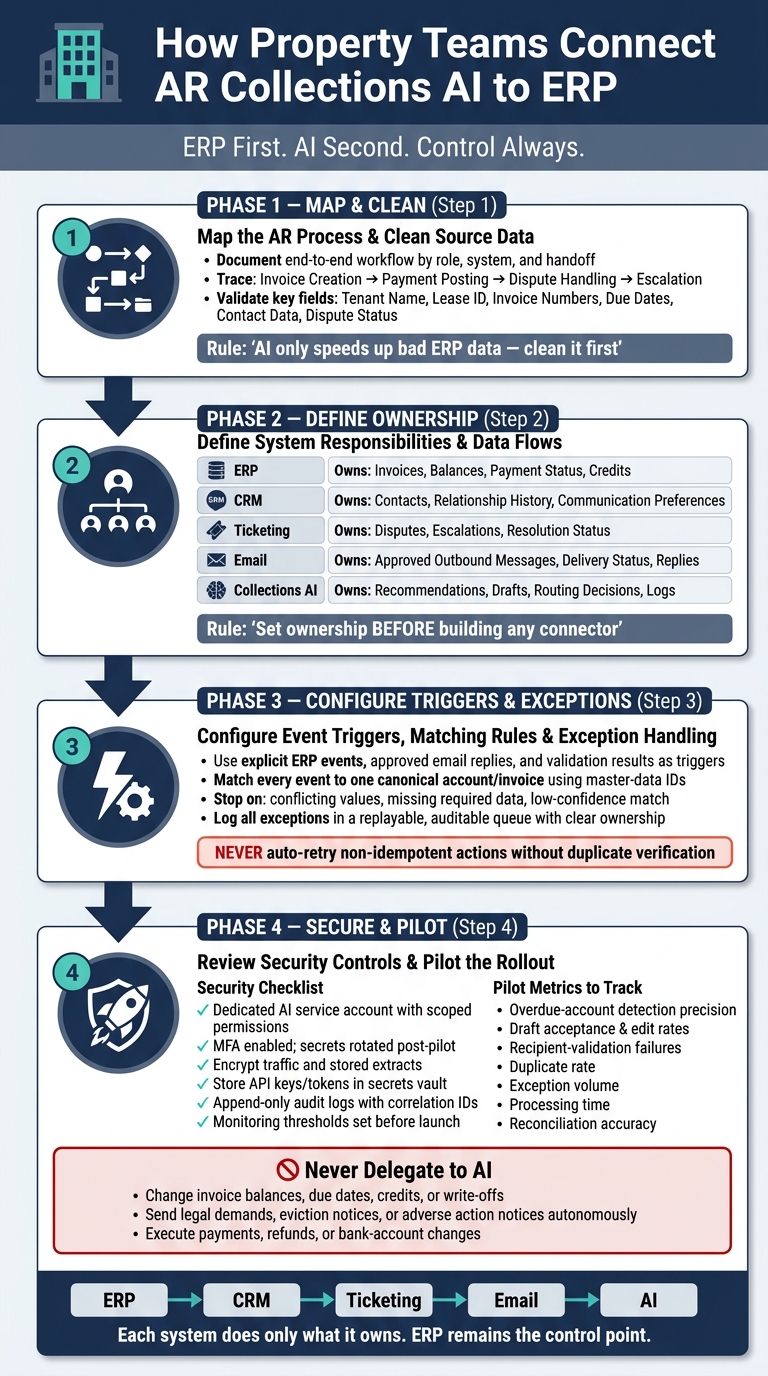
AR Collections AI Integration: ERP-First Setup Process
1. Map the AR collections process and clean the source data
Document the end-to-end workflow by role, system, and handoff
Before any AI touches a tenant account, your team needs a clear view of how collections work today - not how the process diagram says they work.
That means sitting down with property operations, accounting, and finance leadership to trace each step across your ERP, CRM, ticketing, email, and document systems. Start at invoice creation and follow the work all the way through payment posting, dispute handling, escalation, and reporting. Throughout that flow, the ERP remains the system of record for invoice status, payment status, and open balances.
Spell out who handles each task, which system they use, and where the work passes from one team or tool to another. Show where the CRM logs disputes, where ticketing tracks exceptions, and where email kicks off outreach. Then map the handoffs this setup will rely on:
- ERP to CRM
- ERP to ticketing
- ERP to email
Be specific. Which updates are still manual? Which exceptions need human review? When does a dispute resolution or credit override need approval? Those details are what show where AI can help later.
AI that sits outside the workflow just adds manual overhead.
At the start, keep the scope tight. Focus on the handoffs and exception points that come up most often. That gives you a clear picture of how data moves between systems and where human review still matters. Once those handoffs are mapped, check the records that support them.
Validate the records that collections AI depends on
Validate the records AI will use before any automation goes live. AI only speeds up bad ERP data.
The fields below matter most for matching, routing, and exception handling. Every one of them needs review and confirmation before you turn on automation:
| Field Category | Specific Fields to Validate |
|---|---|
| Tenant identity | Tenant name, legal entity |
| Property & lease | Property ID, unit ID, lease ID, lease term |
| Financial records | Invoice numbers, open balances, due dates, payment terms, credit limits |
| Contact data | Email addresses, phone numbers, mailing addresses, communication preferences |
| Account status | Dispute status |
Data quality across disconnected legacy systems is often worse than teams think. And that’s where things can go sideways fast. If one system shows an open balance, another shows a dispute, and a third has the wrong contact, automation can route the wrong message to the wrong person at the wrong time.
The fix is simple in concept, even if the work takes effort: close the gaps before automation goes live. Validate each dataset against the ERP, use strict reconciliation, resolve conflicting records, and block AI triggers until the records are dependable.
With the workflow mapped and the data cleaned, the next step is to define which system owns each field and each action.
2. Define system responsibilities and data flows
Assign what ERP, CRM, ticketing, email, and AI each own
Set system ownership before you build a single connector. If you skip this step, two systems can each act like they own the same field. That’s how you end up with mismatched records, conflicting actions, and a mess that takes time to sort out.
Here’s the plain version: ERP owns financial state. CRM owns account context. Ticketing owns disputes and escalations. Email sends approved messages and captures replies. Collections AI coordinates actions, drafts messages, and routes exceptions.
| System | Authoritative Records | Inbound Data | Outbound Actions | Trigger Types | Write Permissions |
|---|---|---|---|---|---|
| ERP | Invoices, balances, due dates, payment status, credits, write-offs, receivables status | Resolved dispute outcomes and approved notes | Publish invoice and payment events; accept approved notes, holds, or postings | Invoice issued, due date reached, payment posted | Restricted financial writes; posting limited to approved service accounts |
| CRM | Contacts, account ownership, relationship history, communication preferences | ERP account and balance context; email engagement metadata; collections activity | Provide contacts and ownership; update approved activity notes or ownership fields | Contact changed, account reassigned, consent updated | Contacts, ownership, and activity records only |
| Ticketing | Disputes, evidence, service issues, escalations, resolution status | AI-routed cases, customer replies, ERP invoice context | Return case status, resolution, and evidence links | Dispute opened, SLA breached, case resolved | Case and workflow fields; no direct invoice edits |
| Approved outbound messages, delivery status, replies, bounce or unsubscribe events | AI-approved drafts, CRM contacts, ERP collection context | Send messages; return delivery and reply events | Message approved, delivered, bounced, replied, unsubscribed | Message metadata and delivery status; no financial writes | |
| Collections AI | Recommendations, classifications, drafts, routing decisions, confidence scores, execution logs | ERP events, CRM context, ticket data, email replies | Recommend action, draft message, open ticket, request approval, log outcome | New receivable event, reply received, confidence threshold crossed | Recommendations and workflow records; financial writes require explicit approval |
Once ownership is clear, turn those roles into trigger rules and exception paths. That’s where the handoffs stop being fuzzy and start becoming usable.
Define the data contract for every integration
Ownership tells you who owns what. The data contract tells you how systems talk to each other. Every integration flow needs one.
For each integration, spell out the source, destination, trigger, required fields, matching ID, transformations, duplicate prevention, retry rules, audit logging, and approval requirements. Include a stable ERP ID, timestamps, status, currency, amount, source version, and correlation ID. Use a stable identifier such as an ERP customer, lease, invoice, or case ID. Don’t rely on a name or email address alone. That’s asking for trouble.
A good contract also draws a hard line around retries. Use bounded retries for transient failures such as timeouts, throttling, and selected server errors. Never auto-retry non-idempotent actions unless the destination can verify duplicates. A duplicate collection email sent because of a retry failure isn’t some small glitch. It creates a real operational problem.
Workflow orchestration tools like Azure Logic Apps can coordinate the multi-system sequences these contracts describe - HTTP requests, webhooks, approval steps, and document handling - but the contract itself is a business decision your team has to make first. The tool executes the contract; it does not create it.
With ownership and contracts in place, the next step is to map event triggers and exception handling.
3. Configure event triggers, matching rules, and exception handling
Use explicit events to drive approved collections actions
Once system ownership and data contracts are set, the next step is simple: turn those rules into clear triggers and clear exception paths.
Use defined events to start only preapproved collections actions. In property AR operations, the safest triggers are usually the ones your systems already produce: an ERP event, an approved email reply, a validation result, or an integration error that needs attention. The workflow should stay bounded. Each trigger should lead to a specific action, with human review for rent hold decisions, write-offs, payment reversals, or dispute escalation.
When an event fires, the workflow should pull the latest source data, check it against ERP master data, apply the approved rule, and then either draft the action or send it for review. That keeps the AI in a coordination role instead of letting it make open-ended decisions.
| Trigger | Source System | AI Action | Approval Required? |
|---|---|---|---|
| ERP event | ERP | Draft the next approved action | Yes, for high-stakes actions |
| Approved email reply | Draft the next approved action | Yes, for high-stakes actions | |
| Match failure or field conflict | ERP, CRM, ticketing, email | Stop and route to review | Yes |
| Sync failure or integration error | Integration layer | Stop processing and alert operations | Yes |
| Routine, validated case | ERP | Continue through the approved workflow | No |
Build a canonical record model and stop on uncertainty
After the trigger fires, matching decides whether the workflow moves forward or stops.
Match every event to one canonical account or invoice using master-data IDs before any action. If the match is clear, the workflow continues. If the system finds conflicting values, missing required data, or a low-confidence match, it should stop and route to exception. Let routine cases move on automatically, but send edge cases and data gaps for review.
This is one of those areas where being strict pays off. If the system isn’t sure which account or invoice it is looking at, it shouldn’t guess.
Log exceptions in a queue that supports replay, audit, and ownership
Every exception should land in a centralized queue with enough detail to replay the event, review the decision path, and preserve the audit trail. That’s what makes the workflow recoverable after a data fix or sync correction.
Common exceptions in property AR integrations include duplicate customer records across ERP and CRM, missing lease IDs on invoices, unapplied payments sitting in a clearing account, and conflicting field values between CRM and ERP. Each exception should have a clear owner and a resolution path so collections can restart cleanly after data fixes or sync recovery.
Once exceptions are replayable and auditable, move to security and governance review before production access.
4. Review security controls and pilot the rollout
Complete the security and governance review before production access
Once exceptions are replayable and auditable, lock down production access before the pilot. Before the AI touches live ERP data, finish a formal security review. This is the production gate before go-live.
The review should cover access control, data protection, integration permissions, LLM output controls, auditability, and incident response. Each area should have a written decision and a named owner from property operations, finance, IT/security, privacy, legal, and the ERP administrator.
Give the AI its own service account. Keep permissions tight and limit scope by property or region. Use MFA where the system supports it, and rotate secrets when the pilot ends or when an integration changes.
For data protection, encrypt traffic between systems and encrypt stored extracts. Store API keys, database credentials, and OAuth tokens in a secrets vault. Send the model only the data it needs. A reminder-drafting workflow needs the invoice number, due date, balance, approved recipient, and payment instructions - not a full tenant file. Also, treat retrieved email and ticket content as untrusted input.
Audit records should be append-only and should cover every material run. That includes correlation ID, timestamp, service and human identities, property and account scope, source-record IDs, retrieved fields, prompt or template version, model output, policy decision, approval identity, records read or changed, delivery result, and error details. Tie these fields to the replayable exception queue so you can rebuild any record after a data fix or sync correction. Set monitoring thresholds before launch. For example, pause the workflow after repeated API failures, duplicate-send detection, or an unusual spike in recipient volume. Document who gets the alerts.
Use the following policy to turn review rules into enforced system behavior. Enforce this action policy in the integration layer before the pilot begins.
| Action type | Example action | Allowed system | Approval requirement | Notes |
|---|---|---|---|---|
| Automated | Detect invoices more than 30 days past due and create a review task | ERP or ticketing system | No individual approval if the rule is preapproved | Read-only balance calculation; log rule version and source records |
| Automated | Draft a standard reminder without sending it | AI workspace, CRM, or ticketing system | Review required before external delivery | Use an approved template and current ERP fields |
| Automated | Add an internal “collections review” label | CRM or ticketing system | No individual approval if limited to nonfinancial metadata | Do not alter balances, due dates, or customer status |
| Approval-required | Send an overdue-balance reminder | Email or CRM | Assigned property or finance reviewer | Validate recipient, balance, contact permissions, and final content |
| Approval-required | Create or update a payment-plan commitment | ERP or CRM | Finance approval | Write only the approved terms; retain the approving identity |
| Approval-required | Escalate a disputed account or possible legal matter | Ticketing system | Collections manager or legal reviewer | Preserve dispute evidence; prohibit automated legal conclusions |
| Prohibited | Change an invoice balance, due date, credit, write-off, or fee | ERP | Not delegated to collections AI | Route through existing finance controls |
| Prohibited | Send a legal demand, eviction notice, or threat of adverse action autonomously | Email or CRM | Not delegated to autonomous execution | Require specialized human and legal procedures |
| Prohibited | Execute a payment, refund, bank-account change, or vendor-payment instruction | ERP or banking system | Not delegated to collections AI | Require separate authenticated workflows and segregation of duties |
Start with a controlled pilot and expand only after reconciliation holds
With permissions and logging in place, run the workflow in draft-only mode first. Start with overdue-balance detection and draft-only reminders. Choose a small group of properties with clean ERP data, steady contact records, cooperative reviewers, and account volumes that reflect normal operations. Then run the AI in shadow or draft-only mode alongside the current process for a set period.
During the pilot, track the measures that tell you if this is working or drifting off course:
- Overdue-account detection precision
- Draft acceptance and edit rates
- Recipient-validation failures
- Duplicate rate
- Exception volume
- Processing time
- Reconciliation accuracy
Review samples from every action category. That should include correct matches, disputed balances, missing contacts, and retries. If you only check the easy cases, trouble tends to hide in the corners.
Expand only after ERP reconciliation holds, exceptions stay under control, and audit trails remain complete. Before expanding, run an incident exercise: revoke the service account, stop queued messages, identify affected records, restore from validated data, and confirm that logs are intact. If the team can complete that drill cleanly, you’re in a good place to move to the next stage.
How AI-powered AR Automation Supercharges Your ERP Efficiency | HighRadius
Conclusion: Connect collections AI around ERP without losing control
Getting AR collections AI to work in property operations isn’t about picking the best model. It’s about setting up a system where each part has a clear job and a hard boundary. For collections teams, that means rent, fees, disputes, and outreach stay tied to ERP records. The payoff comes from putting those controls in the right order.
The order matters. Map the process, clean the data, define ownership, enforce event rules, and pilot before production. Ryshe notes that untrustworthy inputs produce untrustworthy outputs. The chain looks like this: ERP → CRM → ticketing → email → AI. Each system should do only what it owns. Once the data and workflow line up, the security review becomes the last gate before live data access. Then the pilot shows whether reconciliation holds up under real conditions.
In property operations, ERP drives the record. CRM carries context. Ticketing handles exceptions. Email sends approved outreach. AI adds value when it supports the ERP-backed decision path for balances, holds, reminders, and escalations.
That is what makes the workflow production-ready. ERP remains the control point, and every other system supports it. Start with ERP, define each handoff, and scale only after the pilot holds.
FAQs
Why should the ERP stay in control?
The ERP should remain in control because it’s the system of record. It holds the data that runs the business: core data models, part numbers, and vendor codes.
When the ERP stays at the center, AI-driven actions can be checked against master data and business rules before anything moves forward. If something doesn’t match, it goes to your team for review.
That setup helps protect governance, auditability, and day-to-day stability.
What should trigger a stop in AI workflows?
AI workflows should stop for human review when they run into edge cases or exceptions that fall outside normal processing. The idea is simple: let the routine stuff keep moving, and send only the right items to the people best equipped to handle them.
Workflows should also pause or flag items when data quality checks fail, or when the information is unclear. That extra checkpoint helps keep mistakes from spreading into connected systems like your ERP or CRM.
How do teams know a pilot is ready to scale?
A pilot is ready to scale when the AI fits into the tools people already use, instead of sitting off to the side in a separate portal. That usually means it’s built into existing workflows and shows up right inside the ERP or project management system, where its outputs can shape day-to-day decisions.
You can also spot readiness in the results. The AI should produce accurate, transparent output and show clear business value, like shorter cycle times or better decision-making. Team support matters too. People tend to get on board when they see the system handle routine work well and send only the right exceptions to humans for review.