If you want AI to do useful ERP work on Azure, the setup is simple: send the right ERP events, route each one to the right agent, log every step, and write results back through a controlled path.
I’d sum the article up like this:
- Do not trigger on every ERP update. Trigger only on business events with a clear owner, clear threshold, and clear next step.
- Use a standard event envelope. Include IDs, timestamps, ERP record links, severity, and an idempotency key so duplicate events do not run twice.
- Pick transport based on control needs. Event Grid fits low-latency fan-out. Service Bus fits strict delivery, ordering, and dead-letter handling.
- Keep agent input lean. Pass IDs first, then fetch only the fields needed for that run.
- Put checks before write-back. Use Entra ID, approval gates, routing filters, safety checks, and audit logs before any ERP update.
- Store results in coded ERP fields. That makes actions traceable and reportable later.
- Match write-back to risk. Low-risk updates can use direct APIs. Higher-risk actions should go through approval.
One data point stands out: one manufacturer cut PO processing from 3–4 days to under 6 hours, lowered errors from 12% to 1.8%, and recovered $95,000/year in early-payment discounts after moving to AI-driven event workflows.
If I were building this, I’d think in one chain: event → routing → agent → approval/checks → ERP update → audit trail.
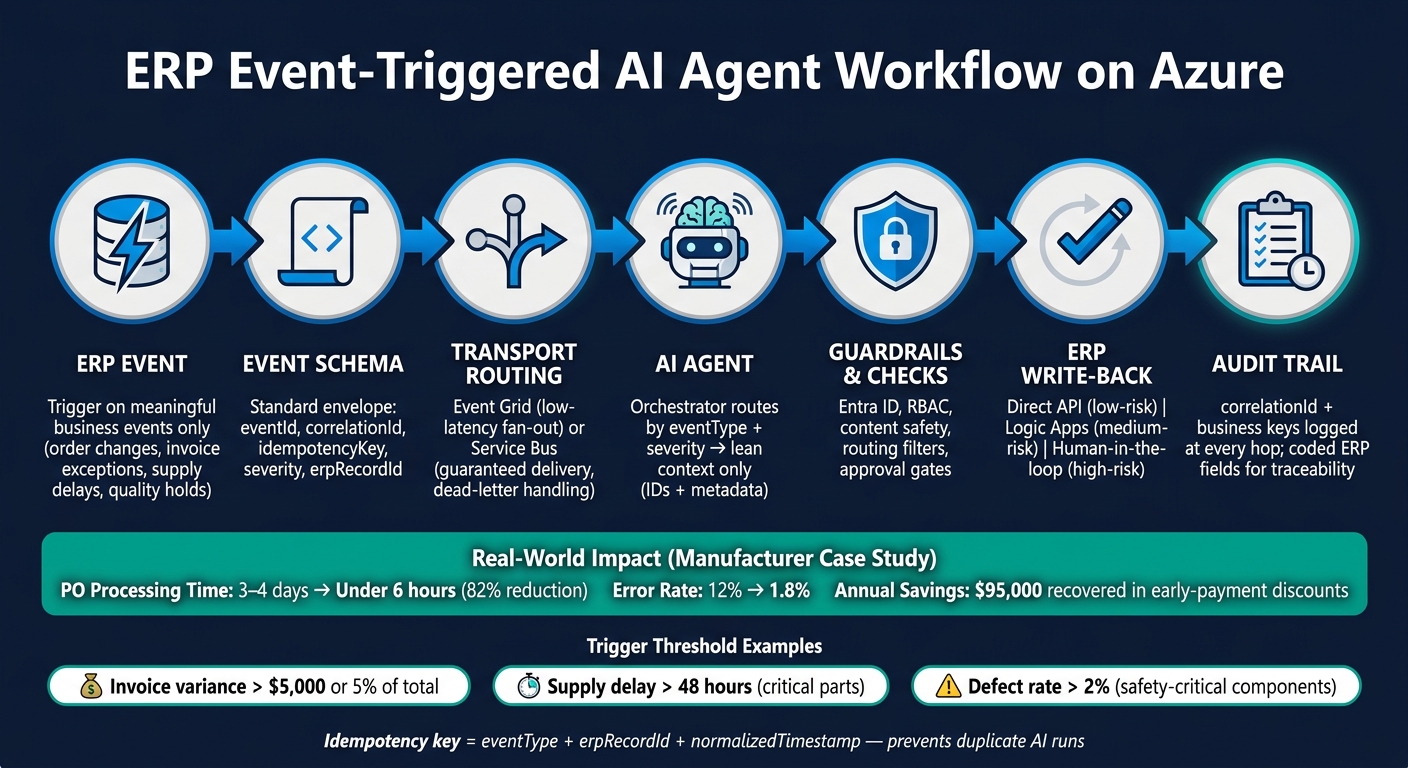
ERP Event to AI Agent Workflow: Azure Integration Pipeline
Building secure AI Agents with Azure Functions | BRK189
2. Identify the right ERP events and define trigger rules
Not every ERP update should kick off an AI action, as ERP-related blockers often prevent seamless integration. The best triggers are the ones with a clear owner, a measurable business effect, and a next step AI can help move along. Each rule should tie back to a specific ERP record, transaction type, and business owner. From there, you can turn those events into rules that the Azure pipeline handles the same way every time.
Map high-value trigger points to event types
In construction, manufacturing, and aerospace, four event categories tend to make the cut: order changes, invoice exceptions, supply delays, and quality issues. Each one maps cleanly to a standard event type that your Azure routing layer can filter and act on.
| Event Type | Common Trigger Scenario | Key Payload Fields |
|---|---|---|
OrderUpdated | Change order created; delivery date or quantity revised | Order ID, customer/project ID, change type (scope, quantity, due date), financial impact |
InvoiceExceptionRaised | Price mismatch, missing goods receipt, disputed line item | Invoice ID, PO ID, vendor ID, exception category, variance amount (USD), payment term |
SupplyDelayReported | Critical component ETA pushed out; carrier update received | Shipment ID, original vs. updated ETA, delay duration (hours), affected work order or project ID, material or part numbers, criticality score |
QualityHoldCreated | Batch defect detected; nonconformance logged; inspection failed | Lot/serial number, defect type, severity, affected quantities, affected order or project, regulatory/safety flags |
Stick with one naming pattern, like OrderUpdated or QualityHoldCreated. It keeps event types easy to read for both engineers and business teams. It also makes routing rules in Azure Event Grid or Service Bus much simpler to manage.
Set trigger thresholds so AI triggers only on meaningful events
Picking the right event type is only part of the job. You also need thresholds that tell the system when an event matters enough to act on.
Each threshold should have a named owner. For example:
- An AP manager for invoice exceptions
- A supply chain lead for shipment delays
- A quality director for nonconformances
That person signs off on the threshold, reviews AI output, and updates the rule if trigger volume starts drifting too high or too low.
A few practical examples: trigger on invoice variances above $5,000 or 5% of invoice total, supply delays over 48 hours for critical parts, and defect rates above 2% for safety-critical components.
Design an event schema that supports routing and traceability
Use one event envelope for both routing and audit. The schema below covers the fields that matter most.
| Metadata Category | Essential Fields | Purpose |
|---|---|---|
| Identity | eventId, correlationId, idempotencyKey | Prevents duplicate AI runs; enables end-to-end tracing |
| Temporal | timestamp (ISO 8601, preferably UTC) | Supports audit trails and event sequencing |
| Source | sourceSystem (e.g., “SAP SD”, “Dynamics 365 Finance”), businessUnit | Identifies origin; supports routing and traceability |
| Context | erpRecordId, severity (Low / Medium / High / Critical), eventType | Provides urgency and business context for AI reasoning |
| Governance | aiTriggerCandidate (boolean), owner role | Flags whether the event qualifies for AI processing |
The idempotencyKey needs extra care. Azure delivers events at least once, which means the same event can show up more than once because of retries or ERP replays. A deterministic key built from eventType + erpRecordId + normalizedTimestamp gives your Azure processing step a clean way to check a deduplication store, such as Cosmos DB or Azure Table Storage, before doing any work. If that key is already there with a processed status, the agent logs the duplicate and skips re-execution.
With event types, thresholds, and schema in place, you can route events into Azure and call the right agent with only the context it needs.
3. Build the trigger flow from ERP to Azure AI agents
Once your event schema and thresholds are set, the next job is simple to describe but easy to mess up in practice: move ERP events into Azure reliably, then get the right agent on them fast.
Use the event envelope and idempotencyKey from your trigger rules to keep routing deterministic. This is the point where transport, agent routing, and production safeguards need to work as one system.
Route ERP events into Azure with the right transport
Start with the transport your ERP already supports. Then line that up with the level of delivery control you need. That choice shapes how your orchestrator routes work and handles retries.
| Transport Pattern | Best Fit | Key Advantage |
|---|---|---|
| ERP webhooks → Event Grid | ERPs with native outbound HTTP callbacks (e.g., Dynamics 365 F&O, SAP S/4HANA) | Low-latency, push-based fan-out to multiple subscribers with built-in retry |
| API + Azure Functions | ERPs with REST/SOAP APIs but no native webhooks | Strict payload validation, throttling, and policy checks before ingestion |
| Logic Apps connectors | SaaS ERPs (Dynamics 365, NetSuite, SAP cloud) needing low-code flows | Prebuilt certified connectors, built-in retry, and audit logging with minimal custom code |
| Service Bus queues/topics | Regulated, multi-system environments (aerospace, manufacturing, finance) | Guaranteed delivery, durable storage, dead-letter queues, and ordered processing |
For regulated U.S. environments, Service Bus is usually the best fit when durability, ordering, and dead-letter handling matter most. Event Grid can also sit beside Service Bus when you need fan-out to downstream consumers.
Select the right agent and pass only the needed context
After an event hits the transport layer, an orchestrator - usually an Azure Durable Function or Logic App - reads it and decides which agent to call.
That routing should come from configuration, not hardcoded logic. Store the routing matrix in Azure App Configuration or Key Vault so business rule changes don’t force a redeployment.
Use eventType, severity, and owner fields from the schema to drive routing. In plain terms, eventType points to the agent specialty, while businessUnit and severity help decide whether the agent runs on its own or in assist mode.
A few examples make this concrete:
- An
OrderUpdatedevent can route to an Order Management Agent. - An
InvoiceExceptionRaisedevent can route to a Finance Exception Agent in assist mode, where a human must approve the output before anything writes back to ERP. - A
SupplyDelayReportedevent can route to a Supply Chain Agent. - A
QualityHoldCreatedevent can route to a Quality Agent.
Keep the initial event payload lean. Pass only identifiers and metadata, not full records.
Then let the orchestrator fetch only the fields the agent needs from ERP APIs or other approved data sources. Use the agent’s service principal and Azure RBAC to enforce access boundaries. That keeps sensitive data - like customer PII, payment details, or ITAR-controlled part specifications - out of prompts and out of general-purpose logs.
Use retries, dead-letter handling, and idempotency from day one
Plan for ERP API timeouts, AI throttling, and random network blips from the start. If you wait until production to deal with them, you’re already behind.
Event Grid retries failed deliveries with exponential backoff for up to 24 hours by default, with up to 30 attempts [3][4]. Service Bus moves messages to the dead-letter queue after MaxDeliveryCount is exceeded, which defaults to 10 attempts [5]. For Logic Apps and Functions calling ERP APIs or Azure OpenAI, set bounded retries with exponential backoff, and keep total retry time inside your business SLA.
Idempotency isn’t optional.
Before the orchestrator does any work, it should check a processing log. SQL, Cosmos DB, or a data lake table all work well. Key that log on the same idempotencyKey defined earlier, or use the transport MessageId as a fallback. If the key already shows a completed status, log the duplicate and skip execution.
Also, carry the correlationId through every hop: Service Bus message, Function invocation, agent call, and ERP write-back. When something breaks, that ID is what lets you trace the full event path without piecing it together by hand.
Set up Azure Monitor alerts when dead-letter counts start climbing so the right team gets warned before a backlog starts hitting operations. Before any result writes back to ERP, apply guardrails, logging, and access checks. The next step is to apply guardrails and logging before any write-back.
4. Add guardrails, logging, and observability before writing back to ERP
Once routing is set, the next problem is simple: uncontrolled execution.
Before any AI output writes back to ERP, lock down identity, logging, and governance. If you skip that step, things can go sideways fast.
Apply access control, content and approval checks, and routing filters
Use Microsoft Entra ID with managed identities for every workflow step. Give each identity only the ERP read or write access it needs. Nothing more.
For example, a Finance Exception Agent running in assist mode should have no write access until a person approves the output. The same rule applies to actions like invoice reversals, supplier blocks, and purchase order cancellations. Those should go to human approval before anything is written back to ERP.
Event Grid subscription filters help keep the stream clean. They make sure only approved ERP events reach an agent. You can filter by event type, subject prefix, or data fields such as order value or risk flag. That keeps agents focused on events that matter and cuts down the chance of odd behavior from low-value or irrelevant inputs.
| Control Layer | Purpose | Tradeoff |
|---|---|---|
| Azure RBAC | Restricts which resources and data each identity can access | Requires disciplined identity lifecycle management |
| Routing Filters | Blocks irrelevant or low-stakes events before they reach agents | Needs a precise event schema to avoid silent misses |
| Content Safety Checks | Detects PII, prompt injection, or disallowed outputs before and after inference | Adds latency and requires explicit configuration |
| Governance Gateway | Centralized policy enforcement, observability, and audit across all workflows | Adds architectural complexity; can become a bottleneck if poorly designed |
Each layer handles a different kind of risk. In production, you usually need all four.
Once access is locked down, the next job is building an audit trail that ties every decision back to an ERP record.
Log every step with ERP-aware audit fields
Log every step with a correlation ID and ERP business keys such as order ID, invoice ID, or supplier ID. Also capture event time, source system, schema version, routing decision, agent version, tool calls, safety checks, retries, latency, and write-back result.
That gives operations teams two views at once:
- The system path
- The business transaction
Without that, people end up piecing things together by hand, and that gets messy fast.
The table below splits logging duties so each team owns a clear area, while business evidence stays separate from technical diagnostics.
| Logging Scope | Application | Team Ownership |
|---|---|---|
| Event-Level Logging | Raw ERP event receipt, payload metadata, source system | IT / Integration Team |
| Workflow Logging | Routing decisions, retry counts, branching logic, write-back results | DevOps / AI Engineers |
| AI Agent Telemetry | Model version, prompt size, tool calls, latency, confidence signals | AI team |
| Governance Gateway Logging | Access decisions, redaction events, approval gates, centralized audit records | Compliance / Security Team |
Use a governance layer for enterprise AI control
Think of the governance layer as the checkpoint between agent output and the ERP update.
This is where policy enforcement, redaction, approval gates, and audit logging should live. Putting them in one shared layer means every workflow follows the same rules for policy, logging, and approvals. That makes control far less scattered.
Ryshe’s Quanta enterprise AI context gateway centralizes policy enforcement, immutable audit records, and AI observability.
5. Hand off results back into ERP and close the loop
Once a result is approved, send it back through the narrowest write-back path that fits the risk. That’s the basic rule. If you use a path that’s too open, you add risk. If you use one that’s too locked down, you slow everything down for no good reason.
Choose the right write-back pattern
Most ERP-triggered AI setups fall into three write-back patterns. Pick the wrong one, and you end up with extra risk or extra friction.
| Pattern | Speed | Control | Best-Fit Use Case |
|---|---|---|---|
| Direct API (Azure Functions) | High | Medium | Low-risk, high-volume updates such as updating promised delivery dates, closing low-value exceptions, or changing status flags |
| Connector-based (Logic Apps) | Medium | High | Multi-step ERP updates using native SAP or Dynamics 365 connectors, such as creating exception cases, updating invoice status, or sending notifications |
| Human-in-the-loop | Low | Maximum | High-stakes changes such as credit limit updates, BOM changes, payment terms, or inspection sampling plan changes - owned by an AP manager, quality lead, or supply chain lead |
These three patterns handle most cases. The main job is to decide up front which one applies to each event type and risk level.
For example, a predicted purchase order delivery-date update in SAP is a good fit for the direct API pattern. An invoice exception that needs Accounts Payable review is better handled through Logic Apps with a human approval step before the ERP commit.
No matter which path you choose, keep the same business keys, decision ID, and timestamp on every update.
Record AI outcomes in ERP without losing traceability
Each write-back should include the same core fields so the action stays traceable. At a minimum, store:
- the source event ID
- a unique agent decision reference tied to the model version
- approval status (
Auto-Applied,Approved, orRejected) - a timestamp in ISO 8601 format in the ERP’s configured time zone
Beyond identity and timing, write the AI output into coded ERP fields instead of free text. That’s where many teams slip up. Free text is easy to dump into a notes field, but it’s hard to report on later.
For the four event classes - order change, invoice exception, supply delay, and quality hold - map outputs into ERP-ready fields. A risk assessment should become a RISK_LEVEL field (Low, Medium, High). A quality finding should become a QUALITY_FLAG_CODE. A recommended action should become an ACTION_TYPE field with a controlled vocabulary.
Free text can still live in notes. But the main fields need to be queryable, so finance controllers, quality managers, and auditors can review AI-driven actions without digging through logs.
For financially sensitive or regulated work - common in aerospace and AEC - use ERP-native transaction boundaries so partial updates don’t sneak through. If an AI action has to be reversed, create a reversing entry with a linked ROLLBACK_DECISION_ID instead of silently deleting the first record. That matters for SOX compliance and regulated quality dispositions.
Also, carry the same idempotency key into write-back so retries don’t create duplicate ERP posts.
In one case study, structured write-back helped cut processing time by 82% and reduce error rates from 12% to 1.8% [1][2].
Conclusion: The minimum design for production-ready ERP-triggered AI on Azure
A production-ready ERP-triggered AI system on Azure follows one chain every time: event → agent → governed decision → ERP write-back. That means clean thresholds, access controls, audit logging, and a write-back pattern that matches the risk level of each action.
FAQs
How do I choose which ERP events should trigger an AI agent?
Focus on ERP events linked to routine, high-volume, time-sensitive work where an agent can take on 70–80% of the load. Good examples include PO generation, invoice exception routing, and supply disruptions.
Before implementation, map the manual work first. Then rank triggers based on:
- repeatability and predictable logic
- clear authority boundaries
- trustworthy master data
- stakeholder alignment on overrides and interaction
When should I use Event Grid instead of Service Bus?
Use Azure Event Grid when you need fast, event-driven responses to specific ERP changes, like an invoice exception or an order status update. Its push-based model works well for pub-sub setups where AI agents need to react right away.
Use Azure Service Bus when the process is more complex and message handling needs tighter control. It’s a good fit for long-running business flows that depend on ordered queues, transactional support, guaranteed delivery, or advanced scheduling and routing.
What should an AI agent write back into ERP records?
AI agents should write back validated data that fills documents like purchase orders and updates system status.
Within set business rules and approval limits, they can create work orders, update records, and trigger automated processes. For contracts or invoices, they should map extracted details to your ERP data model, including part numbers, vendor codes, and pricing terms, in line with master data.