If a partner can reply in one call, use request-response. If not, pick the lightest async pattern that fits the partner system, wait time, and control rules.
I’d sum the article up this way: Azure Logic Apps gives you 7 main callback patterns, and each one fits a different kind of partner exchange. The article’s core message is simple: don’t overbuild. Match the pattern to how the partner sends data back, how long the process may wait, and how you plan to handle missed, late, or duplicate callbacks.
Right away, here’s what matters most:
- Request-response fits replies that finish in one HTTP call
- Webhook subscribe-unsubscribe fits partner systems that can push events
- Polling fallback fits older systems that cannot push updates
- Async job callback fits jobs that run for minutes or hours
- Event relay with Event Grid fits event-based handoffs with replay support
- File status callback fits document and file tracking flows
- Approval callback fits human sign-off that may take days or weeks
A few hard numbers stand out:
- Logic Apps HTTP calls usually time out at 120 seconds
- A polling interval of 5 minutes is common for status checks
- Stateful workflows can run for up to 90 days
- The article calls for alerts as short as 15 minutes for missing async callbacks
That leads to one clear rule: pick the simplest model that still handles latency, retries, reconciliation, and access control.
Quick Comparison
| Pattern | Best When | Typical Wait | Main Risk | Main Fallback |
|---|---|---|---|---|
| Request-response | Partner replies now | Seconds | HTTP timeout | Retry or exception flow |
| Webhook subscribe-unsubscribe | Partner pushes events | Low to medium | Missed or duplicate events | Retry + idempotency |
| Polling fallback | Partner only exposes status/API | 5–15 minutes | Missed changes between polls | Next poll + reconciliation |
| Async job callback | Partner runs long jobs | Minutes to hours | Callback never arrives | Polling + reprocess |
| Event relay callback | Partner publishes events | Near real time | Delivery gaps downstream | Retry or replay |
| File status callback | File is the unit of work | Minutes to hours | Late or out-of-order statuses | Reprocess + reconciliation |
| Approval callback | Human decision is required | Days to weeks | No response | Escalation + audit trail |
If I were reading this to make a design choice, my takeaway would be: start with partner capability, then check timeout window, then lock down recovery and audit needs before go-live.
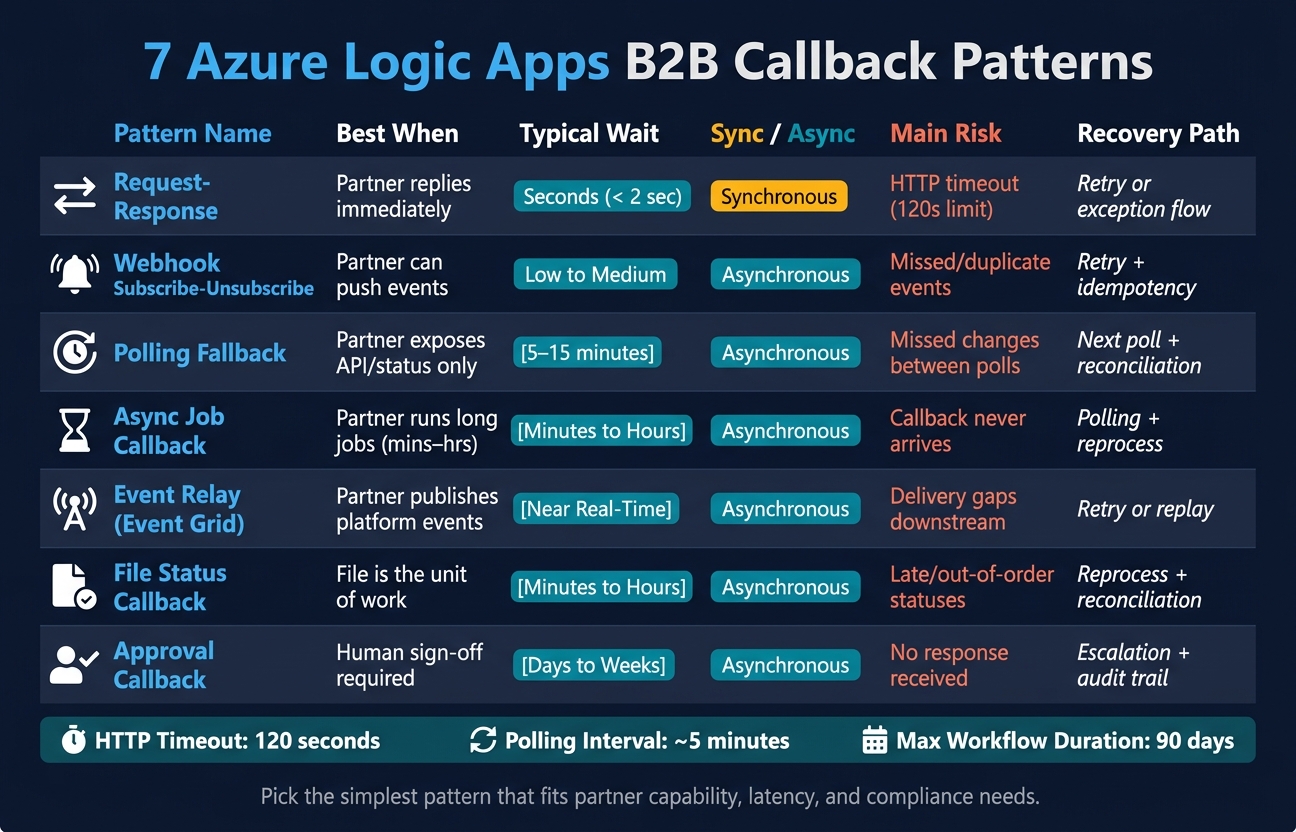
7 Azure Logic Apps B2B Callback Patterns Compared
How Callback Patterns Fit into Azure Logic Apps Architecture
Before getting into the seven patterns, it helps to map the Logic Apps building blocks that make them work. These patterns lean on a small group of triggers and actions, and each one has a clear job.
Stateful workflows keep context across long-running exchanges. In AEC and aerospace, that matters when a partner reply shows up later and still needs to stay tied to the first exchange - for example, linking an RFI to the resulting submittal and final change order [2]. Those long-running workflows also need tight security, retries, and monitoring.
Secure callback endpoints with identity-based access controls, and put content-blocking controls in place before data reaches external partners [4]. In regulated aerospace settings, align access controls with ITAR/CUI classification and RBAC rules [1]. Workflows also need retries, alerts, and error handling. Azure Application Insights gives you audit trails and request metrics for inbound and outbound callback requests [4]. Short alert windows help teams spot late or failed callbacks fast [1].
Use the table below for a quick side-by-side view of each building block.
| Building Block | Primary Role |
|---|---|
| Request trigger | Entry point for inbound HTTP callbacks |
| Response action | Returns a synchronous reply to the caller |
| HTTP action | Calls partner endpoints |
| HTTP Webhook action | Handles subscribe/unsubscribe |
| Recurrence trigger | Drives polling fallback loops |
| Event Grid trigger | Listens for platform events |
| Azure Blob Storage | Landing zone for large B2B files and documents |
| Approval action | Pauses a flow for human review |
| Stateful workflow | Preserves context across long-running exchanges |
1. Request-Response Pattern
The request-response pattern is the simplest callback option when both systems can finish the exchange synchronously. Use it only when the partner can send back a complete response right away. This pattern relies on the Request trigger and Response action described above.
Partner API Capability
This pattern works best for partner endpoints that can handle the request and return a payload in a single call. If the partner can’t respond right away, an async pattern is a better choice.
Latency and Timeout Profile
Keep the partner response under the Logic Apps HTTP timeout, which is typically 120 seconds. If that window is too tight, switch to an async pattern.
Failure Recovery Path
If the partner can’t respond within the timeout, don’t try to force this pattern. Treat timeouts and incomplete payloads as failed sync exchanges. Route them to exception handling, then validate and reconcile the data before retrying.
Best-Fit Use Cases
Use this pattern for short exchanges that need immediate confirmation and a complete response in one call.
If the partner needs to respond later, move to the webhook subscribe-unsubscribe pattern.
2. Webhook Subscribe-Unsubscribe Pattern
Use this pattern when a partner can call your Logic App back after you subscribe to an event. It skips polling and responds only when the partner event happens. The flow is simple: use the HTTP Webhook action to subscribe, wait for the callback, then unsubscribe when the exchange ends.
Partner API Capability
This works well for partner systems that offer webhook callbacks for RFI, submittal, work-order, or quality events. If the partner can’t send callbacks, use the polling fallback pattern next.
Latency and Timeout Profile
This pattern is a good fit for low-volume or irregular events, where polling would just burn extra API calls for no good reason.
Failure Recovery Path
For long-running partner exchanges, plan for missed or duplicate deliveries. That means using monitoring, alerts, retries, and idempotent processing so the same event doesn’t cause problems twice.
Best-Fit Industry Workflow
In AEC, this pattern fits RFI, submittal, and change-order updates. In manufacturing and aerospace, it fits MES and quality events.
3. Polling Fallback Pattern
Use this pattern when a partner system can’t send callbacks or webhooks. That’s common with older ERP, PLM, and MES platforms, which often expose only APIs or CDC feeds. In those cases, polling is the practical fallback.
Partner API Capability
Polling fits when the partner system can’t emit callbacks or webhooks. Older ERP, PLM, and MES platforms often provide status updates only through APIs or CDC feeds.
Latency and Timeout Profile
Use polling only when the partner can’t push updates back to Logic Apps. It works best when near-real-time visibility is enough. For quality and production tracking, a 5-minute interval is common.
Failure Recovery Path
Polling can miss changes that happen between checks. That’s the trade-off. To reduce that risk, pair polling with automated validation and alerting, plus source-system reconciliation to catch gaps before they spread.
Best-Fit Industry Workflow
This pattern is a good fit for:
- CMM-to-ERP quality records in aerospace
- MES production logs in manufacturing
- Document or status tracking in AEC
When polling returns a result that still needs partner processing, the next step is an async job callback.
4. Async Job Callback Pattern
When polling gives you the job state but not the actual result, move to an async job callback. This pattern works when a partner workflow kicks off a long-running process and can’t send the final output right away. Instead of waiting in a request-response flow, Logic Apps submits the job, stores a correlation ID, and then picks the process back up when the partner sends the result through a callback.
Partner API Capability
The partner API should support job submission, a correlation ID, and a callback URL. A status endpoint can still help, but it should be there as a backup rather than the main path.
Latency and Timeout Profile
Use this pattern for jobs that take minutes or hours to finish, not for synchronous exchanges. It’s a good fit for long analysis jobs, document processing, and data migrations that need automated pipelines.
Failure Recovery Path
Callbacks need a backup plan. Pair them with polling in case a callback never arrives, strict source-system reconciliation, Service Bus retries and dead-lettering, and Application Insights alerts at 15-minute alert thresholds. [1][3] The recovery approach should stay the same across partner exchanges:
- idempotency
- retries
- reconciliation
Best-Fit Industry Workflow
This pattern fits AI document intelligence in AEC, predictive quality jobs in manufacturing, and inspection analysis in aerospace. If the partner sends platform events instead of a direct job result, use the event relay callback pattern next.
5. Event Relay Callback Pattern with Event Grid
When a partner publishes events instead of sending back a job result, Event Grid puts a durable relay in front of Logic Apps. Use this pattern when you need replayable event delivery, not a direct callback from the partner.
Partner API Capability
The partner system needs a way to publish events to a topic you control, whether that comes from CDC, APIs, or OCR-fed events. This is a good match for legacy manufacturing and AEC systems that only expose events through CDC or APIs. [1]
Latency and Timeout Profile
Use this pattern for near-real-time delivery.
Failure Recovery Path
Event Grid handles the first recovery layer with built-in retries and dead-lettering. If the workflow is sensitive, add automated data checks and reconciliation against the source system. [1]
In ITAR-controlled aerospace environments, the relay can also work as a compliance checkpoint. That means you can apply data classification and role-based access control before the event reaches a downstream Logic App. [1]
Best-Fit Industry Workflow
The table below shows where the relay layer adds the most value.
| Industry | Workflow | Key Benefit |
|---|---|---|
| Aerospace | Predictive quality for CNC machining | ITAR/CUI compliance checkpointing [1] |
| AEC | RFI and submittal tracking | Centralizing event intake for downstream processing [2] |
| Manufacturing | MES/ERP quality data pipelines | Replayable event delivery across disconnected systems [1] |
6. File Status Callback Pattern
Use this pattern when a file needs to be scanned, classified, or checked before Logic Apps can move forward. The callback should return the file status, not the full processing output.
This is different from an async job callback. Here, the workflow tracks the state of the file itself, not just whether a job finished.
Partner API Capability
The partner API needs to support async processing and provide a status callback URL. For more complex files, the callback should include the file ID, revision, status, and exception flags. In regulated settings, the workflow should classify ITAR/CUI data and apply role-based access controls inside the callback workflow. [1][4]
| Document Type | Callback Payload Fields |
|---|---|
| Drawings / CAD | Revision ID, Spec Section, Project Phase, linked RFI IDs |
| Inspection Files | Machine telemetry, defect code, SPC data |
| Compliance Packages | ITAR/CUI tag, audit trail |
Latency and Timeout Profile
This pattern is a good fit for file workflows that take minutes or hours. Use a short refresh window to confirm completion or spot anomalies early.
Failure Recovery Path
File statuses may arrive late, show up more than once, or arrive in the wrong sequence. Because of that, each callback should be reconciled against the source system.
Alert on missed, duplicated, or out-of-order file statuses, then reconcile against the source system. The recovery path should stay the same:
- idempotency
- retries
- reconciliation
Best-Fit Industry Workflow
Use this pattern when the file itself is the unit of work.
| Industry | Workflow | Key Source Systems |
|---|---|---|
| AEC | RFI, submittal, and change order lifecycle tracking | Procore, SharePoint, Outlook |
| Aerospace | Paper traveler and CMM data processing | Siemens Teamcenter, Epicor, Hexagon MES |
| Manufacturing | Inspection file routing and quality validation | Epicor ERP, MES platforms |
7. Approval Callback Pattern
Use this pattern when a person has to sign off and the workflow may need to sit for days or even weeks. The Logic App sends an outbound notice by email, a portal link, or a webhook, with a unique callback URL included. When the approver makes a call, their system or interface sends a POST request with an approve or reject payload back to that URL, and the workflow picks up from there. This works best when the pause happens at a human checkpoint, not a system event.
Partner API Capability
The approval endpoint needs to accept a decision callback and POST an approve/reject payload back to the Logic App listener. In regulated workflows, block CUI and PII before the request leaves the workflow, and add liability disclaimers only when required. [4]
Latency and Timeout Profile
This is a high-latency pattern by design. Azure Logic Apps supports stateful, long-running workflows for up to 90 days, which makes it a strong fit for review cycles that run across days or weeks. Set up multi-stage deadline alerts so approvers get notified well before the response window closes.
Failure Recovery Path
If nobody responds, the workflow should escalate on its own with deadline alerts, a backup approver, and a full audit trail for decisions and non-responses. Every decision must be logged for regulatory purposes. That makes this pattern a good match for compliance-heavy approvals in AEC, manufacturing, and aerospace. [2][4]
Best-Fit Industry Workflow
| Industry | Workflow | Recovery Mechanism |
|---|---|---|
| AEC | RFI and submittal approvals, change orders | Deadline alerts and RFI trackers [2] |
| Aerospace | AS9100 change control, ITAR/CUI classification approvals | CUI detection and audit trails [1][4] |
| Manufacturing | Quality sign-offs, compliance document generation | Automated status digests and escalation logic [3][4] |
Use the comparison table below to match each pattern to its latency, delivery, and recovery needs.
Side-by-Side Comparison of All 7 Patterns
Use this table to pick the right pattern based on the trigger, expected wait time, and how you recover when something goes wrong.
It gives you trigger style, latency, and recovery path in one place.
| Pattern | Trigger Style | Sync / Async | Partner Prerequisite | Latency | Timeout Risk | Recovery Option | Strongest Use Case |
|---|---|---|---|---|---|---|---|
| Request-Response | HTTP call | Synchronous | Modern REST API | Very low (< 2 sec) | High | Retry | Fast partner lookups |
| Webhook Subscribe-Unsubscribe | Event push | Asynchronous | Callback registration | Low to medium | Low | Retry | Partner notifications |
| Polling Fallback | Scheduled timer | Asynchronous | Read access to the source system | Medium (5–15 minute cycles) | Low | Next poll cycle | Legacy ERP/MES status updates |
| Async Job Callback | Long-running task + callback URL | Asynchronous | Callback URL for completion | Medium to high | Medium | Reprocess or retry | Long-running document processing |
| Event Relay Callback | Event relay | Asynchronous | Event subscription | Low to medium | Low | Retry or replay | MES-to-Logic Apps event handoff |
| File Status Callback | File drop | Asynchronous | SFTP or Blob Storage access | Medium | Medium | Reprocess from storage | File-based aerospace workflows |
| Approval Callback | Human action | Asynchronous | Email, portal, or workflow approval | Very high | High | Escalation and audit trail | Human approval workflows |
Read across each row to line up the delivery model, timeout risk, and fallback path. The patterns fall into a few clear buckets: synchronous, event-driven, polling-based, long-running, file-based, and human-review.
In aerospace, ITAR/CUI controls can narrow the list even more. That’s why the best choice usually isn’t the fanciest one. It’s the simplest pattern that still fits the partner setup and compliance needs.
Implementation Tips and Common Pitfalls
Once you’ve picked a pattern, put a few guardrails in place before go-live.
Start with the callback endpoints. Lock them down with Azure Key Vault, Microsoft Entra ID, RBAC, audit logging, and early ITAR/CUI classification. If the workload touches sensitive data, add rate limiting and PII filtering too.
For long-running exchanges, standard response codes help partner systems stay in sync. Return 200 OK when the work is finished. Return 202 Accepted when the work will continue asynchronously. If you’re using an async job pattern, include a Location header that points to the status URL so partners know exactly where to check next.
Polling-based patterns need restraint. Use exponential backoff so systems don’t keep hammering the same endpoint. And if webhook delivery can fall back to polling, deduplicate by correlation ID or job ID. That way, the same update gets processed only once.
With file-based flows and approval workflows, the docs matter just as much as the code. Use one shared data dictionary so terms like status, defect, and delivery mean the same thing in every system. Before go-live, document:
- naming rules
- lifecycle rules
- diagrams
- runbooks
- troubleshooting steps
These controls apply across all seven patterns - request-response, webhook, polling, async job, event relay, file status, and approval callbacks. They’re what make each pattern dependable in AEC, manufacturing, and aerospace production environments.
Conclusion
No single callback pattern works for every Logic Apps workflow. The right choice depends on partner capability, wait time, recovery model, and approval needs.
For most exchanges, file status works well for document control, approval fits human sign-off, async job makes sense for long-running processing, and event relay is a good fit for governed event intake. Start with the simplest pattern that matches the partner’s delivery model and compliance needs.
In AEC, manufacturing, and aerospace, this choice has real impact. Partner capability, workflow latency, recovery requirements, and governance all shape which pattern will hold up in production. Pattern choice is an architectural decision that affects reliability, auditability, and scale. Pick the simplest pattern that meets the exchange, recovery, and compliance requirements.
FAQs
How do I choose the right callback pattern?
Map the business process first: do you need an answer right away, or can the task happen in the background? Pick the pattern that matches how the workflow needs to run in AEC, manufacturing, or aerospace.
Then decide whether direct request-response or an event-based setup, like webhooks or relays, is the better fit. At the same time, make sure your data foundation can handle data quality and compliance across connected systems.
When should I use polling instead of webhooks?
Use polling in Azure Logic Apps when a partner system can’t send events through a webhook, or when it doesn’t support the auth or security setup needed for a direct callback.
Polling also makes sense when you need tighter control over how often data is fetched. That matters when you’re working around API rate limits or sticking to a set schedule, like 5-minute refresh cycles for MES and CMM integrations in manufacturing and aerospace.
How do I handle missing or duplicate callbacks?
Use an idempotency layer and state checks in your Azure Logic Apps workflow.
Give each request a unique ID. Then store its status in a persistent data store like Azure Cosmos DB or SQL. Before your workflow processes a callback, check that stored status first. If the Request ID has already been handled, ignore the duplicate.
For missing callbacks, use Azure Application Insights to monitor expected events and flag gaps. If a response doesn’t arrive within the set timeout window, trigger an automated retry or send the case to manual reconciliation.