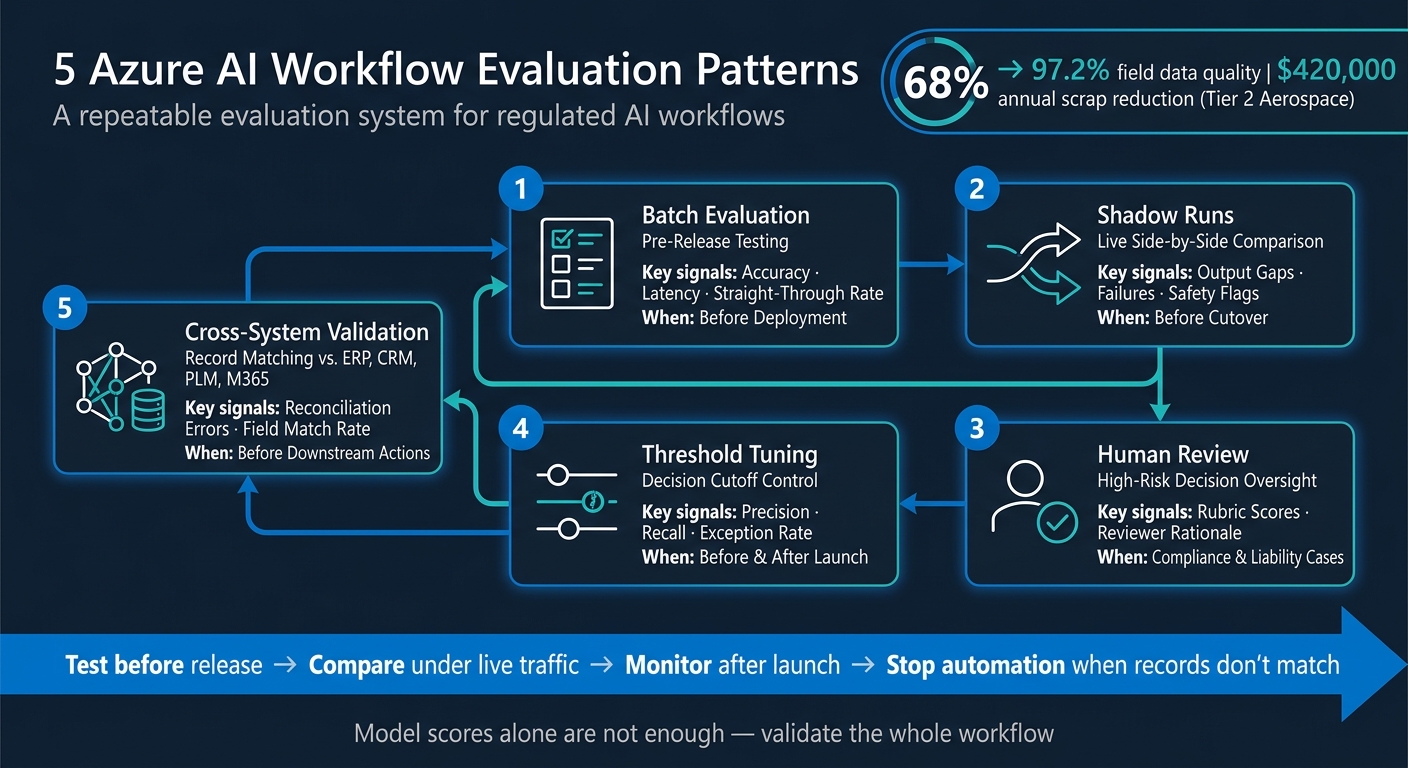
If you only test an Azure AI workflow before launch, you’re missing most of the risk. I’d treat workflow evaluation as a repeat process built around five checks: batch testing, shadow runs, human review, threshold tuning, and cross-system validation.
Here’s the short version:
- I use batch evaluation to test release readiness on held-out data.
- I use shadow runs to compare a candidate workflow against live traffic without affecting users.
- I add human review for outputs tied to compliance, engineering, contracts, or money.
- I tune decision thresholds based on precision, recall, review load, and rework cost.
- I validate outputs against ERP, CRM, PLM, and Microsoft 365 records before automation proceeds.
The article makes one point clear: model scores are not enough. In regulated workflows, teams also need audit trails, lineage checks, CUI/PII controls, and system-of-record matching. That matters when one bad extract or route can lead to scrap, rework, or compliance trouble.
One example stands out: a Tier 2 aerospace components maker moved critical field data quality from 68% to 97.2% and cut annual scrap by $420,000. That kind of result comes from checking the whole workflow, not just the model.
If I had to boil the piece down to one rule, it would be this: test before release, compare under live traffic, monitor after launch, and stop automation when records don’t match.
5 Azure AI Workflow Evaluation Patterns for Regulated Industries
Run an Automated Evaluation in Azure AI Foundry
Quick comparison
| Evaluation pattern | What I use it for | Main signal | When it matters most |
|---|---|---|---|
| Batch evaluation | Pre-release testing | Accuracy, latency, straight-through rate | Before deployment |
| Shadow runs | Live side-by-side comparison | Output gaps, failures, safety flags | Before cutover |
| Human review | High-risk decisions | Rubric scores, reviewer rationale | Compliance and liability cases |
| Threshold tuning | Decision cutoff control | Precision, recall, exception rate | Before and after launch |
| Cross-system validation | Record matching | Reconciliation errors, field match rate | Before downstream actions |
That’s the core of the article, and it sets up the rest of the discussion well.
Batch Evaluation Patterns for Pre-Release Testing
Before a workflow update goes to production, teams should test it on a held-out test set. That gives them a clean way to compare outputs against known-good answers and see whether the change is safe to ship.
Use Curated Datasets and Governance Checks to Score Workflow Quality
Keep training, validation, and held-out test sets separate. If you mix them, results can look better than they are, and weak spots stay hidden.
The goal here isn’t just model accuracy. It’s workflow accuracy. In practice, that means looking at metrics like:
- straight-through processing rate, or cases finished without human help
- extraction accuracy
- task adherence
- tool-call correctness
- latency
For regulated workflows, governance checks for CUI and PII should act as release gates that stop bad releases before they hit production [4].
Your test data also needs some mess in it. Clean samples are nice, but production is rarely clean. Include inconsistent field names, OCR errors, and unstructured text because that’s what teams will deal with in the wild [1].
“The vendors who can show you their failure modes are the ones who actually understand their own product.” - Lisa Anderson [1]
Gate Releases with CI/CD and MLOps Evaluation Checks
Batch evaluation should sit inside your CI/CD or MLOps release process as a gate, not as a nice-to-have. Set thresholds with workflow owners before coding starts, so the release rule matches the business decision from day one instead of getting debated at the end [2].
For multi-model workflows, check each model path against its own quality and cost gates [4].
After the batch gate passes, shadow runs help teams see how the same workflow behaves under live traffic.
Batch Evaluation vs. Live Evaluation: Comparison Table
The tradeoff is pretty simple: batch testing gives you control, while live evaluation shows you what happens in production.
| Feature | Batch Evaluation (Offline) | Live Evaluation (Online/Production) |
|---|---|---|
| Repeatability | High; same data can be run multiple times | Low; inputs are unpredictable and dynamic |
| Input Control | Full; curated test sets with known-good answers | None; inputs arrive from live systems and users |
| Production Realism | Low; test sets may not capture all edge cases | High; reflects real documents, data, and conditions |
| Observability | Focuses on model and workflow metrics | Focuses on monitoring, alerting, and error handling [3] |
| Release Gating | Primary gate; pass/fail against pre-agreed thresholds | Secondary signal; flags drift and threshold breaches post-launch |
Shadow Runs and Human Review for Safer Workflow Changes
After batch evaluation, run the candidate workflow against live traffic in parallel with production, then review any gaps before cutover. The point of a shadow run is simple: catch live-traffic failures before they touch users. Batch tests matter, but they don’t tell you everything. Shadow runs show how the workflow behaves under real conditions, not just how it scores on a test set.
Shadow Test Workflow Changes Before Full Cutover
A shadow run means your candidate workflow handles live traffic alongside the current production version, but its outputs never reach users. Both workflows run side by side, and you log the results so you can compare them afterward.
Look at things like:
- Output differences
- Failure rates
- Safety flags
- Downstream rework risk
If the candidate workflow starts to drift from the current version, treat that as a warning sign. That’s the time to dig in - before cutover, not after.
Add Rubric-Based Human Review Where Automation Falls Short
Some workflow outputs can’t be judged well by a metric alone. Engineering calculations, contract language, building code interpretations, and financial estimates can carry professional liability. In those cases, automated scoring doesn’t go far enough.
Review queues should send those outputs to domain reviewers who use a defined rubric. That keeps reviews steady across people and across time. It also gives you an audit trail when someone asks, “Why was this approved?”
Capture reviewer rationale as audit evidence.
| Review Category | Rubric Criteria | Regulated Industry Application |
|---|---|---|
| Accuracy | Traceability to source; CAD metadata alignment | Aerospace (material certs), AEC (spec revisions) |
| Compliance | ITAR/EAR USML check; CUI/PII detection | Defense (export control), manufacturing (CMMC) |
| Confidence | Rationale validity; model confidence score | Aerospace (jurisdiction), AEC (code interpretation) |
| Exceptions | Handwritten markup clarity; deviation acceptance | Manufacturing (equipment anomaly), AEC (redlines) |
Set mandatory review triggers for cases that need human oversight, such as CUI or PII detection, generated engineering calculations, or any output where the output requires human approval before use [4].
Feed review outcomes back into release decisions and threshold tuning.
Full Cutover vs. Shadow Testing vs. Canary Rollout: Comparison Table
Use the rollout pattern that fits the risk level of the change. Not every change needs the same treatment, and this is one of those moments where caution pays off.
| Feature | Full Cutover | Shadow Testing | Canary Rollout |
|---|---|---|---|
| Rollout Risk | High: immediate impact if the system fails | Zero: AI runs in parallel; no impact on live outcomes | Medium: impact limited to a small subset of users |
| User Impact | Immediate and total | None: users continue with the legacy process | Partial: only selected users or programs are affected |
| Logging and Comparison | High: requires real-time monitoring of failures | Very high: requires logging and comparing every divergence | High: requires monitoring for performance regressions |
| Rollback Complexity | High: may require data restoration | Low: simply stop the parallel process | Medium: redirect traffic back to the stable version |
| Regulated Workflow Fit | Poor: high risk of ITAR/compliance violations | Excellent: allows validation without risk | Good: useful for final-stage validation |
For regulated workflows, shadow testing is usually the safest choice. Canary rollouts fit better at the final validation stage. Full cutover should wait until risk is low.
Threshold Tuning and Cross-System Validation for Decision Accuracy
Once live-traffic safety is in place, the next job is simple to state and harder to get right: make sure the decisions are correct and stay consistent across the systems that depend on them.
Shadow runs show how the system behaves. Threshold tuning shows whether the decision itself is good enough to trust.
Tune Thresholds Using Business Cost, Precision, and Recall
Set the cutoff by looking at precision, recall, exception rate, and the cost of rework or escalation.
Don’t stop at model metrics alone. Plot precision and recall across different thresholds, then compare that with review volume, rework, and downstream risk. That’s where the tradeoff becomes clear. A lower threshold may send more cases through automatically, but it can also create more bad decisions. A higher threshold may cut errors, but it can also pile more work onto reviewers.
Thresholds also aren’t fixed forever. If your inputs change, your rules shift, or the operating context moves, revisit them. A cutoff that works for one workflow or dataset can drift out of line as volume, file formats, or policy rules change.
Once you set the cutoff, validate it against source systems before release.
Validate AI Outputs Against ERP, CRM, PLM, and Microsoft 365 Records
Next, reconcile AI outputs with the systems of record before anything moves downstream.
Cross-system validation checks AI outputs against systems such as ERP, CRM, PLM, and Microsoft 365 records. The goal is to confirm that the model’s output lines up with what the business already treats as the source of truth.
A few checks matter most:
- Compare extracted values against ERP records
- Confirm PLM data matches the authoritative product record
- Verify routed decisions align with the source workflow status
If a mismatch shows up, stop automation and send the case to human review.
Model-Level, Workflow-Level, and System-Level Validation: Comparison Table
Each validation layer catches a different kind of failure. Keep the checks matched to the layer you’re trying to verify.
| Validation Layer | Typical Metrics | Source Systems | Example Check |
|---|---|---|---|
| Model-Level | Precision, recall, F1, confidence distribution | Test datasets, ground truth | Confusion matrix for classification |
| Workflow-Level | Exception rate, escalation volume | Workflow logs, review outcomes | Review how often the workflow requires human intervention |
| System-Level | Field match rate, reconciliation errors | ERP, CRM, PLM, Microsoft 365 records | Compare AI output against the system of record |
If a cross-system mismatch appears in production, make sure the escalation path is clear before go-live.
Conclusion: Build a Repeatable Evaluation Program, Not a One-Time Test
These five patterns work best as one system: batch tests, shadow runs, human review, threshold tuning, and cross-system validation. The payoff comes from using them together and using them again and again, not treating evaluation like a one-time check.
After release, those same checks need to run on a set schedule. Evaluation breaks down when teams stop at go-live. Workflow outputs can drift as documents change, rules shift, and source systems get updated. That’s why teams need to revisit thresholds, review rubrics, and validation checks on a regular cadence.
Treat evaluation, governance, and observability as core product features, not as launch add-ons.
That model is a strong fit for regulated delivery environments. For AEC, manufacturing, and aerospace teams, Ryshe’s Quanta context gateway can support policy enforcement, observability, and append-only audit records. Build evaluation into the workflow, run it continuously, and tighten it with each release.
FAQs
When should we use shadow runs instead of a canary rollout?
Use shadow runs when you need to check model performance and reliability on live data without changing day-to-day operations.
They fit well in a controlled pilot. The AI runs alongside your current manual workflow, which lets your team compare outputs for accuracy and compliance before the system acts on its own. Unlike a canary rollout, shadow runs do not expose live users to AI-driven changes.
How do we set the right automation threshold?
Set the threshold as a business decision, not just a technical setting.
That means being clear about what the agent can handle on its own and what still needs human review. The line should come from day-to-day operating limits, such as work order dollar amounts or schedule changes.
Before rollout, get written sign-off from the workflow owner confirming they’ll use the output once those thresholds are met. Then review those thresholds on a regular basis using actual business results, not just model accuracy.
What should trigger human review in a workflow?
Trigger human review when AI output may be wrong or unsafe. That usually means:
- confidence is low, or the system hits edge cases and failure conditions
- predicted performance drops below set thresholds
- an exception isn’t clearly approved for auto-acceptance
Human review should also be required for regulated or high-risk cases. The same goes for outputs that can’t be checked against reliable sources or supporting evidence.