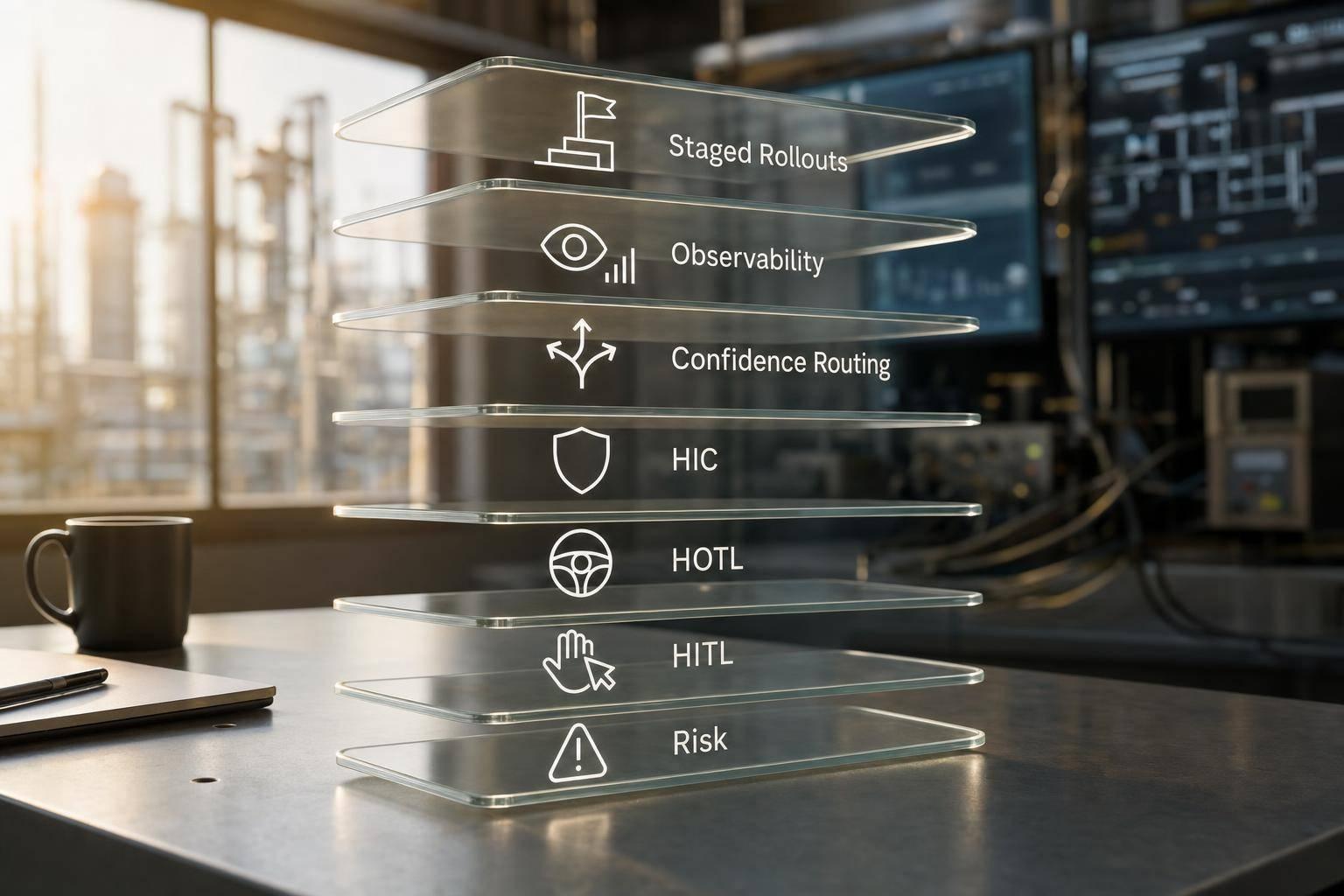
If your inspection AI is not tied to work orders, serials, station events, and QMS records, it is just a camera making guesses.
I’d sum up the article like this: to make assembly verification AI useful on a U.S. factory line, I need to connect it to ERP, MES, and QMS so every pass or fail is tied to the right unit, right step, right station, and right cost record. The article shows that this link is what turns a defect into a hold, rework route, scrap post, audit trail, and supplier or maintenance follow-up.
A few points stand out right away:
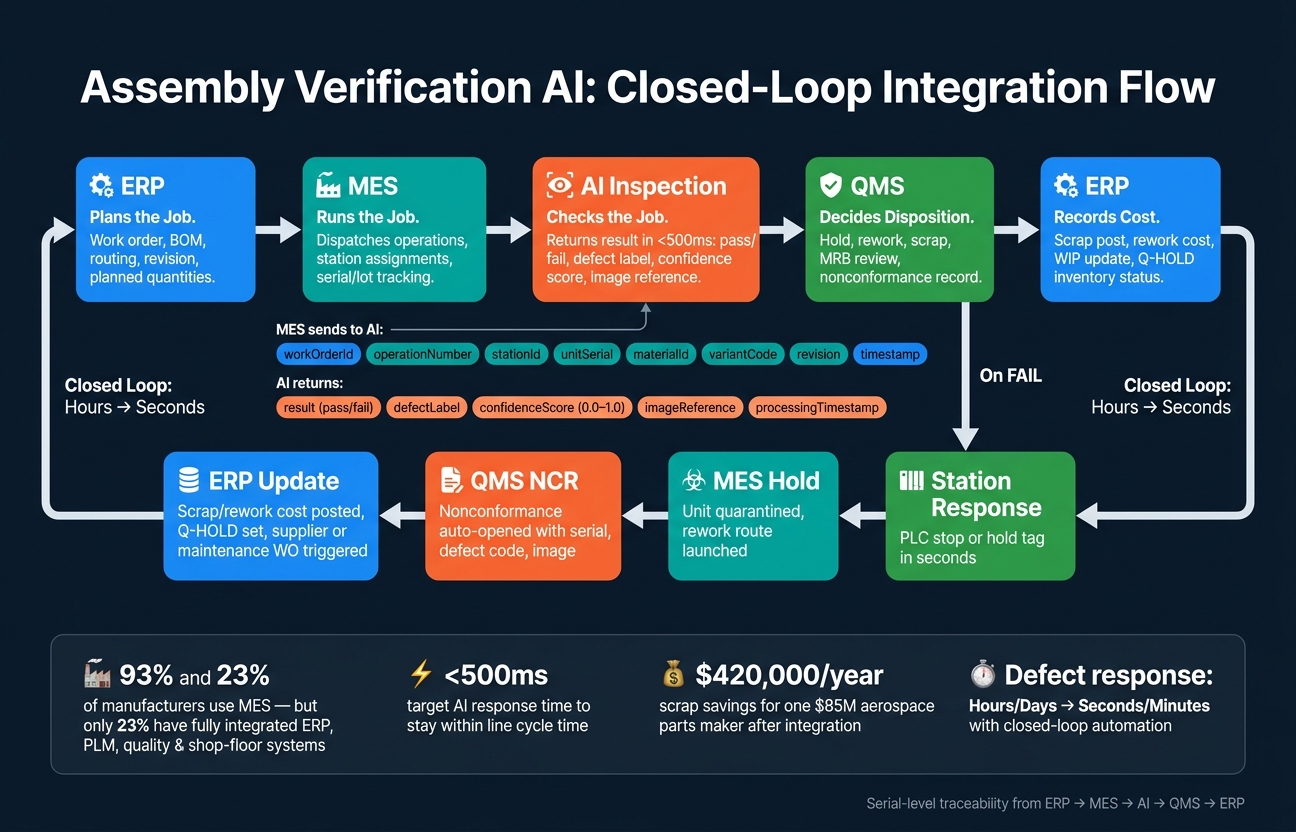
- 93% of manufacturers use MES in at least one plant, but only 23% say ERP, PLM, quality, and shop-floor systems are tied together.
- AI checks must run in milliseconds to seconds, with a response target of under 500 ms to stay inside line timing.
- Each inspection should include fields like work order ID, serial or lot, station ID, operation number, defect code, confidence score, timestamp, model version, and image reference.
- One aerospace parts maker, with $85 million in revenue, cut scrap by $420,000 per year after linking ERP, MES, and quality data.
- A closed-loop setup can move defect response from hours or days to seconds or minutes.
If I were putting this into practice, I’d keep the message simple:
- ERP plans the job.
- MES runs the job.
- AI checks the job.
- QMS decides disposition.
- ERP records scrap, rework, hold, and cost.
The article also makes one point very clear: pass/fail alone is not enough. I need serial-level traceability, mapped defect codes, append-only records, and automatic actions after a failed check. That includes PLC stops, MES holds, QMS nonconformance records, ERP inventory status updates like Q-HOLD, and rework or scrap transactions tied back to the work order.
Here’s the short version of what production use looks like:
| Area | What must happen |
|---|---|
| Context | MES sends work order, operation, serial, station, material, and revision data to the AI |
| Decision | AI returns pass/fail, defect label, confidence, timestamp, and image reference |
| Record | Result is stored with serial, genealogy, model version, and defect mapping |
| Action | Failed checks trigger hold, stop, rework, review, or scrap flows |
| Cost | ERP gets scrap, rework, WIP, and inventory status updates |
| Control | Audit logs, change records, drift checks, and fallback paths stay in place |
I’d read the full piece as a guide to turning inspection AI into a traceable plant system, not a stand-alone vision tool. That is the whole point of the article.
How ERP, MES, AI & QMS Work Together in Assembly Verification
Smart Assembly Demo: AI, RTLS & Guided Tools with Tulip
How Work Orders, Station Events, and AI Checks Fit Together
ERP plans the job, MES runs it, and AI checks each station step. When that handoff works cleanly, every inspection result maps back to the right unit, operation, and revision. When it breaks, teams end up doing manual cleanup all over again.
Work Order Context from ERP and MES
ERP is the system of record for the work order. It stores the routing, BOM, revision level, planned quantities, and operation structure. MES takes that data and turns it into execution records: dispatched operations, station assignments, and serial or lot tracking.
By the time a unit gets to a station, the AI should already have a full work-order payload. That includes work order ID, operation number, material ID or SKU, BOM revision, product variant, and unit serial. Just as important, those fields need to be structured the same way in both systems.
This gets especially important when engineering changes are moving through the plant. If ERP updates a BOM with a new effective date, MES has to push that update to the station before the first unit under the new revision shows up. The AI uses the variantCode and bomRevision fields to load the right inspection template.
If that link is missing, things can go sideways fast. Good parts may get flagged as defects. Worse, bad units may pass. That’s why ERP and MES identifiers need to be standardized before AI is added to the mix.
That context also has to stay intact from the station event all the way into result storage.
Station Event Triggers and Data Contracts
The inspection starts with a trigger. That might be a barcode scan, a part-present signal from the PLC, or an MES “inspection required” flag tied to the active operation. The AI should run only when the work-order context is valid and the part is actually in place. That simple gate cuts down false inspections and missed checks.
The data contract from MES to AI should stay lean, but it can’t leave out key fields. A clean request includes:
workOrderIdoperationNumberstationIdunitSerialmaterialIdvariantCoderevision- a timestamp in ISO 8601 or U.S. local time format, such as
2026-09-22T14:32:18Zor9/22/2026 2:32:18 PM
The AI should return result (pass/fail), defectLabel, confidenceScore (0.0–1.0), imageReference, and processingTimestamp.
Response time should stay under 500 milliseconds so it fits inside line cycle time. If the AI misses the defined SLA, MES should either hold the unit or route it to manual review. It should never let the unit pass without a clear result.
Direct, Middleware, and Hub-Based Integration Patterns
The right connection pattern depends on how many lines, plants, and downstream systems you need to support. A direct MES-to-AI connection is fast and simple on a single line, but it can get brittle as things grow. Middleware adds orchestration and schema control. A hub-based setup, where every system feeds a central data foundation, gives the best traceability fidelity and makes sense for multi-plant or enterprise deployments.
| Integration Pattern | Latency | Implementation Complexity | Traceability Fidelity | Fit for Plant Scale |
|---|---|---|---|---|
| Direct (MES → AI) | Lowest (tens–hundreds of ms) | Lower for single line | Good if MES logs full payload | Best for single plant or limited lines |
| Middleware (ESB/iPaaS) | Medium (hundreds of ms–seconds) | Higher; requires mapping and orchestration | High when middleware enforces standard schemas | Good for multi-system, single-plant integration |
| Hub-Based (Data/AI Hub) | Variable; optimizable with edge services | Highest upfront; central governance | Highest; full lineage, single source of truth | Best for enterprise-wide or multi-site deployments |
The main goal is simple: preserve serial-level lineage from ERP to MES to QMS. That payload becomes the traceability record for serials, defects, and inspection results. The same identifiers need to carry through into serial, defect, and result records.
Building Traceability Records: Serials, Defect Codes, and Result Storage
Once the station event fires and the AI returns a result, that result needs to go somewhere durable, structured, and easy to query. A simple pass/fail flag in a log file doesn’t cut it. A traceability record does much more: it gives a quality engineer enough detail to look back later and reconstruct what the system saw, what it decided, and the context around that decision. The job here is to turn every AI decision into a record that MES, QMS, and ERP can rely on.
Serial and Lot Tracking Across Each Inspection
Every AI inspection result should be tied to a unique identifier before the check runs. For discrete assemblies, that usually means the unit serial number. For bulk materials or parts consumed before unit-level serialization, that means the lot or batch ID. Scan the serial, lot, or batch ID at station entry, then bind it to the AI result before inspection starts.
Serial-level tracking is usually the better default because it lets quality teams isolate one exact unit instead of an entire batch. In many plants, both are tracked: lot for incoming material genealogy, serial for finished-unit traceability. And the serial alone isn’t enough. Each inspection record should also include lot and batch genealogy, shift, line, plant context, and the active product and material revision state.
That extra context matters. It’s often the difference between calling something a product defect and spotting a process problem like a bad station setup, a failing part feeder, or a sensor issue.
Mapping AI Outputs to QMS Defect Codes
AI labels are internal. QMS codes are controlled. That’s why the mapping layer between AI labels and the QMS defect taxonomy matters so much.
A practical setup works in layers: raw AI label → defect family → defect type → severity → disposition. For example, an AI label like connector_not_seated maps to the QMS family “assembly defect”, type “improper seating”, severity “major”, and disposition “rework.” The AI label feeds the QMS code, and the QMS code drives the action signal for hold, rework, scrap, or review. Downstream systems should receive only the mapped code.
| AI Label | QMS Defect Family | Defect Type | Severity | Typical Disposition |
|---|---|---|---|---|
missing_fastener | Assembly Integrity | Missing hardware | Critical | Line hold + rework |
surface_scratch | Cosmetic Damage | Surface defect | Minor | Use-as-is or rework |
connector_not_seated | Assembly Defect | Improper seating | Major | Rework |
wrong_part_color | Material Nonconformance | Material nonconformance | Major | Return to vendor |
label_misaligned | Packaging / Labeling | Label placement | Low | Rework |
dimensional_out_of_spec | Machining Error | Dimensional deviation | Major | Scrap or MRB review |
Treat this mapping as controlled configuration, versioned in your QMS or PLM. If the AI model changes, update the mapping before the new model goes live. Otherwise, the QMS may start receiving defect codes that no longer line up cleanly.
What to Store and Which System Owns It
The inspection record should be built so each entry can stand on its own as evidence, while still linking cleanly to upstream work order data and downstream QMS and ERP transactions. Store one record, assign one owner per field, and avoid duplicate sources of truth.
| Field | System Owner | Purpose |
|---|---|---|
| Work Order ID | ERP | Links inspection to the production job and financials |
| Serial / Lot Number | MES | Unique identifier for the unit or batch |
| Station ID | MES | Where on the line the check occurred |
| Operation Number | MES | Which step in the routing was active |
| Inspection Timestamp | MES | Exact date and time of the AI check |
| Operator ID | MES | Person or machine logged into the station |
| AI Result | AI System | Raw pass/fail decision |
| Final Disposition | QMS | Released, rework, scrap, or MRB |
| Defect Code | QMS | Normalized code for nonconformance reporting |
| Confidence Score | AI System | Statistical certainty of the finding |
| Image URI | AI System / Blob Storage | Pointer to visual evidence, not the file itself |
| Model Version | AI System | Which model version made the decision |
| Inspection Rule Version | AI System | Which inspection rules were active at the time |
MES owns genealogy, QMS owns disposition, ERP owns cost, and the AI system captures and scores the inspection.
In regulated environments, store image URIs rather than the files in the traceability record itself, and keep records append-only. If a reviewer overrides a result, write a new record linked to the original event instead of editing the old one.
A structured traceability record turns each inspection into auditable evidence. That record is what lets the closed-loop actions in the next section happen automatically.
Closed-Loop Actions After a Failed Check
Once the inspection record is in place, the next step is simple: the system has to do something with it. A failed check shouldn’t just sit in a database waiting for someone to notice. The station should contain the issue right away.
Immediate Station Responses in Seconds or Less
For critical failures, stop the station with a PLC interlock. That physically keeps the conveyor or robot from moving the unit forward. For major defects, MES blocks the operation until someone records the disposition. For minor defects, the station can keep running, but it should still flag the unit for review, print a hold tag, and show an annotated image on the operator’s HMI with a message like “Left harness misrouted – compare to reference photo.”
One thing matters here: don’t make the operator type the result again. The AI result, defect code, serial, and station context are already in MES. That same event should open the nonconformance workflow automatically, with no re-entry at the station.
MES and QMS Workflows for Nonconformance and Rework
The nonconformance record should open on its own with the serial, station, operation, defect code, timestamp, and image reference already filled in. Quality staff only need to add judgment fields, such as root cause and corrective action.
From there, MES quarantines the unit so it can’t move to a downstream step or ship out by mistake. If the defect matches a rework disposition, MES should launch the rework route directly. That means sending the unit to the right rework cell and loading the correct work instructions and required tools on the operator terminal.
For critical defects or repeat issues, QMS can notify manufacturing engineering automatically so they can review the control plan or inspection rules. In regulated settings, the hold stays in place until electronic sign-off is complete.
It’s also smart to link image URIs, not the image files themselves, along with the model version and inspection recipe data. That gives engineers the exact evidence the AI flagged when they’re sorting out product defects versus process drift.
ERP Updates for Cost, Inventory, and Escalation
Containment is only part of the job. ERP also needs the cost impact.
When a unit is scrapped, MES and QMS send the scrap quantity, reason code, and work order reference to ERP. ERP then posts the cost to the right cost center and removes the unit from WIP inventory. If the unit goes through rework instead, the extra labor hours and consumed materials flow back to ERP as actual production activity, which increases the true cost of that work order.
Units on hold also need an inventory status update in ERP, often “Q-HOLD,” so they can’t be allocated to customer orders or pushed into more production until they’re released.
The same loop can drive escalation:
- If AI spots a pattern tied to a supplier defect, QMS flags the supplier and sends defect counts plus related purchase order numbers to ERP’s supplier management.
- If repeat failures at the same station point to an equipment issue, the system can generate a maintenance work order in ERP maintenance, tying downtime back to quality causes for OEE and cost-of-poor-quality reporting.
Automated containment cuts response time from hours to seconds.
| Aspect | Open-Loop Flow (Manual/Disconnected) | Closed-Loop Flow (Automated/Integrated) |
|---|---|---|
| Defect response time | Hours to days from detection to system updates | Seconds to minutes from AI fail to MES/QMS/ERP updates |
| Manual data entry | High – multiple re-keying across MES/QMS/ERP | Low – single event feeds all systems |
| Station behavior | Informational only; operator decides next steps | Automated stop, hold, or divert based on rules |
| Cost visibility | Delayed, often via spreadsheets | Near real-time scrap and rework cost in ERP |
| Compliance/audit | Incomplete and hard to reconstruct | Full evidence and traceable workflows across systems |
Lockheed Martin’s MS2 Clearwater facility showed what this can look like at scale. By embedding quality management directly into MES so inspection operations could alert at once on out-of-control conditions, the facility reported a 46.9% reduction in scrap and rework costs [3].
Running the System in Production
Rollout Sequence from Pilot to Multi-Station Deployment
When closed-loop actions work at one station, the next move is a controlled rollout. Start with a single station in shadow mode. In that setup, the AI logs results next to human inspection, but it does not trigger rejects. That gives you a clean baseline for false positive and false negative rates before any part of the process is automated.
Once shadow-mode results settle down, freeze the event contract before turning on automation. A practical next step is a 48-hour production validation window. During that window, confirm that every inspected unit has a correctly tagged, serial-linked record in the MES quality log, with latency still within the accepted range[1]. Only after that check passes should automated rejects and closed-loop rework flows go live.
From there, expand to nearby stations on the same line. Reuse the same integration patterns and data contracts as much as possible. One-off builds at each station may seem fine at first, but they pile up maintenance debt fast. When the line is stable, move to other lines in the plant, then to more plants, with a central team owning shared templates and governance standards.
Monitoring Accuracy, Uptime, and Audit Trails
After go-live, treat the integration like any other production asset. That means watching model quality, system availability, and traceability every day.
Track:
- False positive and false negative rates
- Confidence scores
- Drift by station, shift, and product family
Low-confidence predictions should go into a structured review queue for quality engineers[6][7]. That feedback loop matters because retraining should come from drift you can actually observe, not guesswork.
For uptime, set a target, use edge processing to keep latency low, and keep a fallback path ready. That fallback might be manual inspection or a safe reject path when the system is unavailable[1][4][5][8]. If the AI goes down at 2:00 a.m., the line still needs a safe way to run.
Every model change also needs a version record tied to a change request and approval workflow, in line with ISO 9001 or IATF 16949 change control. Audit logs need to be tamper-evident and must capture the inbound request payload, AI response, model version, rule set version, and timestamp for every inspection. That way, the full inspection history for any unit can be reconstructed on demand[9][11][13][14].
Conclusion: What a Production-Ready Integration Looks Like
A production-ready system is one where the MES sends work order and serial context to the AI automatically, the AI returns a structured result inside a defined response window, and the QMS and ERP update without any manual re-entry[10][12][2][14].
FAQs
Why isn’t pass/fail enough?
Pass/fail by itself isn’t enough. It tells you what happened, but not why it happened or what to do next.
That missing context matters. A simple pass/fail result won’t show the root cause of a defect. It also won’t tell you whether the issue is a one-off event or part of a larger drift that’s building over time.
Without details like defect codes, machine sensor data, and serial tracking, teams end up stuck in reactive mode. They have to rely on slow, manual investigations instead of using closed-loop actions like automated rework routing or real-time alerts.
What data should MES send to the AI?
MES should send the AI real-time production data for assembly verification, including:
- work order context
- serial tracking
- station events
- defect codes, inspection inputs, and machine telemetry
It also needs to send consistent run IDs and timestamps so the AI can match MES data with ERP and quality records, check assembly steps, and trigger closed-loop actions when checks fail.
What happens after the AI finds a defect?
After it spots a defect, the AI labels it by type, severity, and likely root cause. Then it looks at the production context around that issue, including the machine, operator, material lot, and environmental conditions.
From there, it sends the issue to the right place automatically. Critical defects can trigger an immediate line hold and alert the shift supervisor on the spot. Minor defects move into the quality queue instead.
It also kicks off containment right away, with sort instructions and inspection holds for related work-in-progress.