If an after-hours dispatch setup can’t sort a 2:00 AM water leak, send the case to the right person, and log every step, it isn’t ready for production.
I’d boil this guide down to five jobs: take the call, classify the issue, pull the right records, apply fixed escalation rules, and keep an audit trail from start to finish. The Azure stack in the article centers on ACS for voice, Speech + Azure OpenAI for transcript and field extraction, Logic Apps or Functions for workflow, AI Search for SOP lookup, and Monitor, App Insights, Cosmos DB, Blob Storage, Key Vault, and Entra ID for logging, storage, and access control.
Here’s the short version of what matters most:
- Scope comes first. Set after-hours by property in local time, then convert at runtime to UTC.
- The system needs fixed incident paths. The article focuses on 4 main issue types: water leaks, HVAC failures, access issues, and alarm calls.
- Confidence rules matter. If key fields fall below set thresholds - like 0.80 for issue type or 0.75 for unit - the flow should ask follow-up questions or send the case to a person.
- Emergency cases must skip automation. Gas leaks, fire, and medical events need immediate transfer and 911 guidance.
- Write actions need guardrails. Keep retrieval access separate from work-order write access.
- Every step should be traceable. Use one correlation ID across calls, AI output, work-order actions, approvals, and final resolution.
- Testing before launch is non-negotiable. The guide calls out 6 failure scenarios to test before go-live, plus a 30-day hypercare window.
A few details stand out. The article pushes for site-bound document retrieval, idempotency keys to stop duplicate work orders, 10-minute response timeouts for SEV1 and SEV2 no-answer cases, and a permanent “press 0” human transfer path. That’s the core pattern: let AI handle repeatable intake and routing, but stop it from guessing when risk, low confidence, or missing context shows up.
If I were summarizing the production model in one line, it would be this: use Azure to automate overnight triage, not to make unchecked dispatch decisions.
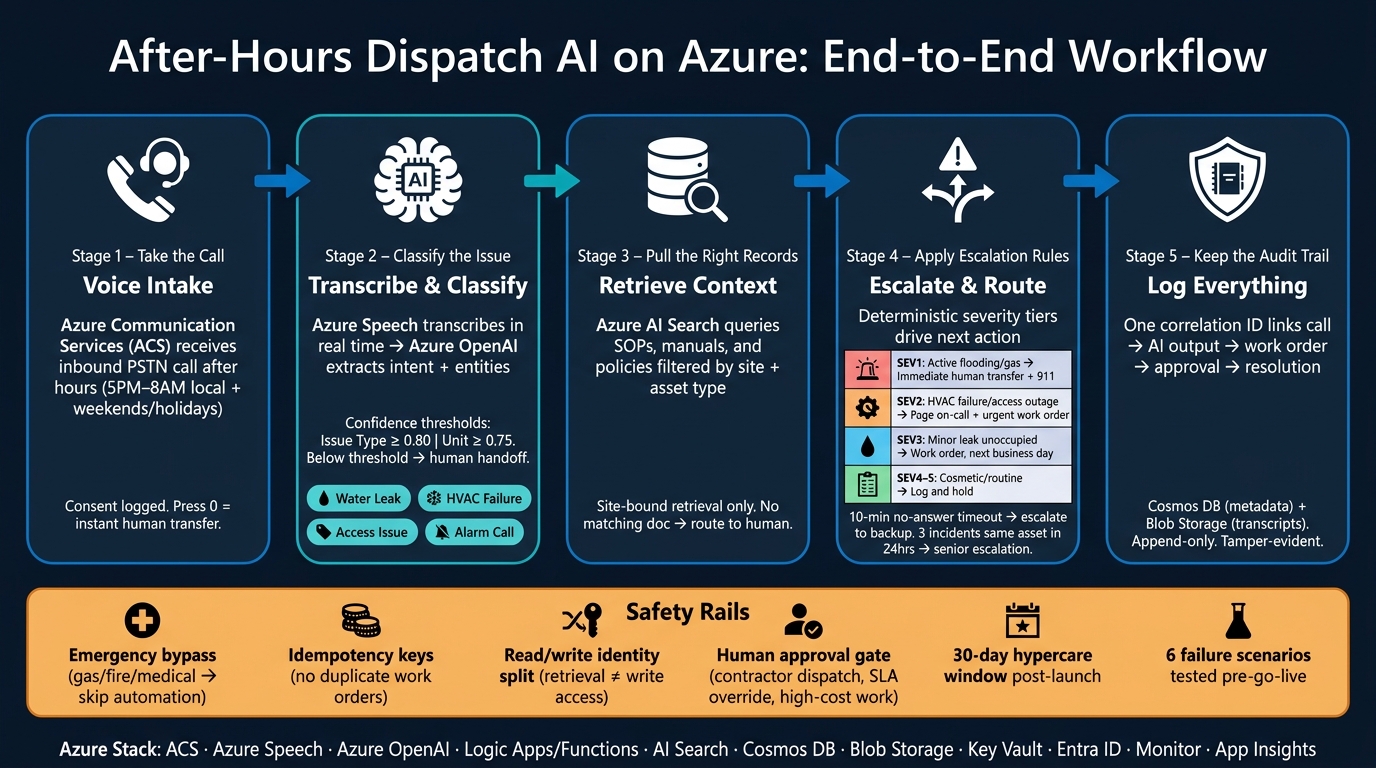
After-Hours Dispatch AI on Azure: End-to-End Workflow
1. What After-Hours Dispatch AI on Azure Covers
This workflow handles the full after-hours dispatch path: call intake, incident classification, context lookup, workflow orchestration, escalation, human handoff, and audit logging. The whole flow runs without overnight human queue monitoring.
1.1 Define the Operating Scope, Hours, and Incident Types
Start by setting the after-hours window for each property. In a typical multifamily portfolio, that usually means 5:00 PM–8:00 AM local time, Monday through Friday, plus all hours on weekends and federal holidays.
Store each property’s after-hours schedule in local time and convert it to UTC at runtime. That matters. Fixed offsets break when daylight saving time kicks in.
Keep these schedules in a central config layer, such as Azure App Configuration or a table in Azure SQL. At a minimum, include:
property_idtime_zone- for example,"America/Chicago"business_hours_startbusiness_hours_end- holiday flags
The orchestrator reads that schedule and decides where the call goes.
You also need a severity model tied to handling rules. That model drives routing, classification, and escalation in Azure.
| Severity | Example Incidents | AI Handling |
|---|---|---|
| Level 1–2 | Noise complaint, general inquiry | Fully automated: log, create work order, next-business-day follow-up |
| Level 3 | Localized water leak, HVAC failure | AI triage plus a structured summary sent to on-call staff |
| Level 4 | Gas leak, fire, medical emergency | Immediate human takeover; caller directed to dial 911 |
A small issue like a noise complaint doesn’t need to wake someone up at 2:00 AM. A gas leak does. That’s why these definitions need to be clear before anything goes live.
1.2 Map the Azure Reference Architecture
A production after-hours dispatch system on Azure needs to send each property call to the right work order, document set, and escalation path.
Here’s the basic flow.
Azure Communication Services (ACS) receives the inbound call on a U.S. phone number. ACS Call Automation sends call events through Event Grid and mid-call callbacks through HTTPS webhooks. Those events feed the orchestration layer.
From there, Azure Speech transcribes the call in real time. Azure OpenAI then classifies intent and pulls out key entities like property, unit, asset type, and issue description. It returns a structured JSON payload that the orchestration layer can use right away.
Next, Azure Logic Apps or Azure Functions run the decision logic. That layer can:
- check property configuration
- query the CMMS or CAFM through a REST API
- pull relevant SOPs from Azure AI Search
- decide whether to create a work order, notify on-call staff, or escalate at once
Supporting services fill in the rest of the stack. Azure Key Vault stores secrets and API credentials. Azure Blob Storage or Cosmos DB stores incident logs and configuration state. Azure Monitor and Application Insights provide end-to-end observability so teams can trace what happened on each call.
Core services and roles:
| Architecture Layer | Azure Service | Function |
|---|---|---|
| Voice Intake | Azure Communication Services | Inbound PSTN calls and call routing |
| Transcription & Classification | Azure Speech + Azure OpenAI | Real-time transcription, intent extraction, structured output |
| Orchestration | Azure Logic Apps / Azure Functions | Decision logic, API calls, workflow coordination |
| Document Retrieval | Azure AI Search + Blob Storage | SOP and policy lookup via semantic or keyword search |
| System Integration | REST APIs / Service Bus | CMMS, CAFM, and field service work order management |
| Observability | Azure Monitor + Application Insights | Logging, tracing, alerting, audit trail |
| Security | Azure Key Vault + Entra ID | Secrets management, role-based access control |
The next step is turning this architecture into inbound call intake and incident classification. If you’re unsure where to begin, you can find the right AI starting point for your specific organizational needs.
2. Set Up Call Intake and Incident Classification
Once scope and architecture are locked in, the next step is intake. The goal is simple: collect the right data, classify the issue well enough to support dispatch, and send fuzzy cases to a person instead of guessing.
2.1 Configure Inbound Voice and Capture Required Call Data
Start by provisioning local or toll-free PSTN numbers in Azure Communication Services (ACS) and mapping them to your properties. Then route after-hours calls into an ACS Call Automation workflow. Use Event Grid to trigger an Azure Function or Logic App that kicks off the intake flow.
At the start of the call, play a recorded notice, log consent, and send opt-outs to on-call staff when needed.
Only collect the data you need to route, classify, and escalate the call. At a minimum, capture:
- Caller name
- Callback number formatted as +1 (312) 555-0198
- Property name
- Building address
- Unit number
- Issue description
- Urgency level
Use MM/DD/YYYY and hh:mm AM/PM for dates and times. For example: 09/22/2026 11:35 PM. If the caller mentions temperature, convert it to °F.
Once those fields are filled, pass the call to transcription and classification.
2.2 Transcribe, Classify, and Structure the Incident Record
Stream call audio to Azure AI Speech for real-time transcription. After you have the transcript, send it to Azure OpenAI or Azure Language (CLU) to identify the main intent and pull out structured entities.
Common incident types include MAINT-LEAK, ACCESS-LOCKOUT, UTIL-POWER-OUTAGE, and SAFETY-SECURITY.
The model should also extract fields such as unit, building, equipment type, and urgency, and return each one with a confidence score:
{
  "issueType": { "value": "water leak", "confidence": 0.94 },
  "unit": { "value": "12B", "confidence": 0.81 },
  "callbackNumber": { "value": "(312) 555-0198", "confidence": 0.98 }
}
Set confidence thresholds at the field level. For example, issue type ≥ 0.80 and unit ≥ 0.75. Only create the incident record when those thresholds are met. If not, ask a follow-up question or transfer the call.
That one rule can save you from half-baked work orders at 2:00 AM.
2.3 Add Observability for Every Call and AI Decision
After classification, trace each call with a single correlation ID. Log the call ID, dialed number, timestamps, duration, consent status, transcript reference, extracted intents, confidence scores, model version, validation decisions, and exceptions in Azure Monitor and Application Insights.
Use operation_Id and operation_parentId to connect telemetry across services.
It also helps to set Azure Monitor alerts for patterns that usually mean trouble, such as:
- A spike in low-confidence classifications
- Transcription errors above a set rate
- Calls where emergency keywords like gas leak or fire were detected
These logs become the audit record for each after-hours call. They also serve as the record for escalation and review.
3. Connect the AI to Work Orders, Documents, and Business Systems
Use the incident record to create the work order, pull the right site documents, and kick off downstream systems.
3.1 Integrate with CMMS, CAFM, and Field Service Systems
Use Azure Logic Apps or Azure Functions as the integration layer. Keep the CMMS as the source of record for work order IDs and lifecycle state. After classification, call the CMMS REST API and create the work order with a structured payload.
At a minimum, include:
- property/site ID
- asset ID
- equipment type
- severity
- trade
- priority
- SLA target
- on-call technician ID
- originating call ID
Calculate due-by times from site-level rules stored in a policy table. Show due-by fields in local U.S. time for users, but keep the canonical timestamp in UTC in the data layer.
If more than one system needs to react to the same incident, publish a normalized event such as work_order.created to Azure Service Bus. Then let each subscriber process its own update. That way, one downstream outage doesn’t block dispatch. Use idempotency keys in each handler so a duplicate message updates the existing work order instead of creating a second one.
Once the work order is live, limit document retrieval to that same site and asset.
3.2 Index SOPs, Manuals, and Tenant Policies for Retrieval
Store SOPs, equipment manuals, vendor instructions, and tenant policies in Azure Blob Storage. Then set up Azure AI Search indexers to pull out text and metadata on their own.
Your index schema should include document_type, site_id, building_id, equipment_type, effective_date, expiry_date, version, and regulatory_region. Mark the key fields as filterable. When a new SOP version is uploaded, tag the older version as superseded and enforce the filter effective_date <= now < expiry_date. That keeps technicians on the current procedure instead of an expired one.
Pass incident context, including site, equipment type, and incident category, as retrieval filters. The model should cite the document title, version, and effective date in its reply. For example: per SOP HVAC-RTU-03, effective 01/01/2026, follow the current shutdown and lockout procedure. If no matching document turns up, route the case to a human instead of letting the model guess.
Use that same incident context to stop cross-site retrieval before the AI responds.
3.3 Apply Governed Delivery and Context Controls Across Systems
After integration and retrieval, enforce role-based context limits before the model sees any data. Set clear access rules by role: technicians should see work-order-related details, property managers should see tenant policies, and central operations should see cross-portfolio data.
Use a gateway to enforce site, role, and incident boundaries, redact sensitive fields, and log every prompt, document, and context set delivered. Think of it as a checkpoint between the model and your business systems. Without that checkpoint, it’s too easy for the wrong person to see the wrong thing.
Ryshe’s Quanta enterprise AI context gateway sits between the AI and your enterprise systems, enforcing those boundaries by site, incident type, and role, redacting PII or sensitive lease terms before they reach the model, and writing append-only audit records of every context delivered, every document retrieved, and every prompt constructed.
4. Build Escalation Rules, Human Handoff, and Audit Trails
Once classification and retrieval are done, the workflow needs a fixed escalation path. That next step shouldn’t be improvised in the moment. It should follow codified rules your team agrees on ahead of time.
4.1 Define Severity-Based and Location-Based Escalation Logic
After retrieval, the system needs deterministic rules for what happens next. Set severity tiers with fixed criteria tied to risk, occupancy, and asset criticality. Ground each tier in the incident type, confidence score, site, and occupancy data already stored in the incident record.
| Severity | Example Incidents | AI Action |
|---|---|---|
| SEV1 | Active flooding, gas smell | Immediate human transfer + on-call page + urgent work order |
| SEV2 | HVAC failure in an occupied building, access control outage | Page on-call technician and create urgent work order |
| SEV3 | Minor leak in an unoccupied area | Create work order and queue for next business day |
| SEV4–SEV5 | Cosmetic issues, routine maintenance requests | Log ticket and hold for business hours |
Location and occupancy should fine-tune the tier. A water leak in a server room or electrical closet carries more risk than that same leak in an empty storage closet. You should also apply site-type overrides for regulated or mission-critical properties.
Repeat failures need their own rule too. If the same asset triggers three incidents in 24 hours, escalate to a senior technician or operations manager no matter what the single incident severity says. That keeps the system from treating a pattern like a one-off problem.
4.2 Design Clear Human Handoff Paths
Send the case to a human when confidence drops below 0.75, the caller is distressed, the issue carries legal or safety risk, or retrieved SOPs conflict.
When handoff kicks in, transfer the caller and pass along the full incident package: transcript, severity classification, confidence score, retrieved documents, proposed action, and the reason for escalation. That way, the person taking over isn’t starting cold. They’re stepping into the same incident package already used for classification and work-order creation, which keeps the response on one continuous track.
For actions that change system state - like dispatching a contractor, overriding an SLA, or authorizing high-cost emergency work - require human approval before the AI executes. Use Power Automate or Logic Apps to send an approval request into Microsoft Teams with the incident summary, proposed action, SLA context, and AI confidence score. After approval, the workflow can update the CMMS or notify the vendor. The approver’s name, timestamp, and decision should then be stored in the audit record.
Set response timeouts as well. If the on-call technician doesn’t respond within 10 minutes for a SEV1 or SEV2 incident, escalate to the backup technician and duty manager. And always keep a press 0 for immediate transfer option available, so the caller can reach a person at any point.
That approved outcome becomes the final action recorded in the audit trail.
4.3 Keep a Durable Audit Trail for Every Action
Every incident should produce one linked audit record from call to closure. That record should include the call transcript, classification result and confidence score, retrieved documents, actions taken or proposed, human approvals or overrides, escalation timestamps, and final resolution outcome.
Store metadata in Azure Cosmos DB, and store transcripts and recordings in Azure Blob Storage. Lock down delete and update permissions so the record can’t be edited or removed. In compliance-sensitive settings, apply hash-chaining or ledger-style protections to detect tampering.
Keep audit logs separate from general application logs. Tag each record with the incident ID so you can reconstruct the full chain of events for any call. The audit trail should record each decision in the same flow used for dispatch, approval, and resolution. In plain English, it isn’t some side compliance file. It’s the live record of what the system did.
With escalation, handoff, and audit in place, the last step is securing and testing the production path.
5. Secure, Test, and Roll Out the System
By this point, escalation, handoff, and audit are already in place. Now the job is to make sure the system can run overnight without someone hovering over it. That comes down to three things: lock down access, test every way the system can fail, and roll it out with tight control.
5.1 Apply Identity, Network, and Data Protection Controls
Before rollout, lock down the production path that will handle calls, data, and work-order actions.
Use Microsoft Entra ID as the identity layer for every user and Azure service before overnight automation touches tenant data or building systems. Assign managed identities to your Azure workloads - Functions, Logic Apps, and App Service - so they sign in through Entra instead of relying on credentials stored in code. For AI services, use Entra ID tokens instead of static API keys.
Split permissions on purpose. Use one read-only identity for retrieval and one write identity for work-order actions. If the AI misclassifies a call or a downstream integration acts in a way you didn’t expect, that split keeps the blast radius smaller. Apply least-privilege RBAC at the resource or resource-group level, not at the subscription level.
For network protection, disable public network access on Key Vault, Azure OpenAI, AI Search, and storage accounts. Route traffic through private endpoints with private DNS zones. Encrypt call recordings, transcripts, work orders, and tenant data both in transit and at rest. Store all API keys, certificates, and connection strings in Azure Key Vault. Enforce TLS on all connections to CMMS, CAFM, and field-service APIs, and apply customer-managed keys if tenant or regulatory requirements call for them.
Treat access controls, data classification, and audit trails as part of the system design - not as cleanup work for later.
5.2 Test Failure Paths, Approval Rules, and Reporting Before Launch
Once access controls are in place, test the failure paths that matter overnight.
Run scenario-based tests against at least six failure conditions before go-live:
- missed data
- integration failures
- duplicate work orders
- low-confidence classification
- partial retrieval
- no-answer escalation
For each scenario, verify that the system does one of three things: recovers safely, routes the issue to a human, or stops before taking action when required inputs are missing. Every test should produce a complete audit record.
Set acceptance criteria before launch. Define a target call pickup and classification response time, a minimum work order creation success rate, a maximum tolerated duplicate ticket rate, and a confidence threshold below which the system must route to a human instead of acting. Then use a 30-day hypercare period to catch production anomalies early.
5.3 Conclusion: The Minimum Production Pattern to Remember
The minimum production pattern is simple: scope tightly, classify calls with care, integrate with guarded write access, escalate when risk shows up, and keep security and audit controls on from day one.
A safe rollout starts small: one property, one overnight window, one incident type. The AI classifies calls and drafts actions. Humans approve outcomes. From there, expand automation only after stable reporting shows steady accuracy and reliable escalation behavior.
FAQs
How do we decide what the AI can automate after hours?
Start with process discovery. Map your manual after-hours workflows and spot the tasks that make sense to automate. Then rank them by impact and feasibility because not every task belongs in an AI workflow.
Put your attention on repetitive, time-heavy work, such as:
- Routing service requests
- Scheduling maintenance
- Processing reports
After that, test each workflow against your actual day-to-day processes before rollout.
What should trigger an immediate human handoff?
Trigger an immediate human handoff when the AI runs into system errors, can’t handle a request with enough confidence, or spots high-risk items.
A handoff is also needed when the situation calls for professional liability disclaimers or falls outside the set automation rules. That keeps the process moving and makes sure there’s human oversight where it matters.
How do we prevent duplicate or incorrect work orders?
Use a unified data foundation as a single source of truth across your current project management and storage systems. With integrations for Procore and SharePoint, the AI sorts incoming requests and checks them against existing project data, RFIs, and submittals before it creates a new work order.
Automated quality checks and validation rules then help confirm the data is consistent and accurate before the work order is finalized.